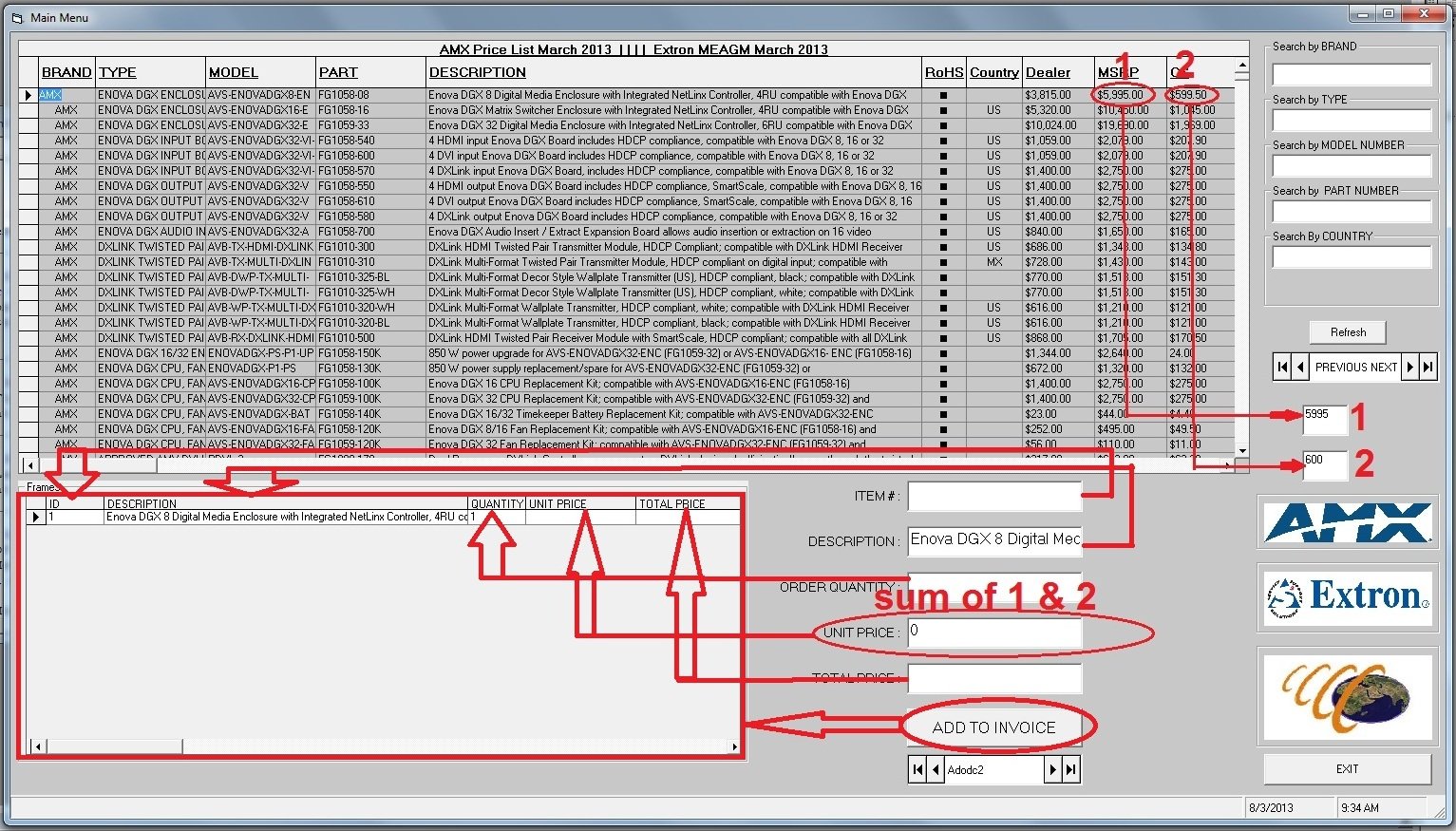
i have this new problem i hope that im not a spam here in this site.but i have to do this bcoz i have no where else to go.sorry for my english hope u understand me.in the picture that i uploaded i have textbox1 and textbox2 their value comes from the datagrid table so i want to get the automatic sum of 1 & 2 to the 3rd textbox called "unit price".for short if i press the adodc1 controller the value of "unit price" will be change. and if i press the add to invoice command button the value in the textboxes will be save in the 2nd datagrid table. i hope you guys out there undrestand my english.i really need your help. hoping for your reply ASAP..thanx alot sincerely yours extra_rice

EXTRA_RICE 0 Light Poster
Dani AI
Generated
: the simplest, safest pattern is to centralize the calculation in one routine that validates and converts the textbox values, then call that routine from the Change events and from whatever code populates the boxes (for example after the ADODC navigation or when the Add button copies values). was right to prefer the Change event, but guarding against empty or non-numeric text prevents the type-mismatch that was happening.
Option Explicit

Private Sub UpdateUnitPrice()
  Dim n1 As Double, n2 As Double
  Dim s1 As String, s2 As String

  s1 = Replace$(Trim$(Text1.Text), ",", "")   ' remove thousands separators (en-US)
  s2 = Replace$(Trim$(Text2.Text), ",", "")

  If s1 = "" Then
    n1 = 0
  ElseIf IsNumeric(s1) Then
    n1 = CDbl(s1)
  Else
    n1 = 0
  End If

  If s2 = "" Then
    n2 = 0
  ElseIf IsNumeric(s2) Then
    n2 = CDbl(s2)
  Else
    n2 = 0
  End If

  Text3.Text = Format$(n1 + n2, "0.00")
End Sub

Private Sub Text1_Change()
  UpdateUnitPrice
End Sub

Private Sub Text2_Change()
  UpdateUnitPrice
End Sub

Private Sub cmdAddToInvoice_Click()
  With Adodc2.Recordset
    .AddNew
    !Field1 = Text1.Text
    !Field2 = Text2.Text
    !UnitPrice = CDbl(Text3.Text)
    .Update
  End With
End Sub
Notes and quick tips: use Option Explicit and declare variables to avoid hidden errors; set Text3.Locked = True (and TabStop = False) so the calculated value is not edited; sanitize or remove thousands separators only when appropriate for the locale (removing commas is fine for en-US but not for locales that use comma as the decimal separator); if a type mismatch still occurs, log the raw Text1.Text/Text2.Text (Debug.Print) to see what non-numeric characters are present. and @rishif2 provided the right direction—this pattern just makes it robust and easier to call from the ADODC-related code that fills the textboxes.

Klahr_R 0 Newbie Poster
Almost the same as rishif2 gave you the other day.
The difference is to use the "Change" event instead of the Lost Focus event.
This causes a problem when starting because when the value of the first box changes the value of the second box is Text2 or some other value that won't add, causing a type mismatch
The is numeric goes in the change event of the first box loaded, or any other boxes before the last
if a group of boxes is being used in the calculation.
Option Explicit

Private Sub Form_Load()
    Text1.Text = 1
    Text2.Text = 25
End Sub

Private Sub Text1_Change()
    If Isnumeric(Text2.Text) then _
    Text3.Text = Int(Text2.Text) + Int(Text1.Text)
End Sub

Private Sub Text2_Change()
    Text3.Text = Int(Text2) + Int(Text1)
End Sub
Be a part of the DaniWeb community
We're a friendly, industry-focused community of developers, IT pros, digital marketers, and technology enthusiasts meeting, networking, learning, and sharing knowledge.