#include <time.h>
#include <math.h>
#include <stdio.h>
#include <conio.h>
#include <string.h>
#include <stdlib.h>

#define ROW 9
#define COL 9

int printboard(int grid[ROW][COL]){
int x,y,n,chk;

srand(time(NULL));
for(x=0;x<ROW;x++){
for(y=0;y<COL;y++){
do{ 
n=rand()%7+2;
grid[x][y]=n;
if (((grid[x][y]==grid[x-1][y]) && (grid[x][y]==grid[x-2][y])) || ((grid[x][y]==grid[x][y-1]) && (grid[x][y]==grid[x][y-2]))){


chk=1;
continue;
}else{
chk=0;
printf("%d    ", n);
}
}while(chk==1);    
}
printf("\n\n");
}
}

int welcome(char name[20]){
printf("********************WELCOME********************\n");
printf("*****************NUMBER CRUSH******************\n\n");
printf("Please key in your name:");
scanf("%s",name);
printf("***Good day %s,let's start a new game...all the best!!!***\n\n\n", name);
fflush(stdin);
return 0;
}

int menu(c){
int choose;
do{
printf("*MENU\n");
printf("*Press 2 to move down\n");
printf("*Press 4 to move left\n");
printf("*Press 6 to move right\n");
printf("*Press 8 to move up\n");
printf("*Press 5 to switch\n");
printf("*Press 0 to quit\n");
printf("Please enter your choose: ");
scanf("%i",&choose);
if(choose==2){

}else if(choose==4){

}else if(choose==6){

}else if(choose==8){

}else if(choose==5){

}else if(choose==0){
printf("Exit the program!");

}else{
printf("Invalid Input!\n\n");
}
}while(choose!=0);
return 0;
}

int main(){
int arr[ROW][COL];
char name[20];
int c;
welcome(name);
printboard(arr);
menu(c);


return 0;
}

above is my coding, i try to make a box inside the 2d array the can be move around.

Dani AI

Generated

A concise, practical approach and a few fixes that address the gaps in 's code and tie into 's suggestion.

The main problems in the original snippet are out‑of‑bounds reads (checks like grid[x-1] / grid[x-2] run when x<2), calling srand inside the board routine instead of once in main, using fflush(stdin) (undefined behavior), and passing an uninitialized variable into menu. The simplest, most portable way to show a “box” around a selected cell is to reprint the whole board each move and render the selected cell with visible delimiters (brackets or line characters). Bracketed output works everywhere; line‑drawing characters (as noted) require an appropriate code page/font (e.g. CP437) or using the Windows console API / ANSI escapes.

Example (Windows, simple reprint + single‑key moves with getch() — numeric keys 2/4/6/8 used in the original menu):

#include <stdio.h>
#include <stdlib.h>
#include <conio.h>

#define ROW 9
#define COL 9

void draw(int grid[ROW][COL], int selr, int selc) {
    system("cls");               /* Windows only; use ANSI/clear on other platforms */
    for (int r = 0; r < ROW; ++r) {
        for (int c = 0; c < COL; ++c) {
            if (r == selr && c == selc)
                printf("[%2d] ", grid[r][c]);   /* boxed cell */
            else
                printf(" %2d  ", grid[r][c]);
        }
        putchar('\n');
    }
}

int main(void) {
    int grid[ROW][COL];
    for (int r = 0; r < ROW; ++r)
        for (int c = 0; c < COL; ++c)
            grid[r][c] = (r * COL + c) % 9 + 1; /* sample data */

    int sr = 0, sc = 0;
    draw(grid, sr, sc);

    for (;;) {
        int ch = getch();         /* '2' down, '8' up, '4' left, '6' right, '0' quit */
        if (ch == '0') break;
        if (ch == '2' && sr < ROW-1) ++sr;
        else if (ch == '8' && sr > 0) --sr;
        else if (ch == '4' && sc > 0) --sc;
        else if (ch == '6' && sc < COL-1) ++sc;
        draw(grid, sr, sc);
    }
    return 0;
}

Additional notes: guard any neighbor checks with index tests (e.g. if (x >= 2 && grid[x]==grid[x-1] && grid[x]==grid[x-2])), call srand(time(NULL)) once in main, avoid fflush(stdin), and use width limits for scanf (or fgets) to prevent buffer overflow. If a visually nicer box is desired, use CP437 line characters or SetConsoleCursorPosition / ANSI escape sequences to draw edges without redrawing the whole screen; remember to handle extended key codes if arrow keys (not keypad digits) are required.

Recommended Answers

All 4 Replies

what compiler are you using? You could draw a box by using the line-drawing bytes of the ascii character set (the values between 179 and 223). google for "ascii character set" and you will find the table of all possible 255 values and a picture of they they look like when printed (assuming your computer is set up to use ascii character set).

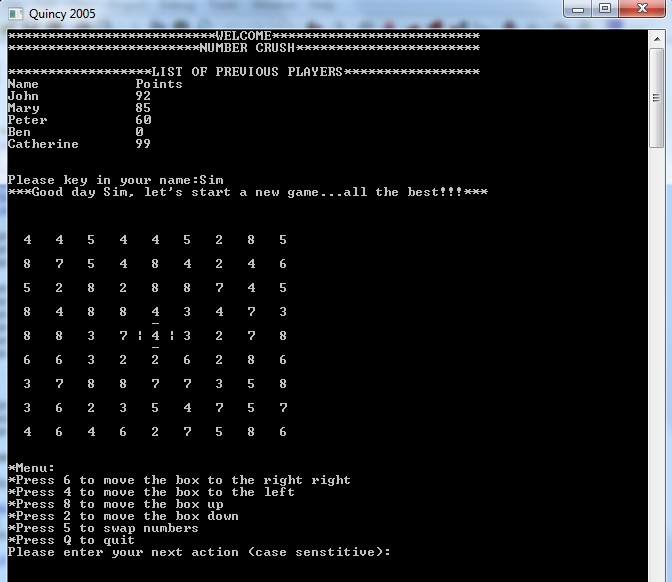
im using quincy 2005, so i need to make the box using code

to do something like this

There's a space between each of the numnbers in that huge square, which leaves room for the |, _ and - characters areound the number in the center.

Be a part of the DaniWeb community

We're a friendly, industry-focused community of developers, IT pros, digital marketers, and technology enthusiasts meeting, networking, learning, and sharing knowledge.