Hi All,

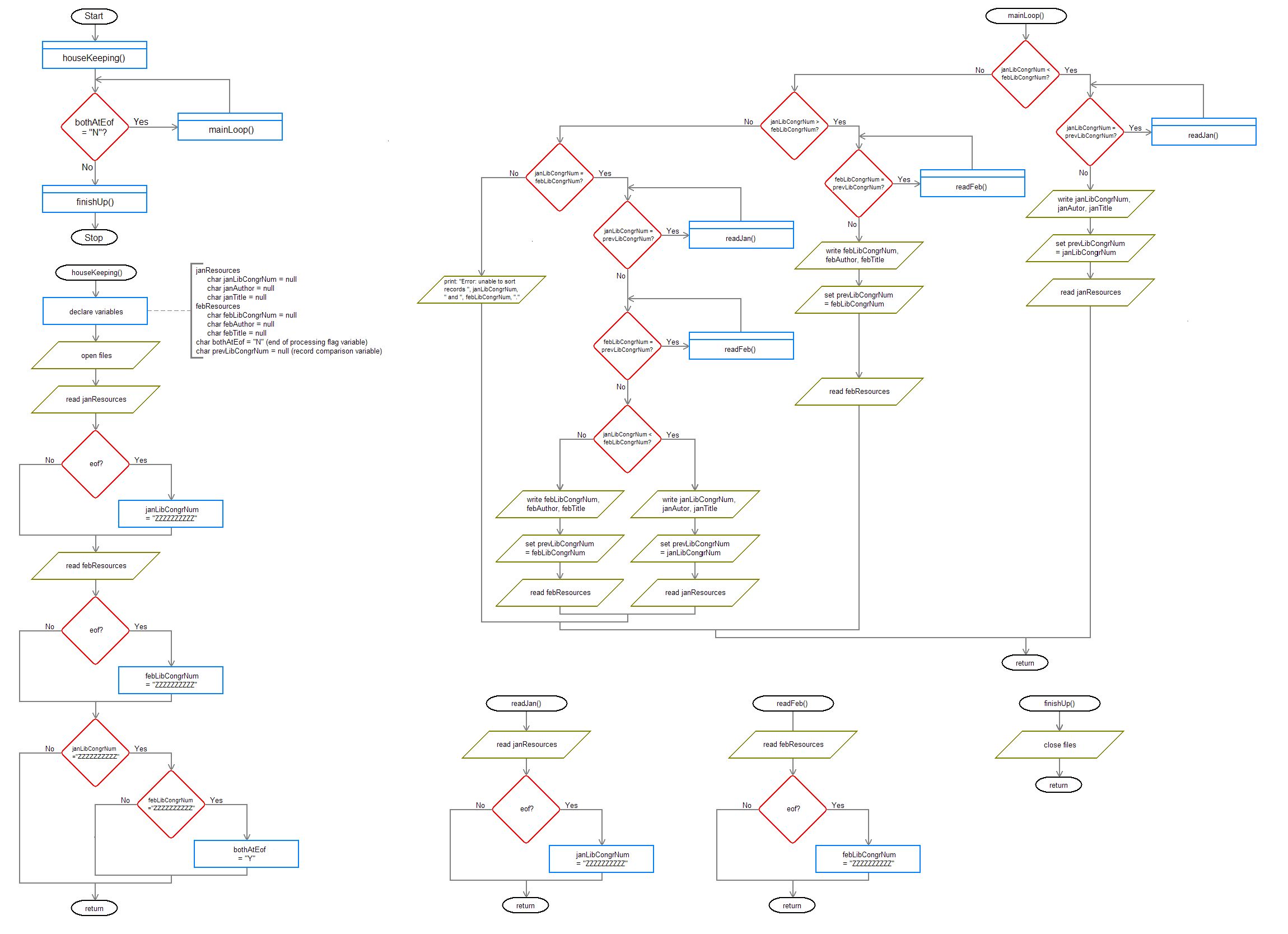
I've converted the pseudocode from this thread into a flowchart, and I'd greatly appreciate if anyone can point out any errors and/or inefficiences in the represented coding. as posted in the above referenced thread, the flowchart represents a solution for a chapter exercise, as follows: "The problem states that a library records monthly book withdrawls, capturing the Library of Congress Number, Author and Title, for each month (sorted by the Library of Congress Number for each withdrawl). The initial problem required the merger of the January and Feburary files - which I was able to do without difficulty, but the follow-on problem required that any redundant records, regardless of file of origin, not be written to the merged file."

Thanks!
Dani AI

Generated

A short correctness-and-efficiency checklist plus a compact reference algorithm to validate the flowchart.

If both monthly files are sorted by the same key, the optimal solution is a single-pass merge: keep one current record from each input, compare keys, write the smaller and advance that input; when keys match, write one copy (or resolve the conflict) and advance both. Track a single last_written_key so you never write the same key twice (this also skips adjacent duplicates inside a single file). That approach is O(n) time with O(1) extra memory and avoids expensive searches or post-filter passes. Decide up front what “duplicate” means (key only, or full-record equality) and document it on the flowchart.

A compact reference pseudocode (adapt into C as needed):

open f1,f2,out
r1 = read(f1); r2 = read(f2)
last = NULL
while r1 != EOF and r2 != EOF:
    if r1.key < r2.key:
        if r1.key != last: write(out, r1); last = r1.key
        r1 = read(f1)
    elif r1.key > r2.key:
        if r2.key != last: write(out, r2); last = r2.key
        r2 = read(f2)
    else:
        if r1.key != last: write(out, r1); last = r1.key
        r1 = read(f1); r2 = read(f2)
# drain remaining f1 or f2, skipping keys equal to last
close files

Practical checks and caveats: normalize keys (trim whitespace, consistent case, remove irrelevant punctuation) so identical records compare equal; confirm both inputs use the same sort/collation; handle the case where keys match but other fields differ (log or merge); include explicit EOF/error branches and resource cleanup on the flowchart. As others observed in the thread (, , , , ), the chart is useful for clarity—just make its assumptions and conflict-resolution policy explicit and keep it synchronized with the eventual implementation.

Recommended Answers

All 5 Replies

[rant]flow charts are evil little critters and should be banned from all educational institutions. I've never seen anyone create or use them outside the university. And most programming books don't even talk about them.[/rant]

On the contrary, I find them pretty useful. Both as a communicating tool, since pseudocode can differ according to the person, and as a tool to understand the algorithm better. For example I couldn't make head or tail out of the OP's pseudocode, since I am not used to pseudocode like that. But the flowchart was easier to understand. But this may depend on personal preferrence.

:- Glanced at the flow chart and it looked okay to me. What was the tool you used to draw it? Was it a free tool?

[aside]
I tend to agree with 'Dragon here. Like comments that don't match the code, a flowchart may not match the implementation code. And then you get to debug in two places -- the flowchart and the actual code. Which one is correct? Bleah. And the implementation always seems to have last minute details that aren't reflected in the flowchart.

But bosses and such like flowcharts. And laying out an initial design can be beneficial. I just don't look at them as gospel, merely the initial skeletal framework.
[/aside]

On the contrary, I find them pretty useful. Both as a communicating tool, since pseudocode can differ according to the person, and as a tool to understand the algorithm better. For example I couldn't make head or tail out of the OP's pseudocode, since I am not used to pseudocode like that. But the flowchart was easier to understand. But this may depend on personal preferrence.

@aeinstein :- Glanced at the flow chart and it looked okay to me. What was the tool you used to draw it? Was it a free tool?

MS Paint (painstakingly produced!) saved as .bmp & converted to .jpg via IrfanView (v3.98, downloaded via CNET) (I only use it to convert images, but for that use, at least, it's a great free-ware product). After this experience I think Visio 2003 Professional Academic is not a too distant purchase!!! Btw, before this particular exercise I was not a fan of flowcharting, but I was able to follow the flow of the program much easier with the flowchart that I produced versus the pseudocode that I produced, so I now consider myself a convert! :lol:

Thanks for the feedback! :)

Member Avatar for Member #46692

Yes, I agree.

Without doubt, flowcharts are excellent devices for planning out the layout of a complicated program. And a must for newbies and definitely useful for schools and universities.

Be a part of the DaniWeb community

We're a friendly, industry-focused community of developers, IT pros, digital marketers, and technology enthusiasts meeting, networking, learning, and sharing knowledge.
