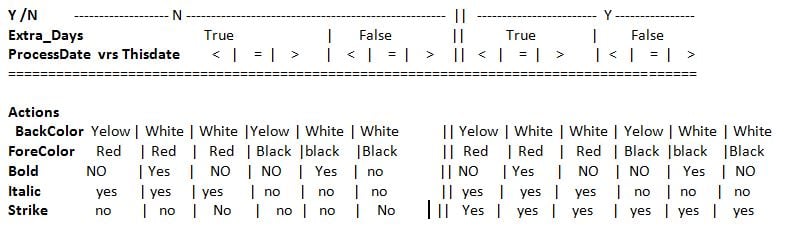
Hi
I have a datagridview with 9 Processes each process holds dates for stating and compleating a job.
When a process is Late a cell back color is set to yellow, when today is the day the same date on the cell the date gets bolded,if the date is altered by the admin the dates forecolor is red and when is compleated a date gets crossed out.
My Problem is some cells on one process have fore color is white when its set to red.

This is my code.

  Private Sub Dgv_Formate(ByVal e As DataGridViewCellFormattingEventArgs, ByVal Stat As String, ByVal processDate As Date, ByVal Extra_Days As Boolean)
        Dim Style As Font = Me.DGV_Machining.DefaultCellStyle.Font
        Dim thisdate As Date = "#12/09/2016#" 'Today()
        Dim started As New Proces
        If Me.DGV_Machining.Rows(e.RowIndex).Cells(Stat).FormattedValue = "n" And Not Extra_Days Then
            If processDate < thisdate Then
                e.CellStyle.BackColor = Color.Yellow
            ElseIf processDate = thisdate Then
                e.CellStyle.Font = New Font(Style, FontStyle.Bold)
            End If
        ElseIf Me.DGV_Machining.Rows(e.RowIndex).Cells(Stat).FormattedValue = "n" And Extra_Days Then
            If processDate < thisdate Then
                e.CellStyle.BackColor = Color.Yellow
                e.CellStyle.Font = New Font(Style, FontStyle.Italic)
                e.CellStyle.ForeColor = Color.Red
            ElseIf processDate = thisdate Then
                e.CellStyle.Font = New Font(Me.Font, FontStyle.Italic + FontStyle.Bold)
                e.CellStyle.ForeColor = Color.Red
            Else
                e.CellStyle.BackColor = Color.White
                e.CellStyle.Font = New Font(Style, FontStyle.Italic)
                e.CellStyle.ForeColor = Color.Red
            End If
        ElseIf Me.DGV_Machining.Rows(e.RowIndex).Cells(Stat).FormattedValue = "y" And Not Extra_Days Then
            e.CellStyle.BackColor = Color.White
            e.CellStyle.Font = New Font(Style, FontStyle.Strikeout)
            e.CellStyle.ForeColor = Color.Black
        ElseIf Me.DGV_Machining.Rows(e.RowIndex).Cells(Stat).FormattedValue = "y" And Extra_Days Then
            e.CellStyle.ForeColor = Color.Red
            e.CellStyle.BackColor = Color.White
            e.CellStyle.Font = New Font(Me.Font, FontStyle.Italic + FontStyle.Strikeout)
        End If
    End Sub

If I comment the line 31 the dates Show.

Dani AI

Generated

The symptom reported by (cells that should paint red but appear white) is usually caused by the DataGridView style system or selection drawing, not a math/logic error in the formatting routine. Each cell’s effective appearance is taken from a style hierarchy (cell.Style → row.DefaultCellStyle → alternating/rows → column.DefaultCellStyle → DataGridView.DefaultCellStyle), so a white value set higher in the chain or the grid’s selection colors can hide per-cell changes. See the Microsoft guidance on DataGridView cell-style inheritance. (Cell Styles in the Windows Forms DataGridView Control). (learn.microsoft.com)

A concrete way to find which style is winning is to dump the cell’s inherited and local style inside the CellFormatting handler (CellFormatting runs on every paint pass, so keep diagnostics light). Example debug lines to insert temporarily:

Dim c = DGV_Machining.Rows(e.RowIndex).Cells(Stat)
Dim inh = c.InheritedStyle
Debug.WriteLine(String.Format("R{0}C{1} HasStyle={2} Inh.Fore={3} e.Fore={4} Selected={5}",
  e.RowIndex, e.ColumnIndex, c.HasStyle, inh.ForeColor, e.CellStyle.ForeColor, DGV_Machining.Rows(e.RowIndex).Selected))

That output quickly shows whether a row/column/default/selection color is overriding the red set in e.CellStyle. See the notes about CellFormatting behavior. (Data Formatting in the Windows Forms DataGridView Control). (learn.microsoft.com)

A few practical fixes and best practices:

  • If selection makes red text look white, set a selection color: DGV_Machining.DefaultCellStyle.SelectionForeColor = Color.Black (or choose a contrasting color). (DefaultCellStyle examples). (learn.microsoft.com)
  • Avoid allocating new Font objects inside every CellFormatting call; create and reuse a small set of fonts at form level and Dispose them on Close.
  • Don’t swallow exceptions in empty Catch blocks (as in ’s Try/Catch): log or rethrow so intermittent problems aren’t hidden.
  • For persistent per-cell styling (not just render-time), set cell.Style or row/column DefaultCellStyle during data load or DataBindingComplete rather than relying solely on CellFormatting.

Centralizing style decisions (the Action helper by ) plus the diagnostic dumps above will quickly reveal whether a higher-level style or selection is making the red text appear white.

Recommended Answers

All 4 Replies

Seems as there are 3 factors: a 'n' or 'y' value; extra_days or not; and procesDate (<,> or =) versus thisDate.
I would suggest to you to draw a table like this one and fill in all the different possibilities. At least having a clear method to follow it'll be easier and less error prone.

  Factors:

'n'/'y'.............:............'n'......................|........'y'
procDate vs.thisDate:      <      |      =      |    >    |

extra_Days..........:  = 0 | <>0  | =0   |<>0   | = 0|<>0 |
=================================================================

Actions to take:
ForeColor...........:      |      |Red   |Red   | 

BackColor...........:yellow|yellow|yellow|yellow|
Bold................:      |      | Yes  | Yes  |

Italic..............:      |  Yes |      | Yes  |
Strike..............:

Hope this makes since. table.JPG

I hope it makes sense to you:

    Private Sub Dgv_Formate(ByVal e As DataGridViewCellFormattingEventArgs, _
                            ByVal Stat As String, _
                            ByVal processDate As Date, _
                            ByVal Extra_Days As Boolean)
        Try
            Dim YN As Int32 = IIf(Me.DGV_Machining.Rows(e.RowIndex).Cells(Stat).FormattedValue = "n", 0, 1)
            Dim extraDays As String = IIf(Not DGV_Machining.Rows(e.RowIndex).Cells(0).Value, 1, 0)
            Dim procDate As Date = DGV_Machining.Rows(e.RowIndex).Cells(1).Value
            Dim lt As Int32
            If procDate < thisDate Then
                lt = 0
            ElseIf procDate > thisDate Then
                lt = 1
            Else
                lt = 2
            End If
            Dim nAction As Int32 = YN * 6 + Extra_Days * 3 + lt
            Select Case nAction
                Case 0 : Action(e, Color.Yellow, Color.Red, False, True, False)
                Case 1 : Action(e, Color.White, Color.Red, True, True, False)
                Case 2 : Action(e, Color.White, Color.Red, False, True, False)
                Case 3 : Action(e, Color.Yellow, Color.Black, False, False, False)
                Case 4 : Action(e, Color.White, Color.Black, True, False, False)
                Case 5 : Action(e, Color.White, Color.Black, False, False, False)
                Case 6 : Action(e, Color.Yellow, Color.Red, False, True, True)
                Case 7
                Case 8
                Case 9
                Case 10
                Case 11
            End Select
        Catch ex As Exception

        End Try
    End Sub
    Sub Action(e As DataGridViewCellFormattingEventArgs, _
               bkClr As Color, _
               foreClr As Color, _
               Bold As Boolean, _
               italic As Boolean, _
               _strike As Boolean)
        Dim fnt As Font = Me.DGV_Machining.DefaultCellStyle.Font
        With e.CellStyle
            .BackColor = bkClr
            .ForeColor = foreClr
            Dim style As New FontStyle
            If Bold Then
                style = FontStyle.Bold
            End If
            If italic Then
                style = style Or FontStyle.Italic
            End If
            If _strike Then
                style = style Or FontStyle.Strikeout
            End If
            .Font = New Font(fnt, style)
        End With
    End Sub

Thanks XRJ
This works great and easear to debug when needed .
I just had to change the extradays to this IIf(Not Extra_Days, 1, 0) and fill in the other NAction values

Be a part of the DaniWeb community

We're a friendly, industry-focused community of developers, IT pros, digital marketers, and technology enthusiasts meeting, networking, learning, and sharing knowledge.