hye,

i have a question about listview checkbox, recently i have tried to do a checkbox inside listview and its print well. but the result are not as i want, what i want is the checkbox is save the item to text file base on which checkbox is checked first. As an example
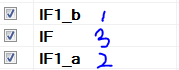
ooo.PNG

the picture show that there are order for which one i checked first, the result should be
IF1_b - > IF1_a - > IF

but what i get is
IF1_b - > IF - > IF1_a

hope i can get some help with this

Dani AI

Generated

The root cause is that iterating a ListView's checked items (for example via CheckedItems) returns them in the control's index/display order, not in the order the user ticked boxes. That explains the screenshot: the saved file reflects the ListView order (IF1_b -> IF -> IF1_a) rather than the check sequence (IF1_b -> IF1_a -> IF).

As pointed out, capture the check sequence when the state actually changes. A robust refinement is to stamp each item with a small sequence value (stored in ListViewItem.Tag) at check time, then sort by that value when saving. ItemCheck gives e.NewValue (fires before the change) and ItemChecked runs after the change; either can work, but ItemCheck avoids reading the property mid-change. Programmatic checks should be done inside a suppression flag to avoid creating bogus sequence stamps.

Example (C# WinForms):

private long _checkCounter = 0;
private bool _suppressItemCheck = false;

private void listView1_ItemCheck(object sender, ItemCheckEventArgs e)
{
    if (_suppressItemCheck) return;
    var it = listView1.Items[e.Index];
    if (e.NewValue == CheckState.Checked)
        it.Tag = ++_checkCounter;   // store sequence number
    else
        it.Tag = null;
}

private void SaveCheckedOrder(string path)
{
    var ordered = listView1.CheckedItems
        .Cast<ListViewItem>()
        .Select(i => new { Item = i, Order = (i.Tag is long) ? (long)i.Tag : long.MaxValue })
        .OrderBy(x => x.Order)
        .Select(x => x.Item);

    using (var w = new StreamWriter(path, false))
        foreach (var i in ordered) w.WriteLine(i.Text);
}

Notes: suppress the event handler when setting Checked programmatically (_suppressItemCheck = true; ... _suppressItemCheck = false;). Storing a sequence number in Tag survives UI sorting (unlike a temporary list of references) and can be persisted if needed. If ListView items are recreated on reload, persist and restore those sequence values so the original check order can be recovered.

Take a look at the Listview.ItemChecked event. In that event handler, Add the item to a List<ListViewItem> defined at the level of the form. If the ListViewItem gets unchecked, Remove it from the list. When it is time to output, go through the list and output the Text in order.

Be a part of the DaniWeb community

We're a friendly, industry-focused community of developers, IT pros, digital marketers, and technology enthusiasts meeting, networking, learning, and sharing knowledge.