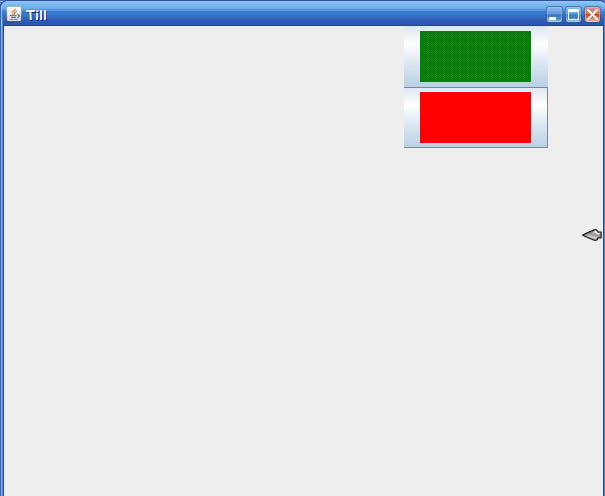
I want a line of buttons down the side of a swing window. I got this code so far:

import javax.swing.*;
import java.awt.*;
class basic extends JFrame // implements ActionListener
{
 
 
    public basic()
   { 
       super("Till");
       setSize(600,500);
       setDefaultCloseOperation(JFrame.EXIT_ON_CLOSE);
       setVisible(true);
 
       Container contentArea = getContentPane();
       contentArea.setBackground(Color.white);
       BorderLayout flowManager = new BorderLayout();
       contentArea.setLayout(flowManager);
 
       JPanel Left = new JPanel();
       contentArea.add(Left, BorderLayout.WEST);
       Left.setPreferredSize(new Dimension(400,getSize().height));
 
       JPanel Right= new JPanel();
       Right.setLayout(new BoxLayout(Right, BoxLayout.PAGE_AXIS));
       Right.setPreferredSize(new Dimension(200,getSize().height));
 
       ImageIcon cup = new ImageIcon("pics/pots.gif");
       JButton button1 = new JButton(cup);
  // button1.setBackground(false);
      button1.setBorderPainted(false);
      button1.setPreferredSize(new Dimension(111,51));
 
      ImageIcon BROC = new ImageIcon("pics/broc.gif");
      JButton button2 = new JButton(BROC);
 
      Right.add(button1);
      Right.add(button2);
      contentArea.add(Right, BorderLayout.EAST);
   }
 
   public static void main(String[]args)
   {
      basic eg = new basic();
   }
}

that leaves me with a thick blue border round the images (which are plain colours at the mo.) Like the picture is too small and you can see the default button round it. (pic attached). How do you get rid of that? And while i'm here, when that app first opens you can't see the right pane. Have to resize the window to see it.. how come?
Dani AI

Generated

If you want the icon to look like a flat, image-only control, there are two paints to deal with: the focus highlight and the content area fill. is right about removing the border; in addition, turn off the fill and focus painting and trim the insets so no extra color shows around the image. For example:

JButton imgBtn = new JButton(new ImageIcon("pics/pots.gif"));
imgBtn.setContentAreaFilled(false);   // no background fill
imgBtn.setFocusPainted(false);        // no focus ring
imgBtn.setMargin(new Insets(0, 0, 0, 0));
imgBtn.setOpaque(false);              // play nice with transparent icons
// Optional feedback:
// imgBtn.setRolloverIcon(hoverIcon);
// imgBtn.setPressedIcon(pressedIcon);

On the layout issue: your WEST panel is 400px wide and your EAST panel is 200px wide while the frame is 600px wide. After subtracting window decorations, there is not enough content width left, so the EAST panel looks missing until you resize. Two fixes work well here:

  • Build the UI first, then call pack() so the frame sizes itself from preferred sizes, and finally call setVisible(true). Or call revalidate() if you add components after showing the frame.
  • Add a CENTER component (even an empty JPanel) so BorderLayout has something to balance WEST and EAST against, or reduce the hard-coded side widths and let pack() handle it.

Side notes:

  • Buttons are still the right choice here (@iamthwee): you keep keyboard accessibility and mnemonics. If you must use a label+mouse listener, add a tooltip and an accessible name.
  • Consider loading icons via getResource(...) so paths work regardless of the working directory, and add tooltips so users know what each icon does.

Recommended Answers

All 9 Replies

Member Avatar for Member #46692

I don't think you would use buttons if you want to do that?

Well, when you click it, it'll do something. Show text hopefully, when I get to that bit.

where do I fit that code into my code iamthewee?

You should be able to just setBorder(null)

ImageIcon cup = new ImageIcon("pics/pots.gif");
       JButton button1 = new JButton(cup);
  // button1.setBackground(false);
      [B]button1.setBorder(null);[/B]
      button1.setBorderPainted(false);
      button1.setPreferredSize(new Dimension(111,51));

I've been thinking of a book, trouble is, you can't ask it questions. Like: Why would i need an event handler to get rid of the background bit of the button permantly?

Thanks you Ezzaral! It worked :D

Member Avatar for Member #46692

A good book is a good reference though, and you can always use that with help forums as well.

Member Avatar for Member #46692

Well, when you click it, it'll do something. Show text hopefully, when I get to that bit.

where do I fit that code into my code iamthewee?

Oppsie, I misunderstood you, I thought you was asking how to get your button to show text, i.e create an event handler. :D

ahh, no, I did that once and still have the code so'll i'll bring that in when I'm done with the rest of the layout. Hopefully...

Be a part of the DaniWeb community

We're a friendly, industry-focused community of developers, IT pros, digital marketers, and technology enthusiasts meeting, networking, learning, and sharing knowledge.