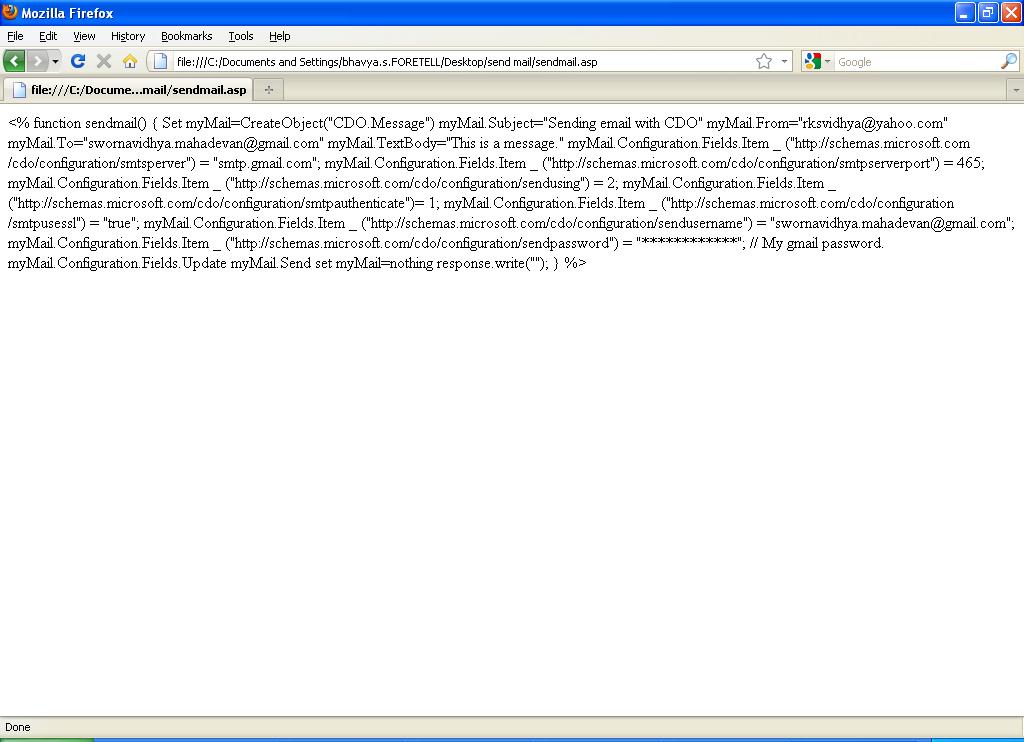
I want to send mail from an asp page. The asp page is called from a html page. The sending mail using CDOSYS and CDO is not working properly. When i call the asp page from html page, the script for sending mail in the asp page is getting displayed while running rather than working of the process which i had mentioned in the script to work.

The attached image file "sendmail.JPG" shows the runtime problem, when the asp file is being called from html file.


HTML Code

<html>
<head>
<meta http-equiv="Content-Language" content="en-us">
<meta name="GENERATOR" content="Microsoft FrontPage 6.0">
<meta name="ProgId" content="FrontPage.Editor.Document">
<meta http-equiv="Content-Type" content="text/html; charset=windows-1252">

</head>

<body>

<form action=sendmail.asp method="POST">
  <p><input type="text" name="T1" size="20"></p>
  <p><input type="submit" value="Submit" name="B1">&nbsp;&nbsp;&nbsp;&nbsp;&nbsp;&nbsp;&nbsp;&nbsp;
  <input type="reset" value="Reset" name="B2"></p>
</form>

</body>

</html>

ASP File "sendmail.asp" code
*****************************

<html>

<head>
<meta name="GENERATOR" content="Microsoft FrontPage 6.0">
<meta name="ProgId" content="FrontPage.Editor.Document">
<meta http-equiv="Content-Type" content="text/html; charset=windows-1252">

<%

function sendmail()
{

Set myMail=CreateObject("CDO.Message")
myMail.Subject="Sending email with CDO"
myMail.From="rksvidhya@yahoo.com"
myMail.To="swornavidhya.mahadevan@gmail.com"
myMail.TextBody="This is a message."

        myMail.Configuration.Fields.Item _
		("") = "smtp.gmail.com";
       myMail.Configuration.Fields.Item _
       ("") = 465;
       myMail.Configuration.Fields.Item _
       ("") = 2;
       myMail.Configuration.Fields.Item _
       ("")= 1;
       myMail.Configuration.Fields.Item _
       ("") = "true";  
       myMail.Configuration.Fields.Item _
       ("") = "swornavidhya.mahadevan@gmail.com";
       myMail.Configuration.Fields.Item _
       ("") = "************"; // My gmail password.
myMail.Configuration.Fields.Update
myMail.Send
set myMail=nothing

response.write("<script>alert('Process Successful.')</script>");

}
%>
</head>

<body>

</body>

</html>

Kindly help me at the earliest.

M.Sworna Vidhya
Dani AI

Generated

As noted, seeing ASP source in the browser usually means the page is not being processed by an ASP-capable server. The most common causes are: the HTML/ASP files are opened directly from the filesystem (file://...), or the web server (IIS) does not have Classic ASP enabled or the .asp handler removed. Fix the hosting first, then debug the mail code.

Quick checklist to confirm and fix the server side:

  • Make sure the URL in the browser starts with http:// or https:// (use http://localhost/... for local testing), not file://.
  • Put both the HTML form and the .asp file into the web server document root (IIS wwwroot or your site folder).
  • In IIS (or your hosting control panel) enable Classic ASP and confirm the handler mapping for .asp is present.
  • Create a tiny test ASP page to verify execution:
<%
Response.Write "Classic ASP is running"
%>

Only proceed to mail troubleshooting once that test shows output.

Notes on sending mail (Gmail and CDO): modern Gmail will block simple username/password SMTP unless you use an App Password or OAuth2; check Gmail’s SMTP docs and App Password guidance before assuming the credentials are wrong. Google SMTP settings (server/ports/SSL requirements) are documented here: and information about App Passwords is here: . Also verify your server/firewall allows outbound connections to Gmail’s SMTP port (587 or 465), and check IIS logs and event viewer for errors.

Do not leave real credentials in source or forum posts. Once ASP is executing, share the exact server error (if any) rather than the full code and credentials for safer, targeted help.

According to your image, you link to the local file. Apparantly, your local webserver does not recognize the asp extension. So instead of executing the code it thinks it is html. Check your webserver configuration.

Be a part of the DaniWeb community

We're a friendly, industry-focused community of developers, IT pros, digital marketers, and technology enthusiasts meeting, networking, learning, and sharing knowledge.