xuexue 15 Junior Poster

hi guys, i have this page, add_row.html,
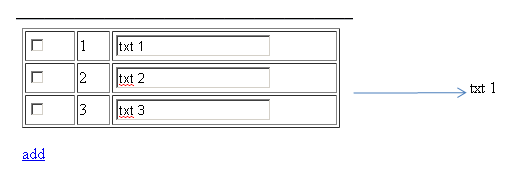
this page dynamically adds another row of inputs as per the user requirements..

<HTML>
<HEAD>
    <TITLE> Add/Remove dynamic rows in HTML table </TITLE>
    <SCRIPT language="javascript">
        function addRow(tableID) 
		{ 
            var table = document.getElementById(tableID); 
            var rowCount = table.rows.length;
            var row = table.insertRow(rowCount);
 
            var cell1 = row.insertCell(0);
            var element1 = document.createElement("input");
            element1.type = "checkbox";
            cell1.appendChild(element1);
 
            var cell2 = row.insertCell(1);
            cell2.innerHTML = rowCount + 1;
 
            var cell3 = row.insertCell(2);
            var element2 = document.createElement("input");
            element2.type = "text";			
            cell3.appendChild(element2);
        }
    </SCRIPT>
</HEAD>
<BODY>
<form action="get_values.php" method="get">
  <TABLE id="dataTable" width="318" border="1">
<TR>
            <TD width="34"><INPUT type="checkbox" name="chk[]" /></TD>
            <TD width="21"> 1 </TD>
            <TD width="166"> <INPUT type="text" name="txt[]"/> </TD>
    </TR>
</TABLE>
  <p><a href="javascript:addRow('dataTable')">add</a> </p>
  <p>
    <input type="submit" name="submit" id="button" value="Submit">
  </p>
</form>
</BODY>
</HTML>

not this one is for the values getting get_value.php,
it gets the value of the 1st row only.

<?php
$submit = $_GET['submit'];
$txtbox = $_GET['txt'];
 
if (isset($submit))
{	
	foreach($txtbox as $a => $b)
		echo "$txtbox[$a]  <br />";
  
}
?>

my question is that, how could i get the values of all the rows
added by the user? since in my code, it only gets the 1st row..
please help me..regards...
Dani AI

Generated

The reason only the first row reaches PHP is that newly created inputs have no name attribute, so the browser does not include them in the submitted form. In 's addRow routine the elements are appended but not given name values like txt[] or chk[]. Set the name when you create the input elements so the server receives them as arrays.

Small example of the fix in the JavaScript that creates the inputs (only the relevant lines shown):

var element1 = document.createElement("input");
element1.type = "checkbox";
element1.name = "chk[]";
element1.value = rowCount + 1;

var element2 = document.createElement("input");
element2.type = "text";
element2.name = "txt[]";

On the PHP side iterate the array directly and sanitize output. Example pattern to use instead of the current foreach:

if (!empty($_GET['txt'])) {
foreach ($_GET['txt'] as $value) {
echo htmlspecialchars($value, ENT_QUOTES, 'UTF-8') . "<br>\n";
}
}

Notes and troubleshooting tips:

  • Unchecked checkboxes are not submitted; if you need a value for every row, use a hidden field or include the row index in a text field.
  • If you switch the form to POST, use $_POST instead of $_GET.
  • Use browser DevTools -> Network to inspect the form payload or run console.log([...new FormData(yourForm).entries()]) to confirm names and values before submit. See MDN for FormData and createElement details (FormData, Document.createElement). For PHP sanitization see htmlspecialchars.

An alternative pattern is to keep a hidden template row in the DOM and clone it (cloneNode(true)), then update the numbering; that preserves names and reduces DOM-construction errors.

Be a part of the DaniWeb community

We're a friendly, industry-focused community of developers, IT pros, digital marketers, and technology enthusiasts meeting, networking, learning, and sharing knowledge.