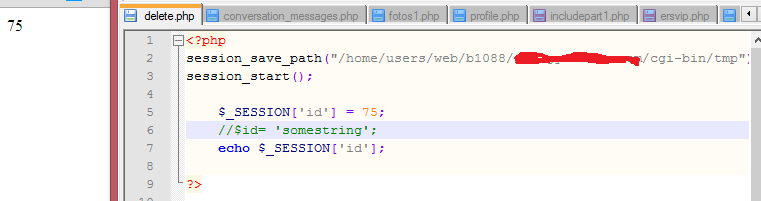
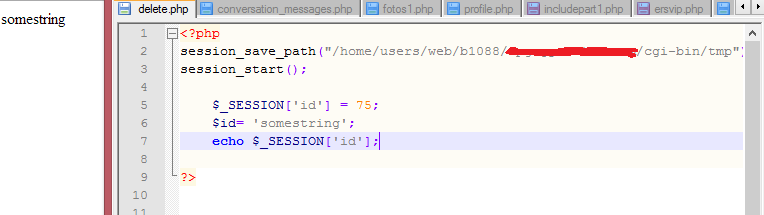
In local host i could create $username and $_SESSION['username'] and were two different variables, now it seems to interfere?

Dani AI

Generated

Short summary: the symptom seen by (a page variable like $username changing $_SESSION['username']) is a classic sign of the legacy register_globals behaviour on the host. correctly pointed that out; turning register_globals off fixes the immediate collision. The rest below explains why it happened, how to confirm it, and safe ways to fix it on other servers.

register_globals made PHP automatically create ordinary global variables from incoming sources (GET/POST/COOKIE/etc.), which can silently overwrite or mirror values that code expects to keep isolated in $_SESSION or local variables. That feature was deprecated and removed from modern PHP, but old hosts or legacy configs can still have it enabled and cause exactly the kind of interference described. (php.net)

Quick troubleshooting and fixes:

  1. Confirm the setting with phpinfo() or ini_get('register_globals').

  2. If it’s ON, turn it off in the proper config for the server: in php.ini add register_globals = Off. On Apache with mod_php the per-directory option is:

    php_flag register_globals Off

    On CGI/FastCGI / PHP-FPM setups use a per-directory INI (.user.ini) or the account php.ini instead — .htaccess php_flag lines will fail under CGI/FastCGI. After changing, reload and re-check with phpinfo(). Example checks:

    <?php
    phpinfo();            // look for register_globals
    // or
    var_dump(ini_get('register_globals'));
    ?>

    (php.net)

Longer-term: remove any code that relies on register_globals (don’t use session_register() or undocumented global tricks). Use session_start() before output, always read inputs from $_GET, $_POST, $_COOKIE, and keep session state in $_SESSION. Review session security (cookie flags, sameSite, use_strict_mode) while fixing legacy code. ’s note about $_SESSION vs local variables is correct — with register_globals off those are properly separate. (php.net)

Relevant users: (original report), (diagnosis), (session-scope reminder).

Recommended Answers

All 6 Replies

1) both are different

2) one is $username is local page variable and $_SESSION['username'] is a session variable and its an array too.

3) even $UserName, $userName, $_SESSION['uSERnAME'], $_SESSION['UserName'] all are different as php is case sensitive

4) any $_SESSION variable is available globally across all pages if you start your page with session_start(); function

5) other variables stay live for that particular page only

1) both are different

2) one is $username is local page variable and $_SESSION['username'] is a session variable and its an array too.

3) even $UserName, $userName, $_SESSION['uSERnAME'], $_SESSION['UserName'] all are different as php is case sensitive

4) any $_SESSION variable is available globally across all pages if you start your page with session_start(); function

5) other variables stay live for that particular page only

Yes, im aware of all this, but for some reason $username is changing $_SESSION['username'] variable... $id is changing $_SESSION['id'] value.. etc, as i said before , in localhost it was working perfectly fine... when i pass it all to ipage the problem starts..

thanks for reply

here are some screenshot so u know im not crazy....

1) both are different

2) one is $username is local page variable and $_SESSION['username'] is a session variable and its an array too.

3) even $UserName, $userName, $_SESSION['uSERnAME'], $_SESSION['UserName'] all are different as php is case sensitive

4) any $_SESSION variable is available globally across all pages if you start your page with session_start(); function

5) other variables stay live for that particular page only

Is turned on perhaps?

Is register globals turned on perhaps?

yes it is turned On, should i turn this off? (screenshot below)

I turned to off, and now it works fine, pfff that was a weird one , thank you very much pritaes

Be a part of the DaniWeb community

We're a friendly, industry-focused community of developers, IT pros, digital marketers, and technology enthusiasts meeting, networking, learning, and sharing knowledge.