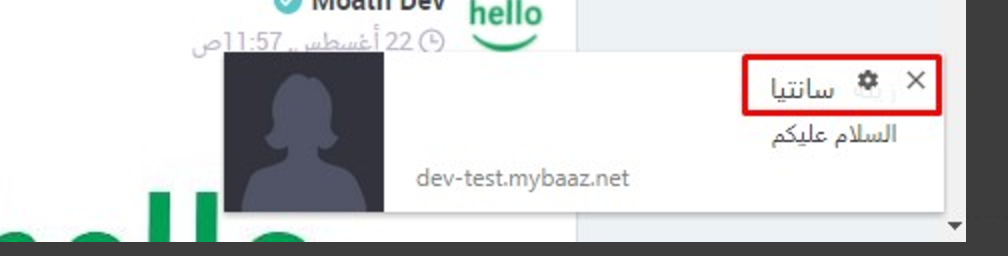
Using desktop push notification when the title and body written using right-to-left languages like Arabic language, the browser detect the language and change the direction even if dir and lang param not provided in the object the new notification is created for example:
bug.png

The title is under the setting icon (this is the current implementation)

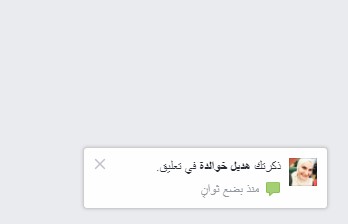
But in facebook it seemed their use custom desktop notification, for example:
rightOne.jpg

The facebook desktop notification looking perfect

Note: this behavior for windows user and to be more specific just Chrome browser the IOS always work with ltr direction neither if dir and lang provided or not and I try to use the chrome rich notification also it didn't work.

The Question: how I can custom the desktop notification at least show the hole title.

Thank you very much in advance.

Dani AI

Generated

Short answer: this is a rendering limitation of the browser/OS, not a bug you can fix from page CSS. As described, Chrome/Chromium choose the toast layout (and will detect bidi from the text itself), so the page has very little control over where the title sits or how many characters are shown. The same behavior was observed by and has been discussed by others; native/system toasts differ by platform and user settings. (developer.mozilla.org)

Practical workarounds (ordered by how easy they are to try):

  • Try forcing bidi with Unicode controls (this is quick to test). Prefix/suffix the title with a Right‑to‑Left Mark (U+200F) or the Arabic Letter Mark to influence the Unicode BiDi algorithm. This does not change browser policy, but in many renderers it changes alignment/embedding. The Unicode spec documents these controls. If that fails, the OS/browser may be stripping or ignoring control characters. ()

Example:

var title = '\u200F' + 'السلام عليكم ورحمة الله' + '\u200F';
new Notification(title, { body: 'النص الكامل هنا' });
  • If you control the notification payload, keep the title short and put the rest in the body (browsers often truncate titles unpredictably). Community experience shows truncation is platform/browser-dependent and not under author control. (stackoverflow.com)

  • For consistent layout, use an extension-level rich notification or render the content into an image and show it via the extension API (image-type notifications) or use an in-page HTML popup while the tab is active. Extension templates (and image slots) give you predictable rendering but still vary by OS—see the chrome.notifications reference for details. (developer.chrome.com)

Recommended next steps: try the small RLM test, verify behavior on the target Windows Chrome version, and if that still fails use the short-title/body fallback or an extension/image approach for guaranteed layout. If consistent native behavior is required across many users, platform-level fixes (Chromium bug) are the only long-term solution.

Hi,

I see this happens on Linux Chromium too, here's a demo: https://jsfiddle.net/tzd1gyjf/
Looking at the bug list it seems to be an intended behaviour:

But it still does not explain how the FB notification looks so different.

Be a part of the DaniWeb community

We're a friendly, industry-focused community of developers, IT pros, digital marketers, and technology enthusiasts meeting, networking, learning, and sharing knowledge.