Google Upgrades Google Images

Emily Banks 1 Tallied Votes 634 Views Share

Maybe you're among the few who have seen the changes already; Google Images is getting a facelift this week.

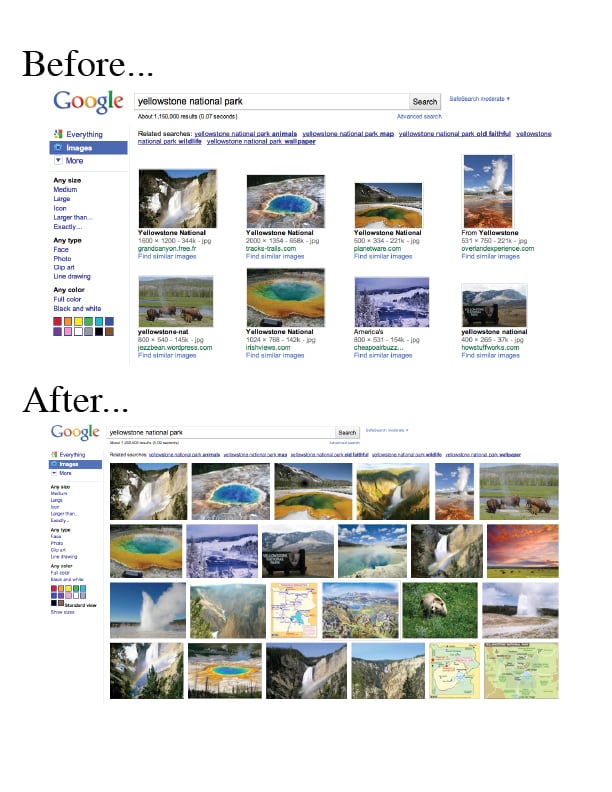
Google announced Tuesday that the familiar landing page for an image search will be changing and the site will offer more sophisticated technology for the 10 billion images it has indexed.

When Google Images was first built in 2001, it had 250 million images. Four years later it was up to 1 billion.

"It’s not just about quantity, though," product manager Nate Smith said in a blog post Tuesday. "Over the past decade we’ve been baking deep computer science into Google Images to make it even faster and easier for you to find precisely the right images. We not only find images for pretty much anything you type in; we can also instantly pull out images of clip art, line drawings, faces and even colors."

The new results page looks similar to Bing's -- just tightly organized images without text. The results page will also use a hover pane with each thumbnail image that will provide larger preview and information about the image.

The changes will be made throughout the week worldwide.

"We hope they (the upgrades) not only make it easier to search for images, but also contribute to a better aesthetic experience," Smith said. "We see images as a major source of inspiration, a way of connecting the world—and their growth is showing no signs of slowing down. We’ll work to make sure Google Images continues to evolve to keep up."

The changes will also include larger thumbnail previews and the ability to view up to 1,000 images on a pages.

Smith said Google will also be launching Image Search Ads, a new ad format, for its advertisers.
Dani AI

Generated

As reported the Google Images refresh, it makes sense to treat that announcement as a reminder: image search behavior and presentation change, but the fundamentals that make images discoverable and useful have stayed consistent. The short checklist below translates that signal into practical, evergreen steps for designers, front-end engineers, and site owners. (developers.google.com)

Make images discoverable and context-rich. Use real HTML image elements (not purely decorative CSS backgrounds) so crawlers can find the file; give each file a clear, hyphenated filename; provide concise, meaningful alt text; include captions or visible context nearby; and keep the image URL crawlable (avoid blocking it via robots.txt). For images that are only reachable via JavaScript or CDNs, publish an image sitemap (or add image entries to the existing sitemap) and verify any CDN domains in Search Console. (developers.google.com)

Keep UX and Core Web Vitals in mind when serving images. Use responsive delivery (<picture> / srcset + sizes), declare width and height (or use aspect-ratio) to avoid layout shifts, serve modern formats (WebP/AVIF) with fallbacks, preload the hero/LCP image and avoid lazy-loading that specific image, and use loading="lazy" only for off-screen images. Example (basic pattern):

<img
  src="hero-1600.jpg"
  srcset="hero-400.jpg 400w, hero-800.jpg 800w, hero-1600.jpg 1600w"
  sizes="(max-width:600px) 100vw, 1200px"
  alt="Handmade ceramic mug on wooden table"
  width="1600" height="900"
  fetchpriority="high">

These implementation choices reduce CLS and improve LCP. (developer.mozilla.org)

Add provenance and testability. For licensing/credit and richer image presentation, add ImageObject structured data or embed IPTC metadata in the file (either is sufficient); validate with the Rich Results Test. Monitor indexing and troubleshoot with Search Console (URL Inspection, sitemaps, and the indexing request flow). Small, repeatable checks—verify the image appears in the sitemap, that the image URL returns 200, and that structured-data tests pass—cover most problems. Example JSON‑LD snippet:

<script type="application/ld+json">
{
  "@context":"https://schema.org",
  "@type":"ImageObject",
  "contentUrl":"https://example.com/photos/mug.jpg",
  "license":"https://example.com/license",
  "creditText":"Studio Maker"
}
</script>

For details on metadata fields and how Google uses them, see Google’s image metadata guidance and the recrawl/indexing docs. (developers.google.com)

This guidance complements the UI changes noted by and the early reactions like ’s; implementing these steps keeps images both visible to search engines and pleasant for site visitors as the visual search landscape continues to evolve.

redesignunit -4 Posting Pro in Training

I have got news by today and second news from your post thanks for sharing

Be a part of the DaniWeb community

We're a friendly, industry-focused community of developers, IT pros, digital marketers, and technology enthusiasts meeting, networking, learning, and sharing knowledge.