HI
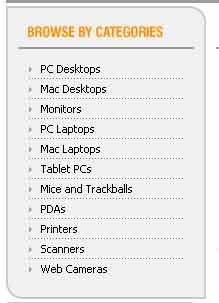
How can I make a menu like this picture ? I have tries some thing but I don’t know how to make the corners like it ? can any one give me a example like this ?

thanks

Dani AI

Generated

A few quick notes that build on the replies already here: and pointed at image-based approaches, and correctly warned against relying on tables. For a clean, future‑proof solution use semantic markup plus CSS3 for the rounded corners and shadows; it keeps the menu responsive, accessible, and easy to style.

Try this minimal structure (role added for accessibility):

<nav class="menu" role="navigation" aria-label="Main menu">
  <ul>
    <li><a href="#">Item One</a></li>
    <li><a href="#">Item Two</a></li>
    <li><a href="#">Item Three</a></li>
  </ul>
</nav>

And the CSS that produces rounded corners, clipping, and hover/focus states:

.menu {
  width:240px;
  background:#fafafa;
  border:1px solid #ddd;
  border-radius:8px;
  box-shadow:0 2px 4px rgba(0,0,0,0.08);
  overflow:hidden;
  font:14px/1.2 Arial, sans-serif;
}

.menu ul { list-style:none; margin:0; padding:0; }
.menu a { display:block; padding:12px 16px; color:#333; text-decoration:none; }
.menu a:hover,
.menu a:focus { background:#f2f2f2; outline:none; }

Notes and troubleshooting:

  • border-radius is widely supported now; see border-radius on MDN for details. No vendor prefixes are needed for modern browsers.
  • overflow:hidden on the container clips child backgrounds so the corners look correct without per-item rounding.
  • Add keyboard focus styles (shown) so the menu is usable by keyboard users.
  • If the original picture shows decorative corner art beyond a simple radius (ornate bevels, carved corners), implement those with small SVGs or with ::before/::after pseudo-elements — only resort to image-slicing if you must support very old browsers.
  • For legacy IE (pre-IE9) either accept square corners or provide tiny corner images as a fallback; aim for progressive enhancement rather than table-based layout.

This keeps markup semantic, avoids tables, and gives you easy control over colors, spacing and corner radius.

Recommended Answers

All 4 Replies

u will need to make a table with background images to make the rounded corner and border. than u will need to have the text in a tr and td and the text needs to have a width and border-bottom: 1px dashed gray

Thank

Don't use tables unless you really, really want to.

i would make a div.... with the main color as a background color then make a image of the top of the boarder and a image of the bottom boarder..... then for the sides make a 1pt by 4pt image and stretch it to fit the side hight you want..... content in the middle.

Be a part of the DaniWeb community

We're a friendly, industry-focused community of developers, IT pros, digital marketers, and technology enthusiasts meeting, networking, learning, and sharing knowledge.