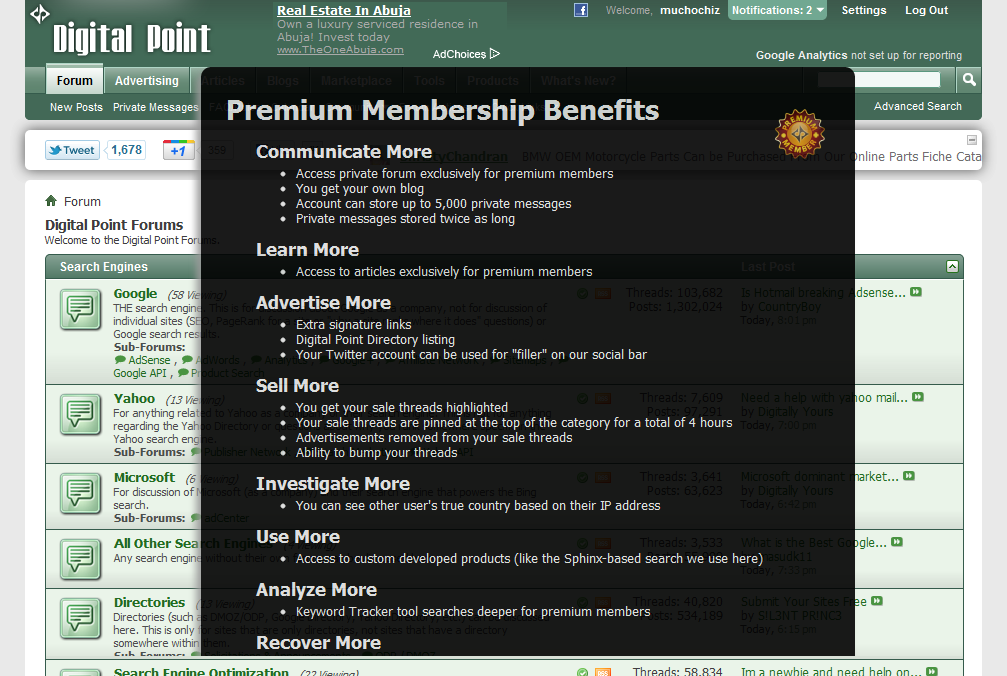
I don't really know what the code is called but the advert shows up once the webpage is loaded completely . I would like to know how i can do this . I attached a screen shot of what the advert looks like .

Dani AI

Generated

Short answer: build a modal/overlay that your JavaScript makes visible after the page finishes loading. As pointed out, this is client-side JavaScript; ’s inline onload idea works but modern code avoids inline attributes and adds accessibility, close controls and simple "show once" logic.

A compact, practical pattern (HTML + minimal CSS + vanilla JS):

<!-- HTML -->
<div id="adOverlay" class="overlay" aria-hidden="true">
  <div class="modal" role="dialog" aria-modal="true" aria-labelledby="adTitle" tabindex="-1">
    <button class="close" aria-label="Close ad">Close</button>
    <h2 id="adTitle">Special offer</h2>
    <p>Ad content or iframe here.</p>
  </div>
</div>
/* CSS */
.overlay{position:fixed;inset:0;background:rgba(0,0,0,.6);display:none;align-items:center;justify-content:center;z-index:9999}
.overlay.is-open{display:flex}
.modal{background:#fff;padding:20px;max-width:520px;width:94%}
// JS
(function(){
  var KEY='adClosed_v1';
  var overlay=document.getElementById('adOverlay');
  function openAd(){ overlay.classList.add('is-open'); overlay.setAttribute('aria-hidden','false'); overlay.querySelector('.modal').focus(); }
  function closeAd(){ overlay.classList.remove('is-open'); overlay.setAttribute('aria-hidden','true'); try{ localStorage.setItem(KEY,'1'); }catch(e){} }
  document.addEventListener('DOMContentLoaded', function(){
    if (localStorage && localStorage.getItem(KEY)) return;
    window.addEventListener('load', function(){ setTimeout(openAd, 300); });
    overlay.addEventListener('click', function(e){ if (e.target === overlay || e.target.classList.contains('close')) closeAd(); });
    document.addEventListener('keydown', function(e){ if (e.key === 'Escape') closeAd(); });
  });
})();

Notes and tips

  • Use window.load if you truly want the ad after all resources; DOMContentLoaded fires earlier.
  • Prefer an overlay/modal over window.open (popup blockers and poor UX).
  • Add tabindex="-1", role="dialog" and focus handling so keyboard users can interact.
  • Use localStorage/sessionStorage or a cookie to avoid re-showing the ad every page load.
  • If the ad embeds third-party content (iframes), watch for mixed-content/CSP issues and test on mobile.

This gives a reliable, accessible pattern you can adapt (timing, frequency, animation) while avoiding intrusive browser popups.

Recommended Answers

All 2 Replies

jquery
or oldschool, back from the 90s when everybody rode dinosaurs,
perhaps something like <body onload='document.getelementbyid('advert')display='block'> where advert is <div id='advert' style='display:none;'>ad</div> untested code, thought exercise

Be a part of the DaniWeb community

We're a friendly, industry-focused community of developers, IT pros, digital marketers, and technology enthusiasts meeting, networking, learning, and sharing knowledge.