Hi,
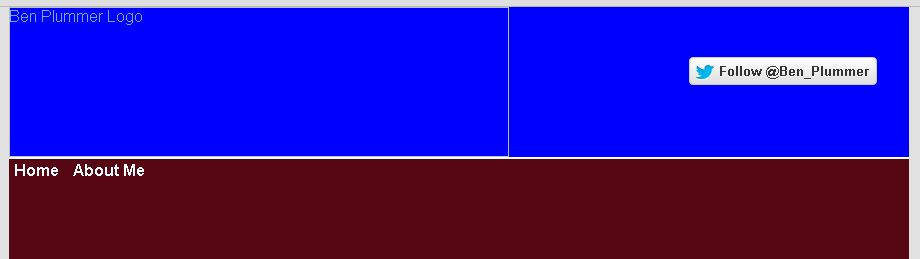
I'm creating a website and currently working on the banner for it which is all contained within the 'logo' div that has a 900px width and 150px height.
For some reason the 'menu' div is not being positioned within the 'logo' div despite being contained in it within the html.
As the img takes up 500px width and 150px height within the 'logo' div I thought that the 'menu' div containing the links would be positioned to the right of the img within the 'logo' div as there is space however as stated, the 'menu' div is displayed outside the 'logo' div.
My html and css code is shown below:
HTML:
<!DOCTYPE html PUBLIC "-//W3C//DTD XHTML 1.0 Strict//EN" "http://www.w3.org/TR/xhtml1/DTD/xhtml1-strict.dtd">
<html xmlns="http://www.w3.org/1999/xhtml">
    <head>
        <meta http-equiv="Content-Type" content="text/html; charset=UTF-8" />
        <meta http-equiv="Content-Language" content="en-gb" />
        <link rel="stylesheet" href="master.css" type="text/css" />
        <title>Ben Plummer</title>
    </head>
    <body>
        <script>!function(d,s,id){var js,fjs=d.getElementsByTagName(s)[0];if(!d.getElementById(id)){js=d.createElement(s);js.id=id;js.src="//platform.twitter.com/widgets.js";fjs.parentNode.insertBefore(js,fjs);}}(document,"script","twitter-wjs");</script>
        <div id="wrapper">
            <div id="logo">
                <img src="benplummerlogo.png" alt="Ben Plummer Logo" />
                <a href="https://twitter.com/Ben_Plummer" class="twitter-follow-button" data-show-count="false" data-size="large" data-dnt="true">Follow @Ben_Plummer</a>
                <div id="menu">
                    <a class="menulinks" href="">Home</a>
                    <a class="menulinks" href="">About Me</a>
                </div>
            </div>
            <div id="pagecontent">
            </div>
            <div id="footer">
            </div>
        </div>
    </body>
</html>
CSS:
html {
    background: none repeat scroll 0 0 #e2e2e2;
    color: #66b7d2;
    height: 100%;
}

body, h1 {
    margin:0;
    padding:0;
    height: 100%;
}

#wrapper {
    min-height: 100%;
    height: auto !important;
    height: 100%;
    width: 900px;
    margin-left: auto;
    margin-right: auto;
    background-color: #570614;
    font-family: Arial, sans-serif;
}

#logo {
    width: 900px;
    height: 150px;
    border-bottom: 2px solid #FFFFFF;
}

img#benplummerlogo {
    height: 150px;
    width: 500px;
}

.twitter-follow-button {
    margin-top: 50px;
    margin-left: 180px;
    position: absolute;
}

#menu {
}

.menulinks {
    color: #FFFFFF;
    text-decoration: none;
    text-align: center;
    font-weight: bold;
    /*border-top: 2px solid #FFFFFF;
    border-left: 2px solid #FFFFFF;
    border-right: 2px solid #FFFFFF;*/
    padding: 5px;
}

.menulinks:hover, .menulinks:active {
    color: #570614;
    background-color: #FFFFFF;
    text-decoration: none;
    text-align: center;
    font-weight: bold;
    /*border-top: 2px solid #FFFFFF;
    border-left: 2px solid #FFFFFF;
    border-right: 2px solid #FFFFFF;*/
    padding: 5px;
}
I'd really appreciate any help. Ideally I want the links underneath the twitter follow button just on top of the bottom border of the 'logo' div.
Thanks.