I am trying to include a datepicker from jQuery UI in my wordpress admin area (specifically in a custom meta box). I have it working, and it seems as though it is finding the stylesheet well enough, but it still looks a little 'off'. I know there must be something in the default stylesheet for the wordpress admin area throwing it off, but I can't figure out exactly what. If anyone has an idea, I would apprecaite it!

I have uploaded a screenshot of my datepicker and how it looks in the wordpress admin area. You can see that some styling looks right (colors, etc), but layout seems to be wrong. Thanks!!
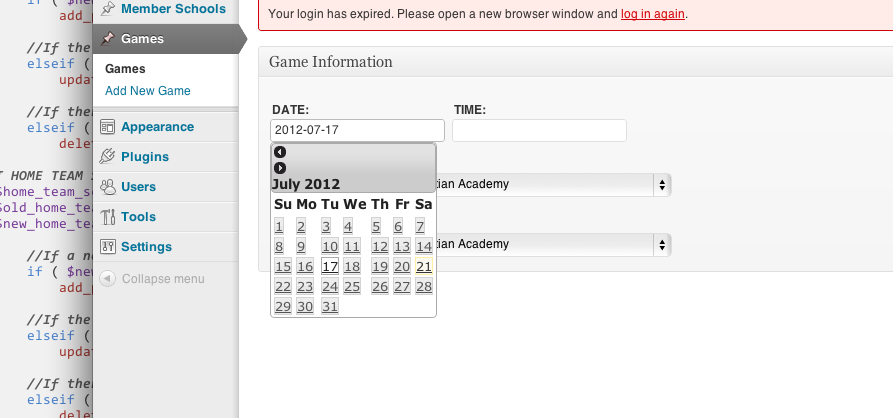
Screen_Shot_2012-07-21_at_8.32_.44_PM_

Dani AI

Generated

Most likely causes for a “mis‑styled” jQuery UI datepicker inside a WordPress meta box are: the jQuery UI theme CSS either isn’t being loaded (or its image paths are wrong), WordPress admin CSS is overriding layout rules (font, box‑model, table rules), or two different jQuery UI versions/styles are colliding. ’s screenshot matches those symptoms; was right to point to the jQuery UI datepicker itself, but the fix is usually in how the CSS is loaded and scoped.

Quick troubleshooting checklist:

  • Confirm the jQuery UI theme CSS is actually enqueued on the admin page where the meta box appears (inspect <link> tags and look for .ui-widget/.ui-datepicker rules).
  • Check the CSS image URLs used by the theme CSS (icons/backgrounds). If the CSS is loaded from your plugin/theme folder, the images folder must be at the same relative path the CSS expects.
  • Use the browser inspector to view computed styles for .ui-datepicker and .ui-widget to find which admin rule is overriding layout (look for font-size, line-height, box-sizing, display, width, float).
  • Avoid loading another copy of jQuery UI; rely on WordPress’ jquery-ui-datepicker script where possible.

Enqueue example (admin only, scope to post screens):

add_action('admin_enqueue_scripts', 'my_meta_box_assets');
function my_meta_box_assets($hook) {
  if ( $hook !== 'post.php' && $hook !== 'post-new.php' ) return;
  wp_enqueue_script('jquery-ui-datepicker');
  wp_enqueue_style('my-jquery-ui', plugins_url('css/jquery-ui.css', __FILE__));
  wp_enqueue_script('my-datepicker-init', plugins_url('js/datepicker-init.js', __FILE__), array('jquery','jquery-ui-datepicker'), '1.0', true);
}

If admin rules still win, scope adjustments work well: prefix jQuery UI selectors with your meta box ID (#your-metabox-id .ui-datepicker) or increase specificity rather than blanket !important. Also check console for 404s (missing images/CSS) and for multiple jQuery UI versions — fixing those two usually restores correct layout.

Be a part of the DaniWeb community

We're a friendly, industry-focused community of developers, IT pros, digital marketers, and technology enthusiasts meeting, networking, learning, and sharing knowledge.