can we make a pop up window using css and html?
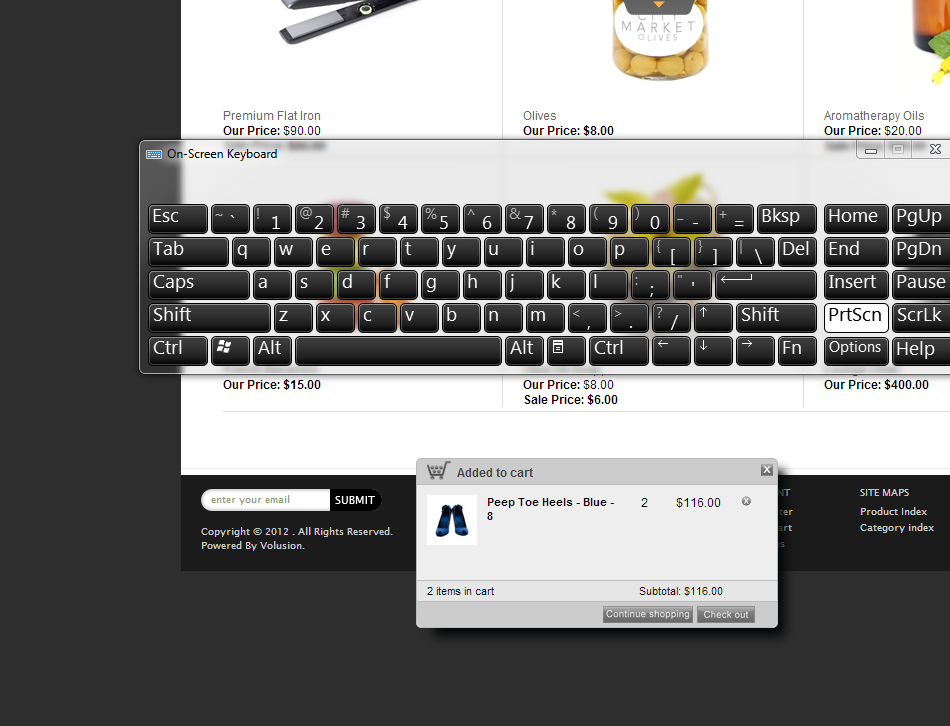
iam making a ecommerce website and when user buys a item. a window should pop up. and on pop up window it should give information about ur cart. here is a example i saw on a website.

---------------------------------------------
the pop window is at bottom of image. i want to create almost same as that. any ideas? i think they are using javascrip not sure.
if this is javascript than is there a way to do the same think by only using jquery thanks.
Dani AI

Generated

Both replies in this thread touch the two separate problems you need to solve: the visual popup and the cart data behind it. was pointing at the client-side behavior that shows and hides the UI, while reminded you that the cart state must come from somewhere persistent. Below are practical options and quick examples so a popup like the one under the product image can be built reliably.

A pure HTML/CSS approach (good for static messages) can be done with the :target or checkbox technique. It works without scripting but has limits: no easy keyboard handling, no Escape key close, and you cannot fetch server data.

Example (minimal :target pattern):

<div class="product" style="position:relative;">
  <img src="product.jpg" alt="Product">
  <a href="#cart" class="open">Add to cart</a>

  <div id="cart" class="popup" role="dialog" aria-hidden="true">
    <a href="#" class="close" aria-label="Close">Close</a>
    <div class="content">Static message or small summary</div>
  </div>
</div>

<style>
.popup { position:absolute; left:0; right:0; bottom:0;
  transform:translateY(100%); transition:transform .2s;
  pointer-events:none; }
#cart:target { transform:translateY(0); pointer-events:auto; }
</style>

For a real ecommerce cart you will want dynamic content and accessible controls. Use JavaScript to fetch the cart (JSON endpoint or localStorage) and inject HTML, then manage focus and keyboard (move focus into the dialog, trap it, restore on close).

Example fetch pattern:

document.querySelector('.open').addEventListener('click', function(){
  fetch('/cart.json', { credentials: 'same-origin' })
    .then(r => r.json())
    .then(data => document.querySelector('#cart .content').textContent = data.summary);
});

Troubleshooting and tips: anchor the popup inside the image container for the bottom-of-image appearance; use position:absolute on a positioned parent, or position:fixed for global overlays; check z-index if it hides; add role="dialog" and aria-modal/focus handling for a11y; persist cart server-side for cross-device reliability, or localStorage for quick client-only carts.

Recommended Answers

All 2 Replies

Hi.

yes, it's possible to do it with JQuery. In fact, jQuery it's the easiest way to do it.

You'll need the html strucutre for the window, the css to add style to the window and jQuery to open, close and manage the window.

Google a little bit about JQuery PopUp Window that you'll find a lot of things.

If you don't want to code much I suggest that you use jQuery UI Dialog.
http://jqueryui.com/dialog/

You are also going to need to include some server side scripting. This shopping cart I for is going to be stored in cookies, session variables, and/or a database.

Be a part of the DaniWeb community

We're a friendly, industry-focused community of developers, IT pros, digital marketers, and technology enthusiasts meeting, networking, learning, and sharing knowledge.