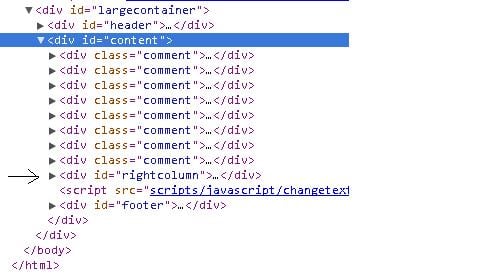
I have a page that loads dynamic content (comments, to be specific). The comments are floated to the left, and the "Add a comment" div is floated right. For some reason, the add a comment div is being pushed down by the comment divs. The link to the page is: http://armyants.us/comments.php

Dani AI

Generated

Nice catch by on wrapping the comments. What pushed the right column down was float behavior: each comment floated left, so the layout engine tried to place the right box alongside them; when there was not enough inline space, it dropped to the next line. Floats sit outside normal flow, so this is expected. See MDN: float. (developer.mozilla.org)

Two solid ways to make this resilient:

Example CSS you can drop in (naming to taste):

/* Option A: keep floats */
.comments-list { display: flow-root; }  /* wrapper around .comment items */
#rightcolumn { float: right; width: 24rem; }

/* Option B: modern layout */
.layout { display: flex; gap: 1rem; align-items: flex-start; }
.comments-list { flex: 1 1 auto; min-width: 0; }
#rightcolumn { flex: 0 0 24rem; }

A couple of quick checks: make sure the combined widths (plus padding/borders) of the two columns do not exceed the container; box-sizing: border-box; on everything helps. Also, as @M/ found, changing z-index will not change document flow, so it will not prevent a float from pushing a sibling down. Finally, reconcile any orphaned selectors (e.g., a #leftcolumn rule that does not match real markup) so you are not debugging dead CSS.

Recommended Answers

All 3 Replies

The issue appears to be that the div with the id of "rightcolumn" is within the div with an id of "content", which is OK if you "wrap" the comment divs within their own div. I assume that is what you mean to do because your CSS refers to an id of "leftcolumn" but you dont appear to have any elements in your code with that id. pic11

I went on your site and I used firebug and i did this to move the comment box.

#rightcolumn {
    background-color: #151515;
    border-left: 2px solid #595959;
    border-radius: 10px 10px 10px 10px;
    border-top: 2px solid #595959;
    margin: 0;
    padding: 0 10px 10px;
    position: relative;
    width: 399px;
    z-index: 0;
}


.comment {
    background-color: #151515;
    border-left: 2px solid #595959;
    border-radius: 10px 10px 10px 10px;
    border-top: 2px solid #595959;
    display: inline-block;
    float: left;
    margin-top: 10px;
    padding: 10px;
    position: relative;
    width: 525px;
    z-index: 800;
}

Hopefully this helps

I fixed it by putting a wrapper around the divs. thanks for the help guys!

Be a part of the DaniWeb community

We're a friendly, industry-focused community of developers, IT pros, digital marketers, and technology enthusiasts meeting, networking, learning, and sharing knowledge.