I have designed a website for a client and now I need to place it into Dreamwaver. The issue I am having is I'm not quite sure how to slice the designed layout. Can someone please tell me the best way to set up divs to make this website work?

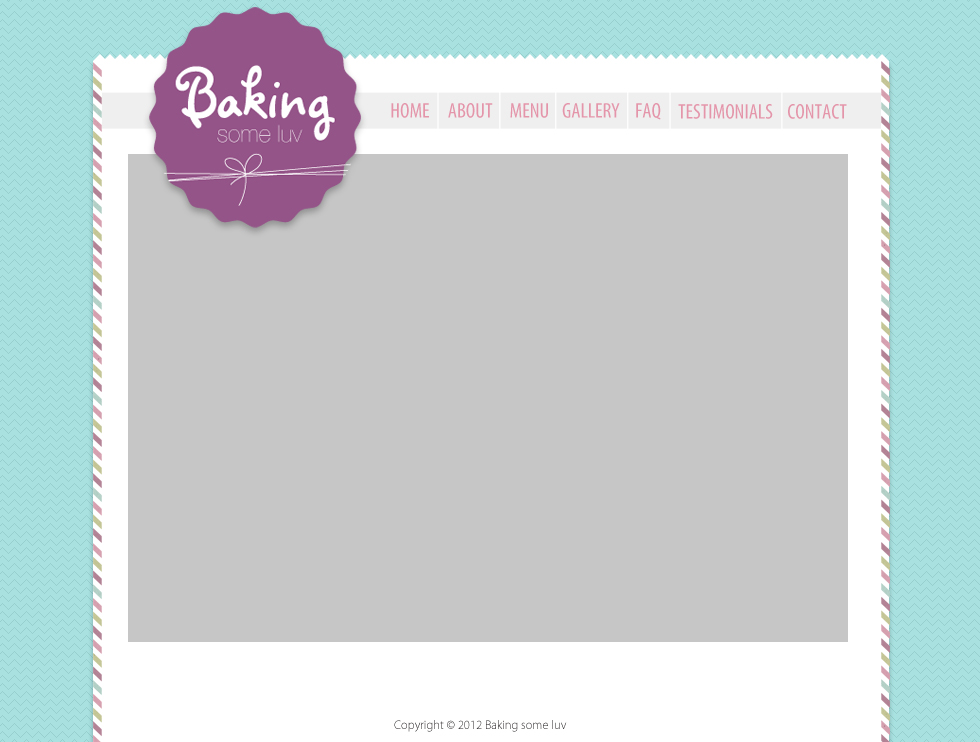
I have attached what the website looks like. The gray box is for content.index
Dani AI

Generated

A compact, practical workflow that builds on ’s and ’s points: treat the PSD as a set of assets and layout cues rather than a picture to be entirely sliced into images. Export only the non-replicable artwork (logo, icons, decorative textures), prefer vector formats for logos/icons (SVG), and export raster images at appropriate quality and pixel densities (see Adobe’s guidance for exporting assets from Photoshop). ()

Map the design to semantic HTML5 regions (header, nav, main, aside, footer) and keep content markup separate from presentation. Use a narrow set of reusable inner containers (a centered page wrapper with a fluid max-width and padding) and let modern layout tools handle alignment: Flexbox for simple one-dimensional layouts and CSS Grid for complex two-dimensional arrangements. (A Complete Guide to FlexboxA Complete Guide to Grid)

A minimal structural example (build markup first, then style progressively):

<header>
  <div class="site-inner">
    <h1 class="logo">...</h1>
    <nav>...</nav>
  </div>
</header>

<main class="site-inner">...content...</main>

<footer class="site-inner">...footer text...</footer>

Dreamweaver workflow notes: define a local site folder before creating files, keep CSS in an external stylesheet, and use Split/Live view for iterative testing. Favor responsive techniques (use srcset/sizes for images and test at multiple widths) rather than fixed pixel slicing—see MDN on responsive images for specifics. (Responsive images (srcset)) Final checklist: optimize and version assets, validate markup/CSS (W3C validator), test in browsers and devices, and avoid rendering text as images for accessibility. (W3C Validator)

Recommended Answers

All 2 Replies

If you want to center a main div, that is a good start. I would suggest that you give it a try. It is going to be unlikely for someone on this forum to produce the structure for you. You are free to start and if you run into issues, post the relevant code and question for assistance.

<style>
#wrapper {
width:1000px;
margin: 0 auto;
}

<div id="wrapper>
  <!-- content -->
</div>

No offense intended, but people get paid to turn images/PSDs into HTML. Like JorgeM said, I'd be surprised if anyone would just convert the image to HTML for you. You're far more likely to get help if you build it yourself, then ask for tips to tweak things here and there. Here's a breakdown of what you should be looking at structuring:

  1. You need a container to make the overall box separate from the blue background
  2. You need an element to contain the logo
  3. You need an element to contain the navigation bar
  4. You need a container for the main content
  5. You need a containr/element for the footer text
Be a part of the DaniWeb community

We're a friendly, industry-focused community of developers, IT pros, digital marketers, and technology enthusiasts meeting, networking, learning, and sharing knowledge.