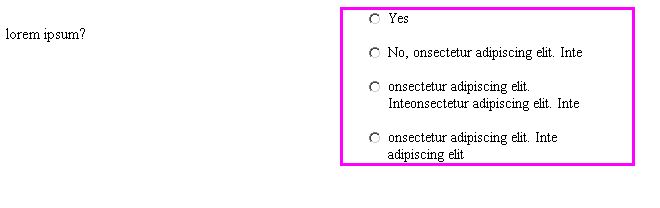
Hi all, I hope somebody can help me with this really annoying issue. Basically I have a some radio buttons and some text inside a label. This is in a small container and when the line of text breaks and goes to the other line, I want it to be below the text and not the radion button, so in short to increase the indentation.
I have spent a few hours on this but I can't get it right. I have tried an awful lot of combinations (and things suggested on stackoverflow too) but for the life of me I couldn't get it to work. Here's the code and 2534aeb83c2b7f8d368ca9c29fe914d8 a screenshot of how the layout looks like at the moment.
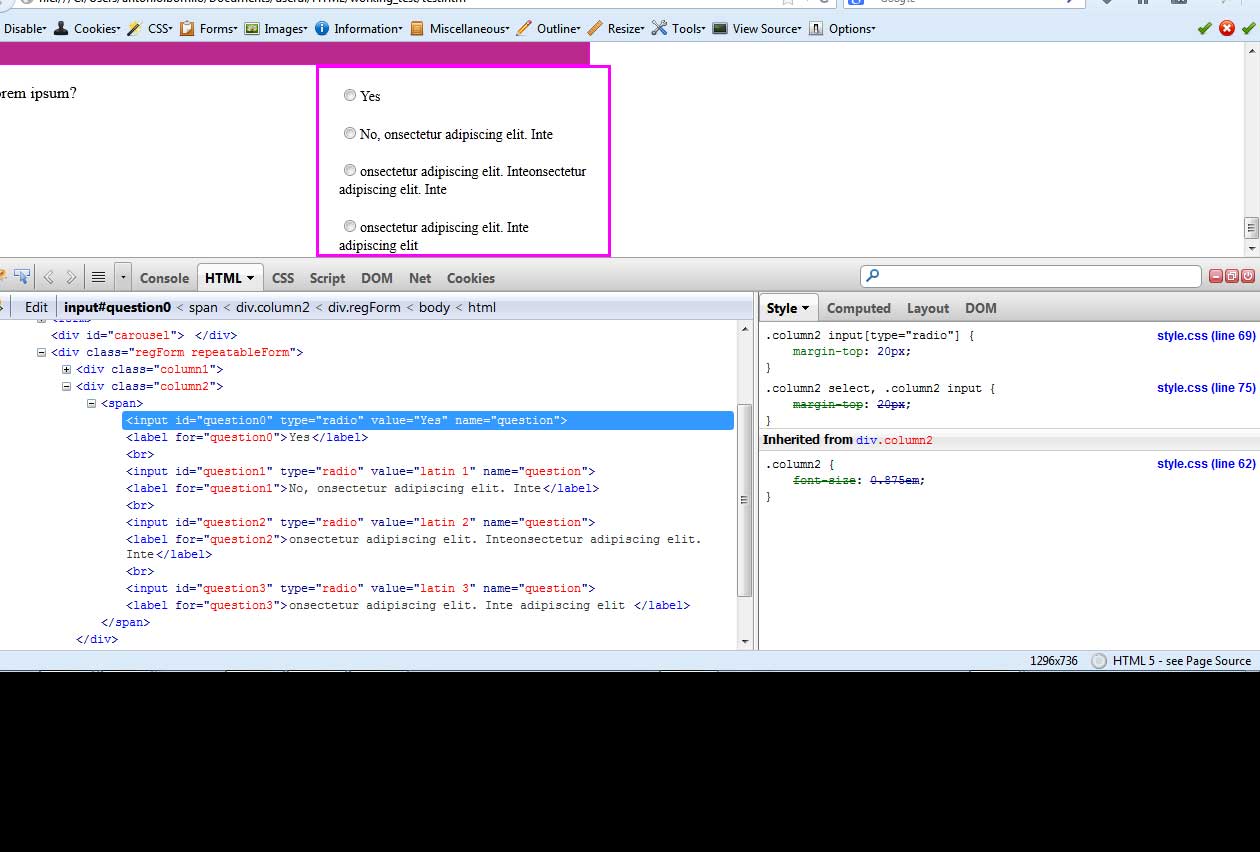
This is the relevant html:

    <div class="myform">
            <div class="column1">
                <p>lorem ipsum?</p>
            </div>
            <div class="column2">
                <span>
                    <input id="question0" name="question" value="Yes" type="radio"><label for="question0">Yes</label>
                    <br><input id="question1" name="question" value="latin 1" type="radio"><label for="question1">No, onsectetur adipiscing elit. Inte</label>
                    <br><input id="question2" name="question" value="latin 2" type="radio"><label for="question2">onsectetur adipiscing elit. Inteonsectetur adipiscing elit. Inte</label>
                    <br><input id="question3" name="question" value="latin 3" type="radio"><label for="question3">onsectetur adipiscing elit. Inte adipiscing elit </label>
                </span>
            </div>
        </div>

And css:

/*radio buttons*/
.column1{
    border:1px solid transparent;
    width:26.1437908496732%; /*200/765*/
    float:left; 
}

.column2{
    border:3px solid magenta;
    width:249px;
    float:left;
    font-size: 0.875em;
    padding:0 20px 0;
}
.column2 input[type="radio"]{
    margin-top: 20px;   
}
/* .column2 span label{
    display:inline;
} */
.column2 select, .column2 input{
    margin-top:20px;
}
.column2.noWidth{
    width:auto;
    /* margin-top:20px; */
}

/*radio buttons*/

Now, you might say that the code is a bit odd, especially what is that span doing there? The thing is the content is generated by a cms so ideally if possible I shouldn't really change the structure, but use css to style it and add some classes/ids if necessary.

The last things I tried:
-float the input to the left but it messes everything up.
-text-indent: no joy
Does anybody have a solution that works and does it cross-browser?
thanks
Dani AI

Generated

This wrap/indent issue happens because the radio is inline and the label starts immediately after it. When the label text wraps, the second line flows into the radio’s box. A robust, accessible pattern is to make each option a block with left padding for the control, then absolutely position the radio in that padded gutter. This creates a proper hanging indent and enlarges the click target.

Example (no floats, no fixed pixel assumptions):

<!-- Ideal markup: nest the input in the label -->
<label class="option"><input type="radio" name="question" value="Yes"> Yes</label>
<label class="option"><input type="radio" name="question" value="No"> No, consectetur adipiscing elit. Integer...</label>
.column2 .option {
  position: relative;
  display: block;
  padding-left: 1.75em;   /* space reserved for the radio */
  margin-bottom: 0.5em;   /* replaces <br> */
  line-height: 1.3;
}
.column2 .option input[type="radio"] {
  position: absolute;
  left: 0;
  top: 0.2em;             /* tweak per font to vertical-align */
  margin: 0;
}

Notes:

  • Prefer em-based padding because radio sizes vary by OS, zoom, and font. Adjust 1.5em–2em as needed.
  • If your CMS cannot emit nested inputs, you can wrap each <input> and its following <label> in a lightweight container (e.g., <div class="option">) at runtime and apply the same CSS to .option instead.
  • Using the label as the block preserves a large, single click target, which improves usability and accessibility; see MDN: label.

Recommended Answers

All 3 Replies

Hello Violet,

Try this code, looks like it resolves your concerns..

dfd5f3ec69b3d5d7e0ed38174e44c5ba

<!DOCTYPE html>
<html>
<head>
<style>
.column1{
    border:1px solid transparent;
    width:26.1437908496732%; /*200/765*/
    float:left; 
}
.column2{
    border:3px solid magenta;
    width:249px;
    float:left;
    font-size: 0.875em;
    padding:0 20px 0;
}
.column2 input[type="radio"] {    
      float: left;
 }

.column2 span label{ 
      margin-left: 25px;
      display: block;
 }
</style>
</head>
<body>
<div class="myform">
    <div class="column1">
        <p>lorem ipsum?</p>
    </div>
    <div class="column2">
        <span>
            <input id="question0" name="question" value="Yes" type="radio"><label for="question0">Yes</label>
            <br /><input id="question1" name="question" value="latin 1" type="radio"><label for="question1">No, onsectetur adipiscing elit. Inte</label>
            <br /><input id="question2" name="question" value="latin 2" type="radio"><label for="question2">onsectetur adipiscing elit. Inteonsectetur adipiscing elit. Inte</label>
            <br /><input id="question3" name="question" value="latin 3" type="radio"><label for="question3">onsectetur adipiscing elit. Inte adipiscing elit </label>
        </span>
    </div>
</div>
</body>
</html>

ah yes, it does! thanks JorgeM, I hope you don't mind if I ask you a bit more about that. You seem to have used a combination of float, and left margin. My mistake in one of my attempts was to leave the top margin in there and that didn't work. Is the value you gav to the left margin arbitrary? So as long as I give the input a left float and the label a left margin and display as block it will work?
thanks

Is the value you gav to the left margin arbitrary?

So, the purpose of the margin is to "clear" (for the lack of a better term) the input element. Its about twenty something pixels wide, so if you use a value less than 20ish, the wrapped text will be shown under the input element.

Another option is to have a margin-bottom applied to the input element. Either case, this approach is to simply prevent the text from showing under the input element.

Its probably not the best approach but its the only solution I've used in the past that has worked for me. I havent figured out a better way as of yet.

Be a part of the DaniWeb community

We're a friendly, industry-focused community of developers, IT pros, digital marketers, and technology enthusiasts meeting, networking, learning, and sharing knowledge.