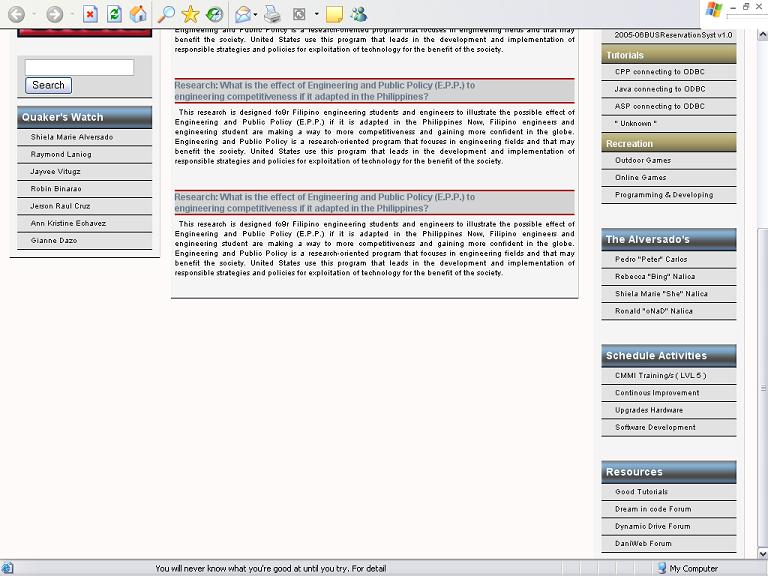
I starting to work on my personal page and here it is shown below:


My problem is I don't had a footer below, I can't code it...can some one please tell me how to had a footer.

CSS code

body 
{ margin-top: 0;
  margin-bottom: 0;
  margin-left: 0;
  margin-right: 0;
  padding-left: 0;
  padding-right: 0;
  font-family: Arial, Helvetica, sans-serif;
  background: #FFFAFA;
}
a:link {
color: #1C1C1C;
text-decoration: none;
}     /* unvisited link */
a:visited {
color: #1C1C1C;
text-decoration: none;
}  /* visited link */
a:hover {color: #0099CC}   /* mouse over link */
a:active {color: #0099CC}   /* selected link */

.seperators {color: white}/* Navigation selector */
#nav {
 color: #FFFFFF;
 font-family: Arial, Helvetica, sans-serif;
 font-size: small;
}
#nav  a:link {
color: #FFFFFF;
text-decoration: none;
}     /* unvisited link */
#nav  a:visited {
color: #FFFFFF;
text-decoration: none;
}  /* visited link */
#nav a:hover {color: #0099CC}   /* mouse over link */
#nav  a:active {color: #0099CC}   /* selected link */

/* menu*/

/* left column  */
#left {
  position: absolute;
  left: 15px;
  top: 160px;
  width: 200px;
  background: #F5F5F5;
  border-bottom: 0.5pt solid RGB(0,0,0);
  border-right: 0.5pt solid #D3D3D3;
  }
#left  .searchengine {
  width: 180px; 
  margin: 10px;
  background: #DCDCDC; 
  padding-bottom: 4px;
  padding-top: 4px; 
  border-bottom: 0.5pt solid RGB(0,0,0);
  }
#left img {width: 180px; margin: 10px;}
#left .leftbox {width: 180px; margin: 10px;}
#left .leftbox .leftheaderbox {
  background: url('../images/Header.gif') #E2E2E2;
  background-repeat: no-repeat; 
  height: 30px; 
  font-size: 14px; 
  font-weight: bold; 
  border-bottom: 0.5pt solid RGB(0,0,0);
}
#left .leftbox .leftheaderbox span {
  top: 7px; 
  left: 6px; 
  position: relative; 
  color: #F0F8FF;
}
#left .leftbox .leftheaderlist {
  background: url('../images/headerlist.gif') #E2E2E2;
  background-repeat: no-repeat; 
  height: 25px; 
  font-size: 12px; 
  font-weight: bold; 
  border-bottom: 0.5pt solid RGB(0,0,0);
}
#left .leftbox .leftheaderlist span {
  top: 7px; 
  left: 7px; 
  position: relative; 
  color: #F0F8FF;
}
#left .leftbox .leftboxlist{
  border-top: 1px outset;
  font-size: 10px;
  background: #E2E2E2;
  background-repeat: no-repeat;
  background-position: 5px;
  padding-left: 18px;
  padding-top: 4px;
  height: 18px;
  border-left-style: none; 
  border-right-style: none;
  border-top-style: none;
  border-bottom: 0.5pt solid RGB(0,0,0);
}
/* middle column  */
#center {
  position: absolute;
  top: 155px;
  width: 543px;
  margin-left: 230px;
  margin-right: 230px;
  background: #F5F5F5;
  border-bottom: 0.5pt solid RGB(0,0,0);
  border-right: 0.5pt solid #C8C8C8 ;
  }
#center .middlenav{
width: 543px;
height: 20px; 
background: #A80000;
border-bottom: 1.5pt solid #D2B48C;
}
#center .middlecontent{
width: 543px;
}
#center .middlecontent .title{
position: relative; 
font-size: 12px;
font-weight: bold;
text-align: left; 
margin: 5px;
background: #D3D3D3;  
color: #708090;
border-top: 1.5pt solid #A80000;
border-bottom: 1.5pt solid #A80000;
}
#center .middlecontent .content{
position: relative; 
margin: 5px;
font-size: 10px;
text-align: justify;  
text-indent: 5px;
}

/* right column  */
#right {
  position: absolute;
  right: 15px;
  top: 160px;
  width: 200px;
  background: #F5F5F5;
  border-bottom: 0.5pt solid RGB(0,0,0);
  border-right: 0.5pt solid #D3D3D3;
  }
#right .rightbox {width: 180px; margin: 10px;}
#right .rightbox .rightheaderbox {
  background: url('../images/Header.gif') #E2E2E2;
  background-repeat: no-repeat; 
  height: 30px; 
  font-size: 14px; 
  font-weight: bold; 
  border-bottom: 0.5pt solid RGB(0,0,0);
}
#right .rightbox .rightheaderbox span {
  top: 7px; 
  left: 6px; 
  position: relative; 
  color: #F0F8FF;
}
#right .rightbox .rightheaderlist {
  background: url('../images/headerlist.gif') #E2E2E2;
  background-repeat: no-repeat; 
  height: 25px; 
  font-size: 12px; 
  font-weight: bold; 
  border-bottom: 0.5pt solid RGB(0,0,0);
}
#right .rightbox .rightheaderlist span {
  top: 7px; 
  left: 7px; 
  position: relative; 
  color: #F0F8FF;
}
#right .rightbox .rightboxlist{
  border-top: 1px outset;
  font-size: 10px;
  background: #E2E2E2;
  background-repeat: no-repeat;
  background-position: 5px;
  padding-left: 18px;
  padding-top: 4px;
  height: 18px;
  border-left-style: none; 
  border-right-style: none;
  border-top-style: none;
  border-bottom: 0.5pt solid RGB(0,0,0);
}
Dani AI

Generated

Quick note that ties the replies together: the problem here comes from using absolute positioning for the layout columns — absolutely positioned elements are removed from the normal flow, so a footer placed after them won't be pushed down or behave responsively. was correct that absolute layout makes a reliable bottom placement across resolutions difficult, and did the right thing by moving away from absolute positioning. Below are practical, modern ways to add a footer that behaves predictably.

A simple, robust solution (works for current browsers) is to make the page a column-flex container so the footer sits after the content but stays at the viewport bottom when content is short:

html, body { height: 100%; margin: 0; }
body { display: flex; flex-direction: column; min-height: 100vh; }
main { flex: 1; }   /* main or wrapper holds your columns */
footer { /* normal footer styling */ }

If you want a footer that is always visible (fixed to the viewport bottom), use position:fixed but prevent it from covering content by adding matching bottom padding to the main area:

footer { position: fixed; left: 0; right: 0; bottom: 0; height: 48px; }
main { padding-bottom: 48px; }  /* same height as footer */

If you stick with floats for columns (the choice you mentioned), make sure the float container is cleared so the wrapper grows and the footer follows it. A compact clearfix:

.clearfix::after { content: ""; display: table; clear: both; }

Put the footer after that wrapper and give it clear: both if needed. Final troubleshooting tips: ensure a standards DOCTYPE, inspect computed heights with dev tools, watch z-index if things overlap, and avoid fixed footers on small screens (they eat valuable space).

Recommended Answers

All 3 Replies

Here are html code,please help me

<body onLoad = "scrollit(100)">
<script src="scripts/statusbar.js" language="javascript"></script>
<script src="scripts/norightclick.js" language="javascript"></script>
<!--Start of the page -->
<!--Banner and Navigation bar -->
<table width="100%" border="0" cellpadding="0" cellspacing="0" bgcolor="#1C1C1C">
   <tr>
    <td colspan="3">
 <table width="100%" border="0" cellpadding="0" cellspacing="0" background="images/bar.jpeg">  
   <tr>
        <td><img src="images/onalogo.png" alt="I dream to exceed to the highest peak" width="264" height="100" /></td>
        <td width="100%">
  <div align="center"></div></td>
      </tr>
    </table>
 </td>
  </tr>
  <tr>  
<td colspan="3">
 <table width="100%" border="0" cellpadding="0" cellspacing="0" background="images/nav_bg.gif">
      <tr>
        <td width="50%"></td>
        <td valign="top">
  <table width="100%" border="0" cellspacing="0" cellpadding="0">
          <tr>
            <td><img src="images/nav_left.gif" width="7" height="36" /></td>
            <td width="100%" nowrap="nowrap" bgcolor="#708090"><span id="nav">&nbsp;<strong><a href="#">Home</a></strong><span class="seperators"> &nbsp;|&nbsp; </span><strong><strong><a href="#">Articles</a></strong><span class="seperators"> &nbsp;|&nbsp; </span><a href="#">Development</a></strong><span class="seperators"> &nbsp;|&nbsp; </span><strong><a href="#">Contour</a></strong><span class="seperators"> &nbsp;|&nbsp; </span><strong><a href="#">Outre</a></strong><span class="seperators"> &nbsp;|&nbsp; </span><strong><a href="#">Blogs</a></strong><span class="seperators"> &nbsp;|&nbsp; </span><strong><a href="#">Contact</a></strong>&nbsp;</td>
            <td><img src="images/nav_right.gif" width="7" height="36" /></td></div>
          </tr>
        </table>
  
  </td>
        <td width="100%">&nbsp;</td>
      </tr>
    </table></td>
  </tr>
</table>
<!--Start of the Middle page -->
<div id="center">
<div class="middlenav"></div>
<div class="middlecontent">
<div class="title">
Research: What is the effect of Engineering and Public Policy (E.P.P.) to <br>
engineering competitiveness if it adapted in the Philippines?
</div>
<div class="content">
This research is designed fo9r Filipino engineering students and engineers to illustrate the 
possible effect of Engineering and Public Policy (E.P.P.) if it is adapted in the Philippines
Now, Filipino engineers and engineering student are making a way to more competitiveness and 
gaining more confident in the globe. Engineering and Public Policy is a research-oriented program that focuses in engineering fields and that may benefit the society. United States use this program that leads in the development and implementation of responsible strategies and policies for exploitation of technology for the benefit of the society.
</div>
</div>
<br />
<div class="middlecontent">
<div class="title">
Research: What is the effect of Engineering and Public Policy (E.P.P.) to <br>
engineering competitiveness if it adapted in the Philippines?
</div>
<div class="content">
This research is designed fo9r Filipino engineering students and engineers to illustrate the 
possible effect of Engineering and Public Policy (E.P.P.) if it is adapted in the Philippines
Now, Filipino engineers and engineering student are making a way to more competitiveness and 
gaining more confident in the globe. Engineering and Public Policy is a research-oriented program that focuses in engineering fields and that may benefit the society. United States use this program that leads in the development and implementation of responsible strategies and policies for exploitation of technology for the benefit of the society.
</div>
</div>
<br />
<div class="middlecontent">
<div class="title">
Research: What is the effect of Engineering and Public Policy (E.P.P.) to <br>
engineering competitiveness if it adapted in the Philippines?
</div>
<div class="content">
This research is designed fo9r Filipino engineering students and engineers to illustrate the 
possible effect of Engineering and Public Policy (E.P.P.) if it is adapted in the Philippines
Now, Filipino engineers and engineering student are making a way to more competitiveness and 
gaining more confident in the globe. Engineering and Public Policy is a research-oriented program that focuses in engineering fields and that may benefit the society. United States use this program that leads in the development and implementation of responsible strategies and policies for exploitation of technology for the benefit of the society.
</div>
</div>
<br />
<div class="middlecontent">
<div class="title">
Research: What is the effect of Engineering and Public Policy (E.P.P.) to <br>
engineering competitiveness if it adapted in the Philippines?
</div>
<div class="content">
This research is designed fo9r Filipino engineering students and engineers to illustrate the 
possible effect of Engineering and Public Policy (E.P.P.) if it is adapted in the Philippines
Now, Filipino engineers and engineering student are making a way to more competitiveness and 
gaining more confident in the globe. Engineering and Public Policy is a research-oriented program that focuses in engineering fields and that may benefit the society. United States use this program that leads in the development and implementation of responsible strategies and policies for exploitation of technology for the benefit of the society.
</div>
</div>
<br />
</div>
<!--Start of the Left Side page -->
<div id="left">
  <div class="leftbox">
    <div class="leftheaderbox">
 <span>Tracker</span></div>
 <div class ="leftheaderlist">
 <span>Right now</span>
 </div>
 <div class="leftboxlist"><script language="javascript">
    YourDate = new Date();
 document.write(YourDate.toGMTString());
    </script></div>
 <div class="leftboxlist">Current Time</div>
 <div class="leftboxlist">Guest</div>
    <div class="leftboxlist">hits</div> 
 <div class ="leftheaderlist">
 <span>Time spend</span></div>
 <div class="leftboxlist">Time</div>
  </div>
<img src="images/LpuLogo.jpg" width="180" height="40" alt="Veritas Et Furtitodo" />
<div class="searchengine">
<input type="text" name="searchfor" value="" size="20">
<input type="button" value="Search" onClick="checkDatabase()">
</div>
<div class="leftbox">
    <div class="leftheaderbox">
 <span>Quaker's Watch</span></div>
 <div class="leftboxlist"><a href="">Shiela Marie Alversado</a></div>
 <div class="leftboxlist"><a href="#">Raymond Laniog</a></div>
 <div class="leftboxlist"><a href="">Jayvee Vitugz</a></div>
    <div class="leftboxlist"><a href="http://www.friendster.com/6720409">Robin Binarao</a></div>
    <div class="leftboxlist"><a href="#">Jerson Raul Cruz</a></div>
    <div class="leftboxlist"><a href="#">Ann Kristine Echavez</a></div>
    <div class="leftboxlist"><a href="#">Gianne Dazo</a></div> 
  </div>
</div>
<!--Start of the Right Side page -->
 <div id="right">
 <div class="rightbox">
    <div class ="rightheaderbox">
 <span>What's inside</span>
 </div>
 <div class ="rightheaderlist">
 <span>Latest</span>
 </div>
 <div class="rightboxlist"><a href="#">OnaDOTCom Go live</a></div>
 <div class="rightboxlist"><a href="#">Repository of my dreams</a></div>
 <div class="rightboxlist"><a href="#">Industries ambients</a></div>
 <div class="rightboxlist"><a href="#">Industry a Tougher Saga</a></div>
 <div class="rightboxlist"><a href="#">Student life is over!</a></div>
 <div class ="rightheaderlist">
 <span>Development</span>
 </div>
 <div class="rightboxlist"><a href="#">2005-2006-0216-PUSH v1.0</a></div>
 <div class="rightboxlist"><a href="#">WEB-2007-0113-IE-MPW v2.0</a></div>
 <div class="rightboxlist"><a href="#">2005-06BUSReservationSyst v1.0</a></div>
 <div class ="rightheaderlist">
 <span>Tutorials</span>
 </div>
 <div class="rightboxlist"><a href="#">CPP connecting to ODBC</a></div>
 <div class="rightboxlist"><a href="#">Java connecting to ODBC</a></div>
 <div class="rightboxlist"><a href="#">ASP connecting to ODBC</a></div>
    <div class="rightboxlist"><a href="#">" Unknown "</a></div> 
 <div class ="rightheaderlist">
 <span>Recreation</span>
 </div>
 <div class="rightboxlist"><a href="#">Outdoor Games</a></div>
 <div class="rightboxlist"><a href="#">Online Games</a></div>
 <div class="rightboxlist"><a href="#">Programming & Developing</a></div>
 </div>
<br />
 
  <div class="rightbox">
    <div class ="rightheaderbox">
 <span>The Alversado's</span></div>
 <div class="rightboxlist"><a href="#">Pedro "Peter" Carlos</a></div>
 <div class="rightboxlist"><a href="#">Rebecca "Bing" Nalica</a></div>
 <div class="rightboxlist"><a href="#">Shiela Marie "She" Nalica</a></div>
    <div class="rightboxlist"><a href="#">Ronald "oNaD" Nalica</a></div> 
  </div>
<br />
 <div class="rightbox">
    <div class ="rightheaderbox">
 <span>Schedule Activities</span></div>
 <div class="rightboxlist"><a href="#">CMMI Training/s ( LVL 5 )</a></div>
 <div class="rightboxlist"><a href="#">Continous Improvement</a></div>
 <div class="rightboxlist"><a href="#">Upgrades Hardware</a></div>
    <div class="rightboxlist"><a href="#">Software Development</a></div> 
</div>
<br />
  <div class="rightbox">
    <div class ="rightheaderbox">
 <span>Resources</span></div>
 <div class="rightboxlist"><a href="">Good Tutorials</a></div>
 <div class="rightboxlist"><a href="http://www.dreamincode.net">Dream in code Forum</a></div>
 <div class="rightboxlist"><a href="http://www.dynamic.com/forum">Dynamic Drive Forum</a></div>
    <div class="rightboxlist"><a href="http://www.daniweb.com">DaniWeb Forum</a></div> 
</div>
</div>
</body>

It can't be done in a way that works with all screen resolutions.

Anything you set up for one screen resolution will get moved when the browser is resized or the screen resolution changes.

There is no way to specify the bottom of the browser window.

Thanks anyway I figure it out i change the absolute positioning into a float...yes i want my page to be relay on the user screen resolution.

Be a part of the DaniWeb community

We're a friendly, industry-focused community of developers, IT pros, digital marketers, and technology enthusiasts meeting, networking, learning, and sharing knowledge.