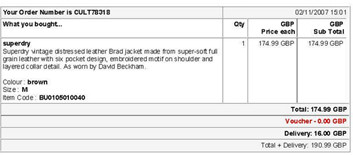
The Ainslot.L Trojan appears to be much the same as any other at first glance; logging user activity and sending Gmail and Facebook passwords to the bad guys, downloading further malware, taking over your computer and the main payload of being a Banking Trojan stealing account login data. But Ainslot.L has one rather more unusual trick up its sleeve in that it will also scan your system for evidence of other bot-related infections such as Zeus or DarkComet and remove any that it finds. Of course, Ainslot.L isn't doing this in order to cleanse your computer but rather to ensure that it is the only active bot and therefore getting all the gravy in terms of data and system resource access.
PandaLabs , the anti-malware research facility arm of vendor Panda Security, warns that Ainslot.L is distributed via a fake email which claims to be coming from a UK clothing company called CULT and takes the format of a 'you have placed the following order' social engineering scam. The sting being the link which supposedly allows the worried user, who has of course not ordered anything, view the order with a value of UKP 200 which it is claimed has been charged to your credit card. Clicking that link executes a download of Ainslot.L to the victims computer.
The bad guys in this case have done quite a good job of obfuscating their true intentions, with the file name of the executable being the same as the subject of the message itself together with the fake order number and implementing an Acrobat icon to fool the perhaps wary recipient into thinking it is 'just' a PDF document. This works well in terms of hiding true intent as most users don't think about changing system defaults that hide well known file extensions such as .exe and therefore wouldn't see it was something it is not. And once Ainslot.L is installed it will change your Registry settings to ensure it always executes when the computer starts, and to bypass the firewall, making it particularly problematical. Oh, did I mention that it names this additional Registry value to 'Windows Defender' so as to make it less likely someone would think it was anything but kosher.
Luis Corrons, technical director of PandaLabs, warns: "the fact that Ainslot.L removes other bots from infected systems definitely caught our attention. It eliminates all competition, leaving the computer at its mercy. It reminds us of the popular Highlander movies 'There can be only one'. Phishing emails are not usually so well done. There is no doubt that this time fraudsters have been very careful to try to make these messages look as real as possible to get as many bites as they can."