Apple, Facebook and Twitter have all been the target of hackers recently, and now Evernote has admitted to a potential breach that has forced it to reset the passwords of approximately 50 million registered users. Evernote, a kind of web scrapbook that enables you to take notes, save web pages and web page content, sync files across devices and share ideas with friends and colleagues, did the right thing in notifying users and resetting passwords. However, it did the right thing in the wrong way; and here's why.
I received an email last night informing me that:
Evernote's Operations & Security team has discovered and blocked suspicious activity on the Evernote network that appears to have been a coordinated attempt to access secure areas of the Evernote Service.
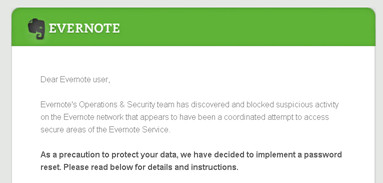
This immediately sought to put my, and the 49,999,999 other people who were reading the communication, mind at rest by assuring me that Evernote was taking this seriously enough to implement an across the board password reset. This despite there being no evidence, as yet, that any of my Evernote content had been accessed, changed or stolen. Evernote also told me that no payment information for 'premium' or 'business' customers had been accessed. So far so good you may be thinking.
The bad news is that the breach investigation does reveal that the hackers were able to gain access to usernames and the emails associated with them (sound familiar yet folks?) and, yes, those all important passwords. Now, in the case of Evernote these passwords are hashed and salted, which makes them pretty robust, but once again Evernote was taking no chances and the email says:
"in an abundance of caution, we are requiring all users to reset their Evernote account passwords. Please create a new password by signing into your account on evernote.com."
Again, so far so much better, you are probably muttering and wondering what the 'farce' angle is. Well, if you examine the link in the email to reset your password (as you always should before clicking anything as scammers and cyber-criminals can be quite clever in their presentation of mis-information) you will see that it takes you to a page at:
http://links.evernote.mkt5371.com
That's not the full URL, the actual thing will be different for each user and there follows a whole bunch of meaningless characters. Meaningless to the casual observer that is. However, the point being this kind of URL looks remarkably similar to the obfuscated variety that phishers and their ilk use to fool users into clicking them: they start with something that includes the product or service name but actually isn't the product or service URL itself. So in this case the link text in the email states 'evernote.com' but actually points to 'links.evernote.mkt5371.com' which is a totally different kettle of fish and raises alarm bells with anyone who has been properly schooled in taking security seriously.

The real farce starts when you continue reading the email and discover that amongst the "several important steps that you can take to ensure that your data on any site, including Evernote, is secure" which the security team helpfully have provided there is, right there at number three on the list:
"Never click on 'reset password' requests in emails - instead go directly to the service"
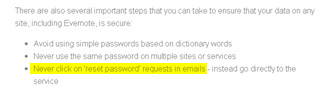
Sorry Evernote, you get kudos for doing the right thing but I'm afraid that you have shot yourself in both feet for doing it in the wrong way. It's important that you eat your own dog food in the security business, that is you yourselves follow the advice that you give others, and in this case you didn't.
