Crunchie, how do I stop those sodding stupid smileys from disrupting the text..... that last reg repair line formats incorrectly if you copy it into notepad. Man, but those things really wee me off.
"3389:TCP"= 3389:TCP:LocalSubNet:Disabled:@xpsp2res.dll,-22009
will copy incorrectly.

Dani AI

Generated

This thread highlights a very common annoyance: the forum emoticon parser will replace short character sequences (colon+glyph, colon+letter, etc.) with images and in the process mangle registry lines or pasted logs. ran into this when a snippet lost characters after posting, and correctly pointed toward preformatted/code posting as the simplest guard. The root cause is the emoticon substitution step in the renderer — it looks for tiny patterns and swaps them out before the text is safe to copy.

Practical approaches (most reliable first): keep technical text inside code/preformatted blocks so markup and line breaks are preserved; if the advanced editor offers a “disable smileys” option, use it; when neither is available try neutralizing only the problem characters with HTML numeric entities (for example : instead of : and * instead of *) which often prevents emoticon matching while leaving the text readable; for longer outputs attach a plain .txt file or put the output on a paste service and link to it (remember to remove or redact passwords, tokens, unique SIDs, or any personal data before posting).

Guidance for helpers and requesters: request that logs be pasted inside code tags or uploaded as .txt; ask for the tool/version and exact steps used so responders can reproduce context; if an incoming post is already mangled, asking the poster to repost using code tags or to “Reply with Quote” (which often preserves the raw text) is usually faster than guessing what changed. Moderators and regulars can save time by including a short posting note whenever diagnostic tools are requested.

If the editor control is not visible, switching skins/editors or trying another browser frequently reveals the advanced options. If none of the above works, rely on attachments or paste services and always warn about not sharing sensitive data.

Recommended Answers

All 11 Replies

Wrap it in code :).

"3389:TCP"= 3389:TCP:LocalSubNet:Disabled:@xpsp2res.dll,-22009

Beauty. Now to train/request repondents with logs from scans that return reg entries to do the same....
Looks like the Love smiley threw me... I thought it had somehow taken out

:LocalSubNet; looks like it was actually :*

Sigh... have to use code tags to even type a msg... those smileys...where's me gun?

:*

= :*
Yep...

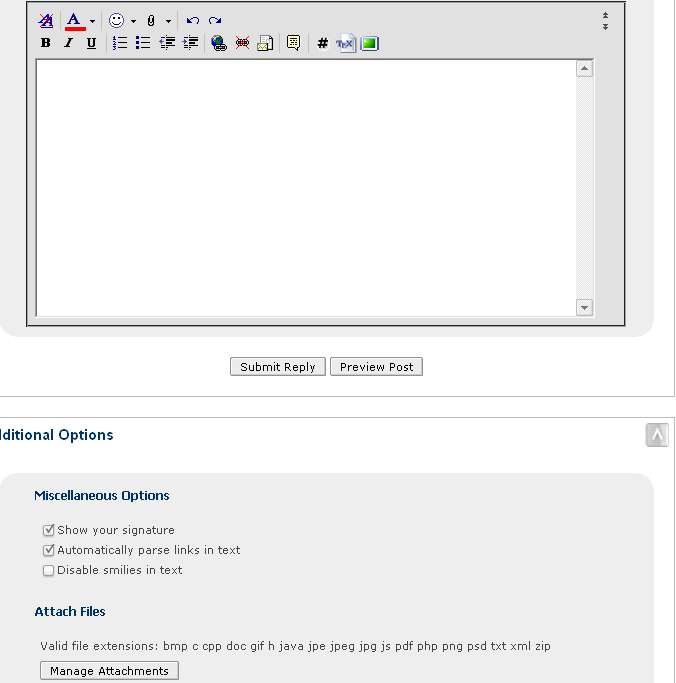
Smileys can be disabled when posting. You have to be in the advanced mode to do it. There is a box to tick to disable them.
I have asked the question on whether they can be disabled another way, but we don't want to lose them altogether :D :) do we.
If it comes to it, you may have to ask the poster to repost using the above method.

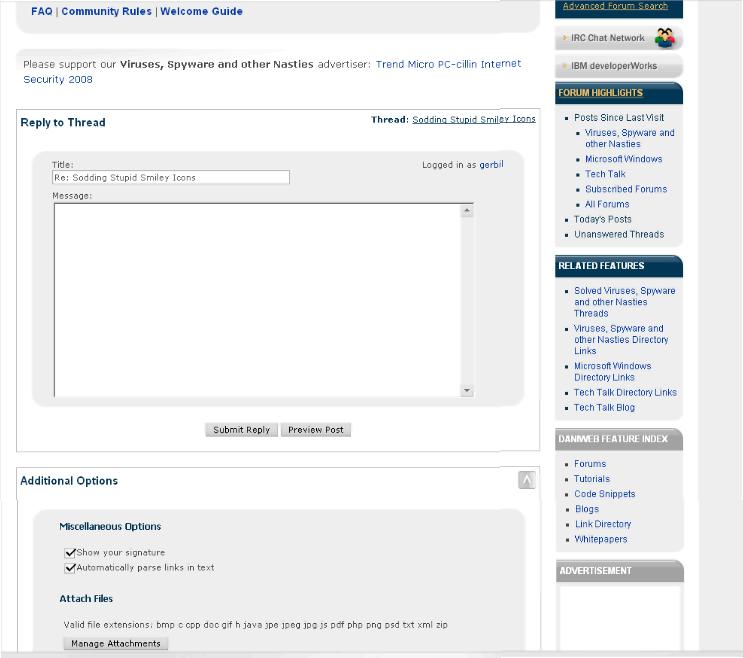
I remember that option to turn off smileys was there in advanced posting, but I don't have it now... or it has been moved, an I do dislike searching for such mundane stuff.
Peeked at smiley page... an gawd, there's thousands of em...

The disable option is there for me. One thing you could do is when you request such things as the SDFix tool to be run, ask the victim to post his/her reply within code tags.

Nope, no smiley disable here. Was. Gone.
Your suggestion to check a reply using the Reply with Quote button is good, though, tht cuts through them.
Thanks.


So we are on the same page, you cannot see the option to disable smileys as the above SS shows?

What I see in Advanced:

Try this; Go into your control panel to Edit Options, and in the Message Editor Interface, select Standard Editor = cscgal

Ahhh... that's fixed it, thanks, Crunchie. Talk about a maze. I had, and selected, the Message Editor Interface option of Extra Formatting Controls [no std format editor - cscgal]

No worries.

Be a part of the DaniWeb community

We're a friendly, industry-focused community of developers, IT pros, digital marketers, and technology enthusiasts meeting, networking, learning, and sharing knowledge.