Please help me with an infection that just occurred (I have the file). As soon as I attempted an install of a downloaded program, AVG warned me about the infection and the files were/are being recreated continuously and each is considered an infection.

My system is Windows 7, x64 (AMD).

I am in the process of following the steps outlined in "Readme Before Posting".

Files are being continuously being created and deleted in C:\Users\Gary\AppData\\Local\Temp. Also, in c:\Windows\SysWos64, there are random 6-character .exe files being created and not deleted. TaskMgr shows they are executing briefly and then terminating as each starts up a new one (according to procmon). All files have the same timestamp of 8/3/2009 1:39pm. Also, there is one explorer.exe with the same timestamp. In /Windows, there is an explorer.exe stamped with the same date but earlier time. I submitted both explorers to jotti online scan and they are flagged as not infected. They are different sizes.

I will provide the requested files when I have them ready.

Thanks,
Gary Davis
Dani AI

Generated

Quick expert summary and recommended next steps for (and anyone who finds this thread later):

The behavior described — short-lived EXEs spawning only when a specific user is logged on, then stopping when that account is logged off — strongly suggests a per-user persistence point (per-user Startup, HKCU Run entries, a scheduled task created under that user, or a user-level service/extension) rather than an OS-level rootkit. Immediate precautions: do not re-run any downloaded installers, disconnect or isolate the machine from untrusted networks while investigating, and avoid relying on System Restore as the sole cleanup step (restore points can preserve infected files).

Useful diagnostic checks (run from an elevated prompt or with Sysinternals tools): verify what starts the process (image path and command line), enumerate per-user Run keys and scheduled tasks, and compute file hashes before deleting so the file can be submitted for analysis. Example commands:

reg query "HKCU\Software\Microsoft\Windows\CurrentVersion\Run"
reg query "HKLM\SOFTWARE\Microsoft\Windows\CurrentVersion\Run"
schtasks /query /v /fo LIST
certutil -hashfile "C:\path\to\suspicious.exe" SHA256

Practical removal workflow: 1) Collect logs (DDS, Malwarebytes logs, Autoruns screenshots) and hashes. 2) Boot to Safe Mode or, preferably, an offline rescue environment (Windows PE or a reputable AV rescue ISO) and run full offline scans. 3) Use Autoruns (from Sysinternals) to disable suspicious startup entries tied to the affected user, then delete the on-disk files from the offline environment. If a file cannot be removed while Windows is running, take ownership and reset permissions only as a last resort:

takeown /f "C:\path\to\file.exe"
icacls "C:\path\to\file.exe" /grant Administrators:F
del "C:\path\to\file.exe"

Caution: do not delete system files (for example, a legitimate explorer.exe) without verifying digital signature and hash first.

Post-clean checklist: run another full set of scans (MBAM, ESET/Microsoft Defender Offline), reboot to a clean admin account to confirm no recurrence, create a fresh System Restore point only after the system is verified clean, update OS and software, and change any exposed passwords. Attach DDS and Malwarebytes logs and Autoruns output when asking for further help so responders can see persistence points and active entries.

Recommended Answers

All 5 Replies

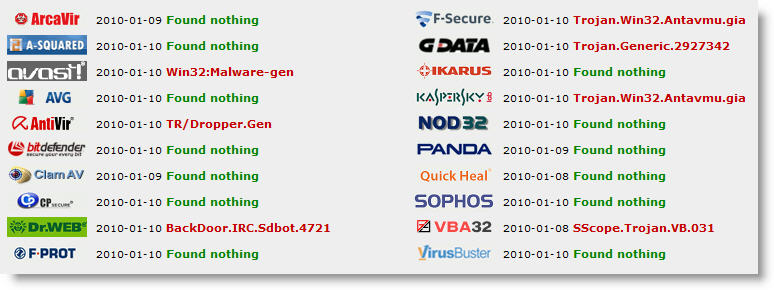
So far, the virus scanners have not picked up anything other than AVG's initial find of the infected files in AppData\Local\Temp. It did not realize the 6-character files in System\SysWow64 were bad (though uploading one to virusscan.jotti.org did show some positives).

Windows malicious scan (non-full) did not show anything wrong. MBA-M is running a full scan now.

I noticed that the 6-character exe's were running on behalf of my logged on (administrative) user so I switched to log on as another user and the exe's did not start up on that user. I logged the "bad" user off and the processes stopped spawning. I then deleted all files in the AppData\Local\Temp and the 8/3/2009 files in Windows\SysWow64 (except the explorer.exe which got access-denied). I booted into safe mode and was still unable to delete the SysWow64\explorer.exe.

I then rebooted back into the "bad" user and the 6-char exe's did not return. I re-ran AFT-Cleaner and am running MAB-M now and will run the ESET Online Scanner next.

I have attached a screen shot from the jotti scan of the downloaded file that infected my PC.

Gary

The MAB-M found nothing new and ESet found an infected program that I downloaded earlier this morning but had not run (it's now deleted).

The PC's been stable since the reboot but there may be remnants of the infection lurking - hopefully not.

What does the dds.scr tool do? It's mentioned in the forum Readme but no details.

Thanks,
Gary


What does the dds.scr tool do? It's mentioned in the forum Readme but no details.

Thanks,
Gary

It is simply a scanner which shows much of what is on the computer, any new files installed, possible infected files. It won't hurt the computer, if you want to you can download, do the scan and post the logs here.

... if you want to you can download, do the scan and post the logs here.

I backed off the PC to the previous restore point from just prior to the infection.

I ran the DDS and am attaching the zip of the log files.

At this point, the PC continues to be stable with no obvious side effects from the infection.

Thanks,
Gary

Continue with the steps given in the sticky. Post back with the MBA-M log next.

Be a part of the DaniWeb community

We're a friendly, industry-focused community of developers, IT pros, digital marketers, and technology enthusiasts meeting, networking, learning, and sharing knowledge.