Hello, I would appreciate some help on this. I'm quite the virus noob so my luck has been limited. My problems started four days ago when I got the wmpscfgs.exe virus, which I think I've managed to remove since. At the same time also, I started getting these errors which I still have:

  • Critical error message, saying shutdown will happen in one minute. Typing in shutdown -a hasn't worked for me.
  • clfs.sys error
  • acpi.sys error

My laptop is Dell, running Vista home premium.

I've run stinger and Malicious software removal tool and it found no viruses. Also did cc cleaner. Could not install mbam-setup.exe.

My anti-virus at the time of crash was McAfee, I've since removed it and replaced with AVG.

At present it's also showing me a rundll32 app crash. I've had various app crashes, sometimes it's Dell wireless.

I had looked up the services.exe crash in different places and they said do msconfig to disenable some start up active x, but I wasn't able to identify anything suspicious.

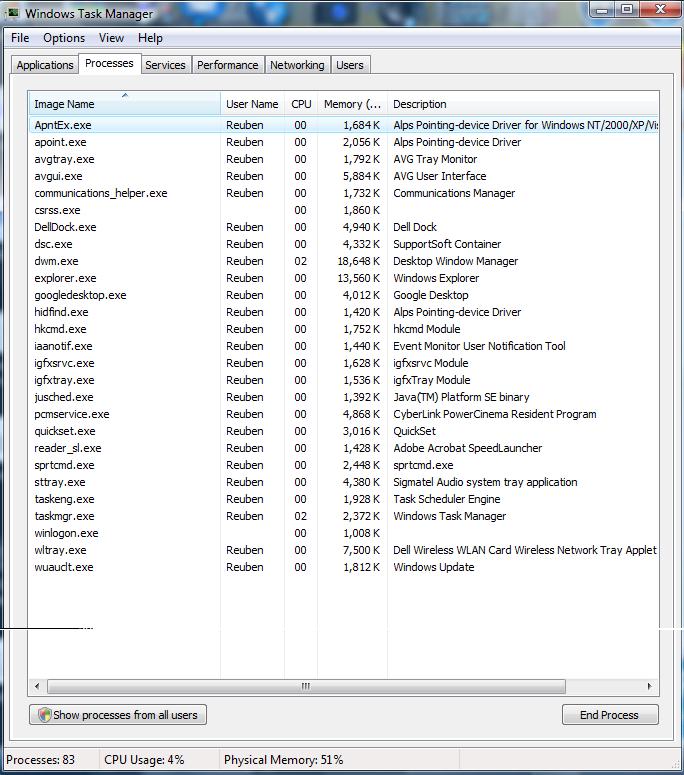
These are the tasks runnnig just after I get the shutdown message.
Dani AI

Generated

As suggested, a focused anti‑malware sweep is still the right next step. The combination of a persistent shutdown timer plus crashes pointing at drivers like clfs.sys and acpi.sys usually means one (or more) of these: active malware protecting itself, corrupted or missing system files, disk errors, or bad/mismatched firmware/drivers. Since reported the Malwarebytes install failed, the infection or leftover AV components may be blocking installers.

Practical, prioritized actions (perform in Safe Mode with Networking when possible): run a process‑terminator tool to stop rogue processes, then install and run an on‑demand scanner. After cleaning, run sfc /scannow and then chkdsk C: /f /r to repair system files and the disk. Use Sysinternals Autoruns to find and disable hidden startup items and scheduled tasks (it lists more locations than msconfig). If residual AV drivers exist from the previous McAfee install, use the vendor cleanup utility before reinstalling other security tools.

If crashes continue, collect and inspect minidump files to identify the offending driver — NirSoft BlueScreenView or similar can show which driver caused the fault. For ACPI/clfs driver faults, update BIOS and chipset drivers from Dell before attempting risky workarounds. If installers are still blocked, create a rescue USB/CD and run an offline scan (rescue media can find rootkits that running Windows misses). When corruption is deep, run Vista Startup Repair or a repair install; keep a current backup of personal files first.

Always download tools from official vendor pages. Useful tools to research: RKill to stop running malware, Autoruns to audit startup locations, and BlueScreenView to read crash dumps. Links: RKill, Autoruns (Sysinternals), BlueScreenView.

Recommended Answers

All 4 Replies

An AVG scan today gave me 14 trojans. They were removed, I rebooted but the one minute shutdown is still happening. So is the service.exe crash.

I tried installing that yesterday, it gave an error and I couldn't install.

What was the error?

Be a part of the DaniWeb community

We're a friendly, industry-focused community of developers, IT pros, digital marketers, and technology enthusiasts meeting, networking, learning, and sharing knowledge.