Hello,

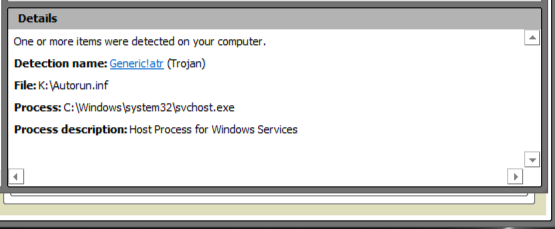
Earlier this morning, after a scheduled McAffee scan, I looked through my quarantine section and found the Autorun Generic!atr trojan on my K drive flash drive, a Cruzer micro. It had picked it up on the 20th, which was the first time I had inserted the drive into my pc since coming back from vacation, where I used it often on various pcs. A manual scan of my flash drive also found the Recycler virus W32\IRCbot.gen.a, which the autorun is apparently a part. Now, McAffee quarantined them immediately and subsequent scans of both my flash drive and my PC came up clean, but the question still bugs me. How did it get there. I haven't copied or moved anything except a couple of photos onto my flash drive in months, and a scan before I left for vacation came up clean. I must have picked it up on vacation. But I always thought that something could only infect a flash drive if something is manually copied to the drive. Am I wrong? Can they become infected by just being connected? This has me very worried.

It's a stretch, but could this be a false positive? I've attatched the log info below.

Thank you.

Peace out and God bless.
Dani AI

Generated

As suggested, simply plugging a thumb drive into an infected PC is a common infection vector. Some removable-drive malware watches for new volumes and drops hidden launcher files or copies of itself to the root or to the hidden recycle folder on the stick, so no deliberate file copy is required from the user side.

Windows creates a hidden folder for deleted items on removable media (older systems call it RECYCLER, newer ones use $Recycle.Bin). Malware authors exploit those hidden system folders to hide payloads, so a detection inside the recycle area is consistent with an earlier infection that was deleted on another machine but remained on the drive. The U3-style virtual-CD partition used by some vendors can also complicate cleanup because that partition is read-only to normal tools and can reintroduce autorun behavior unless the U3 layer is removed with the vendor utility.

Practical cleanup and hardening sequence:

  1. Preserve personal files by copying them to a known-clean system or backup media before changing the stick.
  2. Inspect the drive with hidden/system files shown and remove suspicious files from the root and recycle folder. From an elevated command prompt in the drive root, attributes can be cleared before deleting:
    attrib -s -h -r /s /d *.*
  3. If uncertainty remains, run multiple up-to-date scanners or a multi-engine service on the suspicious files and scan the host with an offline/rescue scanner.
  4. Reformat the USB (after backing up data) to ensure no hidden payloads remain; for U3 drives, use the vendor removal tool to eliminate the virtual CD partition first.
  5. Disable automatic execution for removable media on systems used with the stick, keep OS/AV updated, and use hardware write-protect or read-only modes where available.

Quarantined detections can be false positives, but corroboration from secondary scanners and the presence of hidden autorun-like files is a stronger indicator of real infection.

Recommended Answers

All 4 Replies

It is my understanding that all you have to do is connect the drive to an infected system and you are open to getting a virus. Many viruses look for the addition of a drive and copy them selves the moment they detect a new arrival.

Hm. Guess I'll have to turn on write protection, then.

Is there any way this could have been a false positive?

Hello,

I apologize if this is a double post, but new info has come to light that makes me reevaluate the question slightly. I posted earlier in the thread 'Virus on Cruzer?" It is not neccessary to read that thread to understand this question, but I would greatly appreciate it if you checked that thread out too.

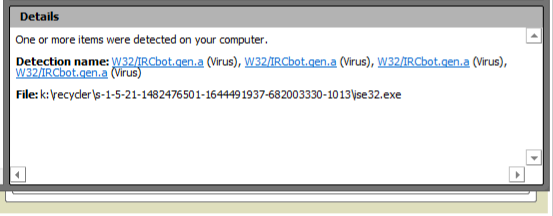
Now. I've read up on the W32/IRCbot.gen.a virus and it usually writes itself into the root or drivers directory, not the recycle bin. Could this have simply been an infected file that was deleted before it could do any harm, and compressed into the recycle bin, to eventually be found and promptly eaten by McAfee? To my knowledge, this is the first time that I can ever remember scanning my flash drive for viruses. Could it simply have found something that had been there before, but was compressed on deletion?

I've attatched the McAfee log file image below for convenience.

Thank you.

Peace out and God bless.

Sorry for the double post, but I can't find out how to edit earlier ones.

Is it possible that this virus was lying dormant until a certain button or action was taken on the drive? On this vacation was the first time I've ever poked around with the U3 system's functionality as a tool. Just curious.

Be a part of the DaniWeb community

We're a friendly, industry-focused community of developers, IT pros, digital marketers, and technology enthusiasts meeting, networking, learning, and sharing knowledge.