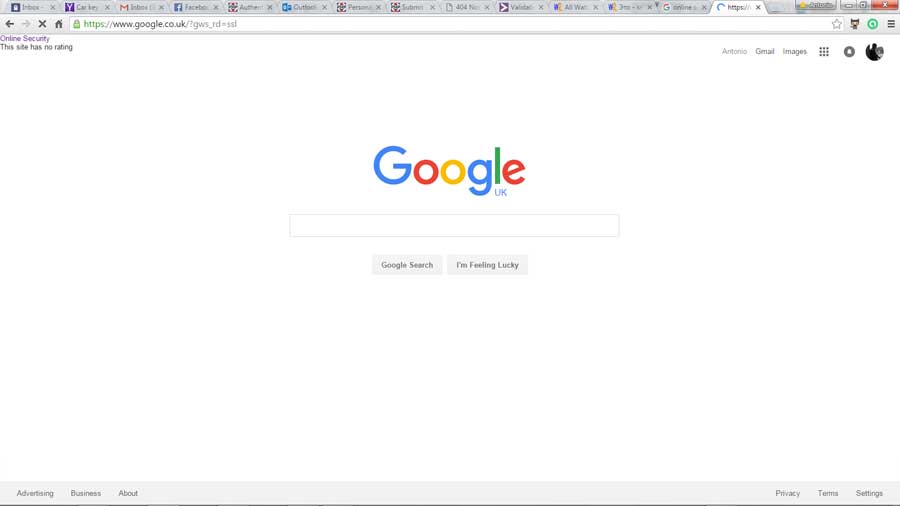
Hi guys, something a little strange has happened. While I browsed to google.co.uk home page I've seen a message flashing on the top left of the screen, it flashed literally for about half a second and after ctrl+f5 numerous times I managed to get a screenshot and it says "Online Security this site has no rating".
I saw that message in windows chrome, I'm logged in, I haven't checked in Ubuntu, but it is definitely the first time I saw it. I'm running a scan with malaware byte just in case, and a google search for that hasn't really revealed much.
Any idea what it is, and why it is showing on the google home page? Here is a screenshot by the way:
googleMSG.jpg

Dani AI

Generated

Short answer: that brief "Online Security — this site has no rating" banner is almost certainly coming from a browser reputation/extension overlay rather than from Google itself. Given 's screenshot and 's note that the same text can be reproduced, the best route is to identify which extension injected the UI and then either update/remove it or report it to the vendor.

Try these practical steps to isolate and identify the source:

  • Quick isolate: open a Chrome Incognito window (extensions are off by default) and load google.co.uk. If the message disappears, it is very likely an extension. Also test in a different browser or on your Ubuntu install.
  • Disable-by-one: open chrome://extensions (Menu > More tools > Extensions) and toggle off reputation/security-style extensions, then reload the page. Enable Developer mode to see extension IDs.
  • Catch a fleeting injection: open DevTools (Ctrl+Shift+I) -> Elements tab -> right-click the <body> element -> Break on -> Subtree modifications. Reload the page; when execution pauses inspect the DOM node and the call stack. If a content script from an extension added the node you will see a chrome-extension://<id>/ entry you can match against chrome://extensions.
  • If no extension shows up: check C:\Windows\System32\drivers\etc\hosts (or /etc/hosts on Linux) for redirects, verify your DNS, and run a second-opinion anti-malware scan (you already ran Malwarebytes — run an additional on-demand scanner if unsure).

If the extension is the cause, update or reinstall it, and include the extension ID and reproduction steps when reporting the bug to the vendor. If pages are being redirected, forms altered, or credentials requested, treat it as higher priority and remove the extension and run a full system clean.

Recommended Answers

All 6 Replies

What was the site? It could be that Google really has no information about the site. This can easily happen with new sites I would think.

Well, the site was google.co.uk, as per screenshot, which is why I found it rather odd

Member Avatar for Member #954384

Hi Violet, I find that to be a little suspicious. I also get that when I test it using the same website you have in your screenshot. However, we have to think is this only with Avast Online Security or is with others as well. If Google is the only one reporting this I would not worry. Google does not really like to disclose their server settings to any sources that ask for it. This could also be the reason why this is occuring.

Also, it does it for .com as well. This is a bit odd I will say though. Also another thing to take into account is that Avast Online Security is based upon its users. They rate the website what they think is secure or not secure. Do you only have the browser extension or do you have Avast Antivirus as well? For the most part, this seems like a bug that needs to be reported to Avast, but I do not think it is security concerning to be honest. If it does it for multiple sites, that's when you worry. Hope this helps :)

I don't think I have a browser extension - not at my laptop at the moment - but I do have avast installed. Yeah, hopefully it's just nothing!
thanks

Member Avatar for Member #954384

Not a problem. According to your screenshot you have another browser extension as well. However, considering I tested it as well and got the same result, I think this is just a simple bug in Avast. Nothing to be concerned about. Feel free to kudos if I helped you. :)

cool, thanks

Be a part of the DaniWeb community

We're a friendly, industry-focused community of developers, IT pros, digital marketers, and technology enthusiasts meeting, networking, learning, and sharing knowledge.