Hi guys,

I just bought a Mac pro on the behalf of my work and thought that it would save money if i just bought the base line computer and added in my own hard drives and RAM. The hard drives went in fine i have them up and running now.

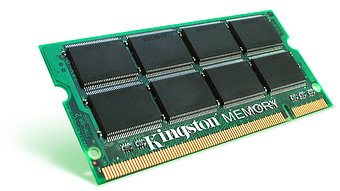
However the DDR2 ram that i bought does not fit into the slot in the mac pro. When i bought the RAM i just assumed that all DDR2 would fit in the machine (especially as on the mac website it says the Mac pro has DDR2) but i have since realised that this is not the case.

I was just wondering if anyone knew why they would be a different format slot even though they are both DDR2 and was also wondering what sort of DDR2 RAM i can buy that will fit.

Dani AI

Generated

Short expert note tied to the replies from , and .

The symptom described (full-size drives installed but purchased DDR2 not seating) is usually a form-factor or class mismatch rather than a manufacturing fault. Laptop modules are physically smaller; desktop modules are larger; some workstation/server modules use different buffering/ECC and a different keying, so two sticks can both be "DDR2" and still be incompatible. That explains why a stick that looks like the right generation will not fit or will not be accepted by the Mac Pro.

Practical checklist to resolve the issue:

  • Identify the exact Mac Pro model (About This Mac -> More Info or the serial on the case) and lookup the memory specification for that model from Apple or a reputable Mac-memory vendor.
  • Read the labels on the DIMM that was bought: terms like SODIMM, ECC, registered/buffered or unbuffered reveal its class. A small module labeled SODIMM is for laptops and will not fit a tower; a module labeled registered/ buffered or ECC may be the server type the Mac Pro requires (or vice versa, depending on model).
  • Use a vendor memory-configurator keyed to the Mac model before buying replacements.

Installation and safety notes:

  • Disconnect power and discharge static before touching memory. Do not force a module into a slot; mismatched notches are a sign of wrong pinout.
  • Avoid mixing ECC and non-ECC, or registered and unbuffered sticks — mixing types frequently prevents boot or causes instability.
  • If the machine fails to boot with new RAM, revert to the original modules and then test one new stick at a time to isolate compatibility.

If the purchased RAM is incompatible, a return/exchange for the Mac-specific modules listed for the exact Mac Pro model is the simplest fix.

Recommended Answers

All 2 Replies

There are hundreds of different types of RAM - even a name such as "DDR2" isn't going to sumarize everything.

Make sure that when you buy RAM for a Mac Pro that it's DDR2 667MHz ECC PC5300 240 Pin.

Be a part of the DaniWeb community

We're a friendly, industry-focused community of developers, IT pros, digital marketers, and technology enthusiasts meeting, networking, learning, and sharing knowledge.