63e834471f9c1463ee1caed517a7fbf1

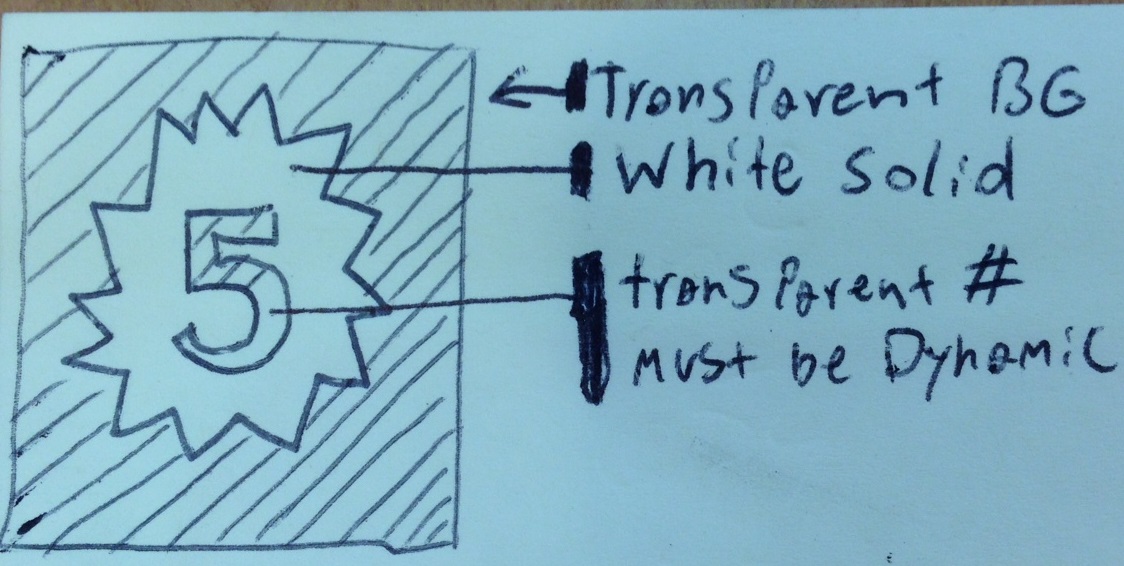
I'm working on an a windows phone project where I need to support fully transparent backgrounds in my controls to overlay ontop of dynamic image. I want to use this "new item" path I created to show how many updates an item has. I attached an image showing the effect I'm trying to create. The number needs to be dynamic. I've trying combinding geometries, but I'm having trouble figuring out how to even get started converting both my xaml defined path and text into geometries, and then combinding them with a xor to create the exclusion. It seems like there would be an easier way. I'm open to suggestions.

Thank you.

Dani AI

Generated

— a practical path forward depends on which XAML runtime you target. The general idea that works everywhere is: turn the digits into vector outlines, then subtract (or use an even/odd fill) so the badge shape has “holes” where the glyphs are. Below are three concrete options (with runnable WPF code where the API exists) and short notes for Windows Phone flavors.

If you can use WPF (desktop/XAML): build a text Geometry at runtime and boolean-combine it with your badge Geometry (Exclude/Xor). WPF exposes FormattedText.BuildGeometry and CombinedGeometry/GeometryCombineMode for this. Example (WPF):

// create text geometry
var ft = new FormattedText(numberString, CultureInfo.CurrentCulture,
    FlowDirection.LeftToRight, new Typeface("Segoe UI"), fontSize, Brushes.Black);
Geometry textGeom = ft.BuildGeometry(new Point(0,0));

// badgeGeom is your existing PathGeometry for the badge
var combined = new CombinedGeometry(GeometryCombineMode.Exclude, badgeGeom, textGeom);
myPath.Data = combined;

Docs: CombinedGeometry and FormattedText. (see Microsoft docs linked below).

If you are on Silverlight / older Windows Phone XAML (FormattedText often not available): pre-convert the digits (0..9) to PathGeometry outlines (export from Illustrator/Inkscape or an SVG->XAML tool) and store them as resources. Create a single Path whose Data is a GeometryGroup with FillRule="EvenOdd": put the outer badge geometry first, then the digit geometries (position them when you export, or apply transforms). That produces holes without runtime boolean math. See the GeometryGroup/FillRule notes below.

If you are on WinRT / UWP (Windows Phone 8.1+): use Win2D to render text to geometry or to an alpha mask and composite on the GPU — this gives crisp results and lets you convert glyphs or draw into an A8 mask for fast compositing (CanvasTextLayout / glyph APIs in Win2D).

Quick tips: export glyphs at the intended size to avoid heavy scaling; cache prepared digit geometries; if you need kerning/variable fonts at runtime, use Win2D or a font-to-path library. Antialiasing/hinting will differ between vector outlines and normal text rendering — pick the technique that gives the visual you need.

References

(Related: and other replies point at alternate non-geometry options; the vector approach above keeps the badge fully resolution-independent and lets the background image show through the cut-out digits.)

I am not much deep in windows apps but as searching on net , i get to know that first try to have a tile in backgroudnroudn transparent with PNg image also choose the backgroudn to be trasnparent in Package.appxmanifest

Be a part of the DaniWeb community

We're a friendly, industry-focused community of developers, IT pros, digital marketers, and technology enthusiasts meeting, networking, learning, and sharing knowledge.