Hey there,

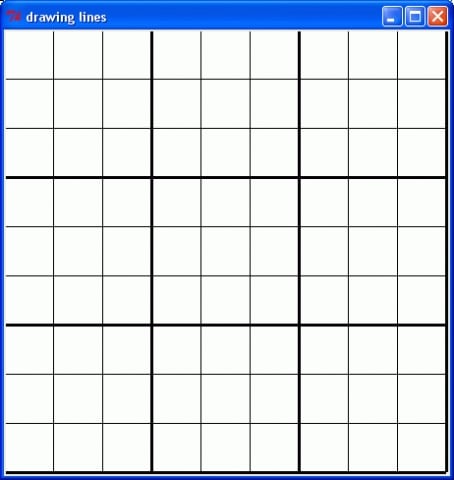
I have written some code to draw a grid on a canvas but the code is far to long.. so I was wondering what the most efficient way to write my code would be.

self._canvas = Canvas(self, width = 450, height = 450, bg ='white', highlightthickness = 0)
        self._canvas.pack(padx = 20, pady = 20)
        self._canvas.create_line(0, 0, 450, 0, width = 5.0)
        self._canvas.create_line(50, 0, 50, 450)
        self._canvas.create_line(100, 0, 100, 450)
        self._canvas.create_line(150, 0, 150, 450, width = 5.0)
        self._canvas.create_line(200, 0, 200, 450)
        self._canvas.create_line(250, 0, 250, 450)
        self._canvas.create_line(300, 0, 300, 450, width = 5.0)
        self._canvas.create_line(350, 0, 350, 450)
        self._canvas.create_line(400, 0, 400, 450)
        self._canvas.create_line(450, 0, 450, 450, width = 5.0)
        self._canvas.create_line(0, 0, 0, 450, width = 5.0)
        self._canvas.create_line(0, 50, 450, 50)
        self._canvas.create_line(0, 100, 450, 100)
        self._canvas.create_line(0, 150, 450, 150, width = 5.0)
        self._canvas.create_line(0, 200, 450, 200)
        self._canvas.create_line(0, 250, 450, 250)
        self._canvas.create_line(0, 300, 450, 300, width = 5.0)
        self._canvas.create_line(0, 350, 450, 350)
        self._canvas.create_line(0, 400, 450, 400)
        self._canvas.create_line(0, 450, 450, 450, width = 5.0)

Thanks :)

Dani AI

Generated

If you want concise code and something you can reuse, wrap the grid drawing in a function, give all lines a common tag, and compute minor/major widths on the fly. You can also bind to the canvas Configure event so the grid redraws when the widget is resized.

def draw_grid(canvas, width, height, spacing=50, major_every=3,
              minor_w=1, major_w=3, color="#000", tag="grid"):
    canvas.delete(tag)
    for i, x in enumerate(range(0, width + 1, spacing)):
        w = major_w if (i % major_every == 0) else minor_w
        canvas.create_line(x, 0, x, height, width=w, fill=color, tags=(tag, "v"))
    for j, y in enumerate(range(0, height + 1, spacing)):
        w = major_w if (j % major_every == 0) else minor_w
        canvas.create_line(0, y, width, y, width=w, fill=color, tags=(tag, "h"))

# initial draw and auto-redraw on resize
canvas.bind("<Configure>", lambda e: draw_grid(canvas, e.width - 1, e.height - 1))

Tips:

  • Toggle or restyle later via canvas.itemconfigure("grid", state="hidden") or fill=....
  • If you want a background image, create it first with canvas.create_image(0, 0, image=img, anchor="nw"), then draw the grid so lines appear above; or control stacking with canvas.tag_raise("grid").
  • For large canvases, debounce the resize handler (e.g., with after_cancel/after) to avoid excessive redraws.

See the official docs for Canvas options and events: tkinter.Canvas and binding events. The Tk canvas item reference is also useful: Tk canvas manual.

Recommended Answers

All 6 Replies

You can create all the lines within one for loop. Your coordinates are incremented in given steps, so you can calculate them in each loop around. It might be simpler to do one for loop for horizontal lines and one for vertical lines.

Something along the lines of for the first loop?

for line in grid:
            if x1 % 50 == 0 and y1 == 0:
                if x2 % 50 == 0 and y2 == 450:
                    self._canvas.create_line()

Thanks for the reply

Lardmeister suggested something much simpler, something like this:

# using the Tkinter canvas to
# draw a line from coordinates x1,y1 to x2,y2
# create_line(x1, y1, x2, y2, width=1, fill="black")

try:
    # Python2
    import Tkinter as tk
except ImportError:
    # Python3
    import tkinter as tk

root = tk.Tk()
root.title("drawing lines")

# create the drawing canvas
canvas = tk.Canvas(root, width=450, height=450, bg='white')
canvas.pack()

# draw horizontal lines
x1 = 0
x2 = 450
for k in range(0, 500, 50):
    y1 = k
    y2 = k
    canvas.create_line(x1, y1, x2, y2)

# draw vertical lines
y1 = 0
y2 = 450
for k in range(0, 500, 50):
    x1 = k
    x2 = k
    canvas.create_line(x1, y1, x2, y2)

root.mainloop()

Got a goofy message and ended up with a duplicate, sorry folks!

I would make it little clearer, what is logic of numbers and to make the subsquare thick lines, like original (for bigger squares, just change sq = 50 line)

# using the Tkinter canvas to
# draw a line from coordinates x1,y1 to x2,y2
# create_line(x1, y1, x2, y2, width=1, fill="black")
try:
    # Python2
    import Tkinter as tk
except ImportError:
    # Python3
    import tkinter as tk

root = tk.Tk()
root.title("drawing lines")

# create the drawing canvas
sq = 50
numsq = 9

thickevery = 3

normal = 1
wide = 3

canvas = tk.Canvas(root, width=numsq*sq, height=9*sq, bg='white')
canvas.pack()

# draw horizontal lines
x1 = 0
x2 = 9*sq
for k in range(0, sq*(numsq+1), sq):
    y1 = k
    y2 = k
    if k % thickevery: w = normal
    else: w = wide
    canvas.create_line(x1, y1, x2, y2, width=w)

# draw vertical lines
y1 = 0
y2 = 9*sq
for k in range(0, sq*(numsq+1), sq):
    x1 = k
    x2 = k
    if k % thickevery: w = normal
    else: w = wide
    canvas.create_line(x1, y1, x2, y2, width=w)

root.mainloop()

Is possible to use a background image with tkinter canvas lines over it?
THANKS FOR THE HELP

Be a part of the DaniWeb community

We're a friendly, industry-focused community of developers, IT pros, digital marketers, and technology enthusiasts meeting, networking, learning, and sharing knowledge.