hi im back with the new problem and the same problem..huhuh
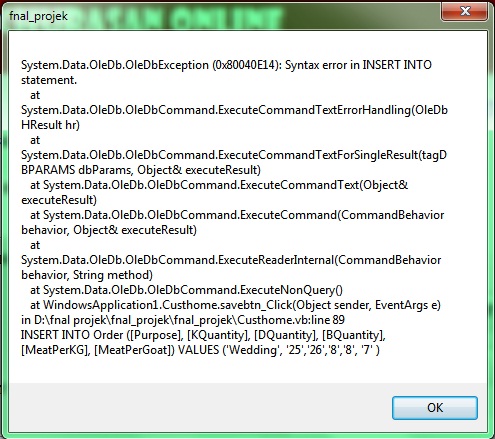
first is the same problem which is why does the data is not being inserted to the db..below is my full code for the custhome page
'Imports WindowsApplication1.LoginForm1
Imports System.Data.OleDb
Imports System.Text.RegularExpressions

Public Class Custhome
    Private _OrderID As Int32 = 0
    Public Property OrderID() As Int32
        Get
            Return _OrderID
        End Get

        Set(ByVal value As Int32)
            _OrderID = value
            RetrieveContactDetails()
        End Set
    End Property
    Private Sub RetrieveContactDetails()

        Dim conn As New OleDbConnection("provider=microsoft.jet.OleDB.4.0;Data Source=D:\fnal projek\khurasan.mdb; Persist Security Info = false;")
        Dim cmd As New OleDbCommand("Select Purpose, KQuantity, DQuantity, BQuantity, MeatPerKG, MeatPerGoat from Order Where OrderID = " & _OrderID, conn)

        conn.Open()

        Dim contactReader As OleDbDataReader = cmd.ExecuteReader
        contactReader.Read()
        cmboxpurpose.Text = contactReader("Purpose").ToString
        cmboxkid.Text = contactReader("KQuantity").ToString
        cmboxdoe.Text = contactReader("DQuantity").ToString
        cmboxbuck.Text = contactReader("BQuantity").ToString
        cmboxkg.Text = contactReader("MeatPerKG").ToString
        cmboxgoat.Text = contactReader("MeatPerGoat").ToString


        conn.Close()
    End Sub
    Private Sub Custhome_Load(sender As System.Object, e As System.EventArgs) Handles MyBase.Load

        ' LoginForm1.UsernameTextBox.Text = Me.unlbl.Text


        Me.ToolStripStatusLabel1.Text = Date.Now
        ToolStripStatusLabel5.Text = "KHURASAN ONLINE"
        DisplayUser()

    End Sub
    Public Sub DisplayUser()
        Dim currentUser As System.Security.Principal.WindowsIdentity = System.Security.Principal.WindowsIdentity.GetCurrent()
        userIdentityLabel.Text = currentUser.Name
    End Sub

    Public Sub TestProgressBar()
        ' Do a loop to simulate a lengthy task and make the progress bar
        ' show progress to its maximum value.
        While (ToolStripProgressBar1.Value < ToolStripProgressBar1.Maximum)
            System.Threading.Thread.Sleep(10)
            ToolStripProgressBar1.Value += 1
        End While

        ' Reset the progress bar.
        ToolStripProgressBar1.Value = ToolStripProgressBar1.Minimum

    End Sub


    Private Sub savebtn_Click(sender As System.Object, e As System.EventArgs) Handles savebtn.Click
        Dim conn As New OleDbConnection("provider=microsoft.jet.OleDB.4.0;Data Source=D:\fnal projek\khurasan.mdb; Persist Security Info = false;")
        Dim sql As String = String.Empty
        TestProgressBar()


        If _OrderID = 0 Then
            sql = "INSERT INTO Order ([Purpose], [KQuantity], [DQuantity], [BQuantity], [MeatPerKG], [MeatPerGoat]) VALUES ('" & cmboxpurpose.Text & "', '" & cmboxkid.Text & "','" & cmboxdoe.Text & "','" & cmboxbuck.Text & "','" & cmboxkg.Text & "', '" & cmboxgoat.Text & "' ) "
        Else
            sql = "UPDATE Order Purpose = '" & cmboxpurpose.Text & "', KQuantity = '" & cmboxkid.Text & "', DQuantity = '" & cmboxdoe.Text & "', BQuantity = '" & cmboxbuck.Text & "', MeatPerKG = '" & cmboxkg.Text & "', MeatPerGoat = '" & cmboxgoat.Text & "' Where OrderID =" & _OrderID


        End If

        TestProgressBar()


        Try
            conn.Open()

            Dim Command As New OleDbCommand(sql, conn)
            Command.ExecuteNonQuery()
            conn.Close()
            TestProgressBar()

            MsgBox("Success !!!", MsgBoxStyle.Information, "Khurasan Online")

        Catch ex As Exception

            MsgBox(ex.ToString & vbCrLf & sql)

            MsgBox("Incomplete,please insert your order once again !!!", MsgBoxStyle.Exclamation, "Khurasan Online")

        End Try

    End Sub

    Private Sub chckbxkid_CheckedChanged(sender As System.Object, e As System.EventArgs)

    End Sub

    Private Sub TabPage1_Click(sender As System.Object, e As System.EventArgs) Handles TabPage1.Click

    End Sub
End Class
my second problem is.... i want to show the username which has been logged to this sytem..
for example...i have 2 form..first is the login form and 2nd let it be the order form
i want the user to login then only it will be navigate to the 2nd form..and i want the username to be appear in the 2nd form..i have been searching 4 everywhere about it..would u plz help me...
n by the way..i would like to ask... i'm using a tabpage for the customer to choose their order..it's that okay if im using only one save button outside the tab page?? or i must not use the tab page...please2 help me...huhuhuhuh....
oh i forget...im using vb 2010 and ms access... below is my error...and the line is refer to 89.... based on the above post...