I am importing data from an excel worksheet in to a sql table,
one of the columns in the table is set to nvarchar(50), the data i am importing are barcodes, but the problem i am having is the column is changing the data
for example the number "5900397732209" is converted to "5.9004e+012" this is only happening when the data is imported.
if i save the barcode direct from my software it shows in the correct format in the table.
anyone know why this is.

Dani AI

Generated

Short summary: the import/driver treated your Excel column as a numeric float, so the value was stored as a floating point number and later converted to text using exponential notation. Formatting a cell to "Number" only changes display in Excel — it does not force the source to be text for import. The OLE/ACE provider (and the Import Wizard) samples a few rows to infer the type (TypeGuessRows, commonly 8), so if the sampled rows look numeric the entire column will be treated as numeric.

What to do before importing

  • Make Excel store the barcodes as text (not "Number"). Select the column and use Format Cells -> Text, then re-enter the values or use Data -> Text to Columns -> Next -> Next -> Column data format: Text -> Finish. Prefixing values with an apostrophe ('5900397732209) also works.
  • If using OLEDB, add IMEX=1 to the Extended Properties so mixed types are treated as text. Example connection string:
Provider=Microsoft.ACE.OLEDB.12.0;Data Source=C:\path\file.xlsx;
Extended Properties="Excel 12.0 Xml;HDR=Yes;IMEX=1";
  • Alternatively save as CSV and import that, or explicitly set the destination column type to NVARCHAR in the Import Wizard / SSIS and force the source to string (DT_STR/DT_WSTR).

Fixing data already imported as float

  • Convert the float column to a precise integer type then to text to avoid scientific notation. Example (adjust names and precision as needed):
UPDATE dbo.MyTable
SET BarcodeText = CAST(CAST(BarcodeFloat AS DECIMAL(13,0)) AS VARCHAR(50));

or if values are safely within bigint range:

UPDATE dbo.MyTable
SET BarcodeText = CAST(CAST(BarcodeFloat AS BIGINT) AS VARCHAR(50));

Test first with SELECT and on a copy of the table — floats can be imprecise, so verify results.

Notes tied to the thread

  • was right to check Excel formatting, but make it Text rather than Number.
  • , your copy/paste likely re-entered values as text, which is why that fixed it.

Checklist for future imports: ensure barcodes are stored as text at source, force text in the import connection or mappings, and verify a few rows before finishing the full import.

Recommended Answers

All 4 Replies

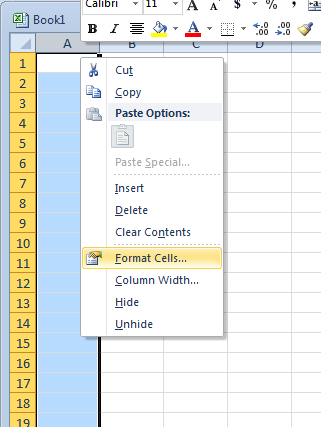
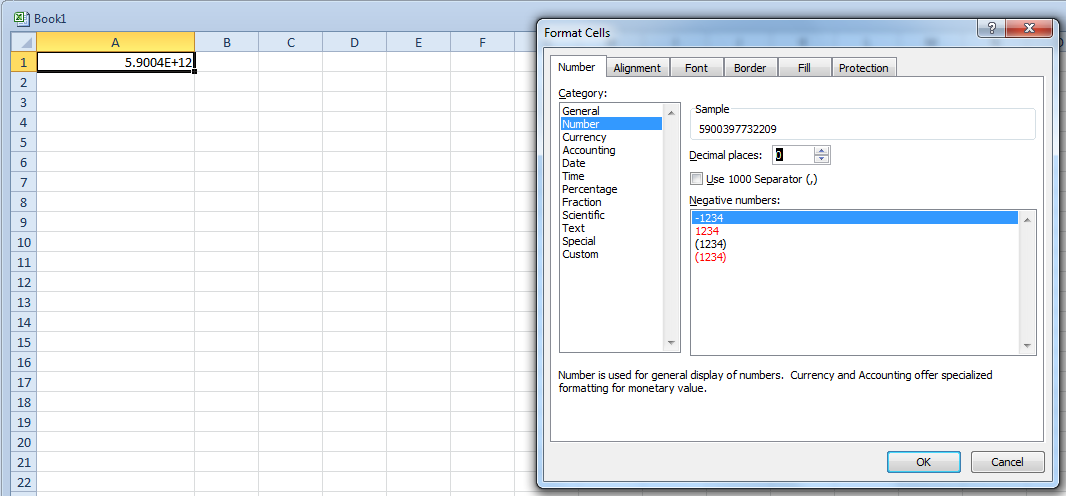
Excel is formatting the number. Open excel and set the desired format for those columns.

First select the column:

2c3a3bd75a4df2f9283ee563f1501fb8

Next set the formatting:

c536ebac45fe03bdcf1984565daa2667

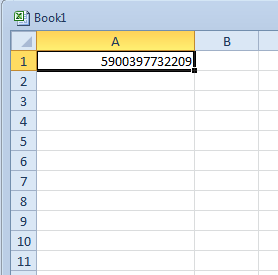
Click okay and you are finished!

791f2d76ccfad3d9ab0d7bd1870f9663

hi,thanks for the reply
I already formatted the cells on the excel sheet to the number format with no decimal spaces but it was still the same, initially when you import the data it is set as "float" in sql at this point the number is in full but as soon as i change it to nvarchar it changes it,

After a quick google session using keywords I found this article. Maybe it is what you are looking for! :)

tried many things , but in the end i just copied and pasted the data into excel and it seems to be fine.

Be a part of the DaniWeb community

We're a friendly, industry-focused community of developers, IT pros, digital marketers, and technology enthusiasts meeting, networking, learning, and sharing knowledge.