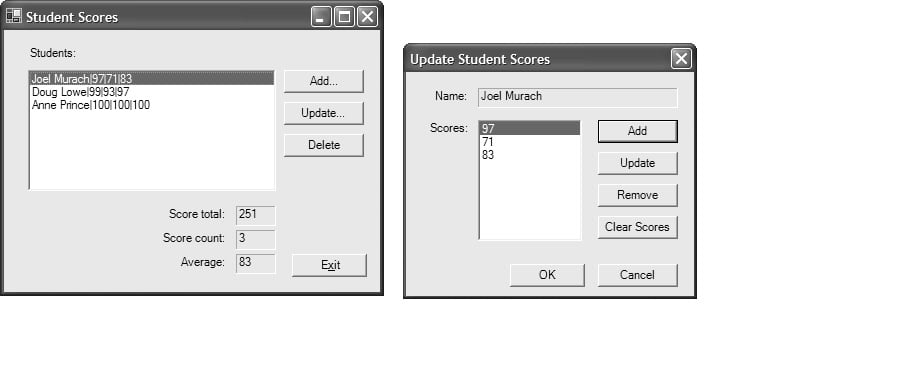
Hello, I'm having trouble getting a part of this program to work... the update student part is supposed to update/edit student's scores.
When i run the program i cant get the bttnUpdate to work in the frmMaintStudentScores.cs. can someone help me fix it?
the other parts of the program are working.
frmUpdateStudentScores.cs
using System;
using System.Collections.Generic;
using System.ComponentModel;
using System.Data;
using System.Drawing;
using System.Linq;
using System.Text;
using System.Threading.Tasks;
using System.Windows.Forms;

namespace WindowsFormsApplication4
{
    public partial class frmUpdateStudentScores : Form
    {
        public static Dictionary<string, List<int>> tmpStudents;
        BindingSource bs = new BindingSource();
        public static int selected;

        public frmUpdateStudentScores()
        {
            InitializeComponent();
        }

        private void frmUpdateStudentScores_Load(object sender, EventArgs e)
        {
            tmpStudents = frmMaintStudentScores.students.ToDictionary(p => p.Key, p => p.Value.ToList());

        }

        private void frmUpdateStudentScores_Activated(object sender, EventArgs e)
        {
            txtName.Text = tmpStudents.Keys.ElementAt(frmMaintStudentScores.selected);
            bs.DataSource = tmpStudents.Values.ElementAt(frmMaintStudentScores.selected);
            lbxScores.DataSource = bs;
            lbxScores.Focus();
        }

        private void bttnAdd_Click(object sender, EventArgs e)
        {
            Form addScore = new frmAddScore();
            addScore.ShowDialog();
            bs.ResetBindings(false);
        }

        private void BttnOk_Click(object sender, EventArgs e)
        {
            frmMaintStudentScores.students = tmpStudents;
            this.Close();
        }

        private void bttnRemove_Click(object sender, EventArgs e)
        {

            tmpStudents.Values.ElementAt(frmMaintStudentScores.selected).RemoveAt(lbxScores.SelectedIndex);
            bs.ResetBindings(false);
        }

        private void bttnUpdate_Click(object sender, EventArgs e)
        {
            selected = lbxScores.SelectedIndex;
            Form updateScore = new frmUpdateScore();
            updateScore.ShowDialog();
            bs.ResetBindings(false);
        }


        private void bttnClreaScores_Click(object sender, EventArgs e)
        {
            tmpStudents.Values.ElementAt(frmMaintStudentScores.selected).RemoveRange(
               0, tmpStudents.Values.ElementAt(frmMaintStudentScores.selected).Count);
            bs.ResetBindings(false);
        }

    }
}
main form: frmMaintStudentScores.cs
using System;
using System.Collections.Generic;
using System.ComponentModel;
using System.Data;
using System.Drawing;
using System.Linq;
using System.Text;
using System.Threading.Tasks;
using System.Windows.Forms;

namespace WindowsFormsApplication4
{
    public partial class frmMaintStudentScores : Form
    {
        public static Dictionary<string, List<int>> students = new Dictionary<string, List<int>>();
        public static int selected;

        public frmMaintStudentScores()
        {
            InitializeComponent();
        }

      //  private frmMaintStudentScores parentForm;

        private void frmStudentScores_Load(object sender, EventArgs e)
        {

            students.Add("Peter Cornell", new List<int> { 20, 30, 50 });
            students.Add("Joe Whatsits", new List<int> { 24, 44, 34 });
            students.Add("Jane Harris", new List<int> { 64, 43, 65 });

            AddToListbox();

        }

        private void AddToListbox()
        {
            foreach (var student in students)
            {
                StringBuilder sb = new StringBuilder();
                sb.Append(student.Key.ToString());
                sb.Append(" - ");
                for (int i = 0; i < student.Value.Count; i++)
                {
                    sb.Append(student.Value[i]);
                    if (i != student.Value.Count - 1)
                    {
                        sb.Append(", ");
                    }
                }
                lbxStudents.Items.Add(sb);
                lbxStudents.SetSelected(0, true);
                UpdateInfo();
            }
        }

        private void UpdateInfo()
        {
            try
            {

                txtScoreTotal.Text = students.Values.ElementAt(lbxStudents.SelectedIndex).Sum().ToString();
                txtScoreCount.Text = students.Values.ElementAt(lbxStudents.SelectedIndex).Count.ToString();
                txtAverage.Text = Math.Round(students.Values.ElementAt(lbxStudents.SelectedIndex).Average()).ToString();
            }
            catch (Exception)
            {
                txtScoreTotal.Text = "";
                txtScoreCount.Text = "";
                txtAverage.Text = "";
            }
        }

        private void lbxStudents_SelectedIndexChanged(object sender, EventArgs e)
        {
            UpdateInfo();
        }

        private void bttnAddNew_Click(object sender, EventArgs e)
        {
            Form addNewStudent = new frmAddNewStudent();
            addNewStudent.ShowDialog();
            lbxStudents.Items.Clear();
            AddToListbox();
        }

        private void btnUpdate_Click(object sender, EventArgs e)
        {

            Form updateScores = new frmUpdateStudentScores();
            int index = lbxStudents.SelectedIndex;
            if (lbxStudents.Items.Count > 0)
            {
                updateScores.ShowDialog();
            }

            lbxStudents.Items.Clear();
            AddToListbox();

        }

        private void bttnDelete_Click(object sender, EventArgs e)
        {
            students.Remove(students.Keys.ElementAt(lbxStudents.SelectedIndex));
            lbxStudents.Items.Clear();
            AddToListbox();
            if (students.Count == 0)
            {
                txtScoreTotal.Text = "";
                txtScoreCount.Text = "";
                txtAverage.Text = "";
            }
        }

         private void frmStudentScores_Activated(object sender, EventArgs e)
        {
            UpdateInfo();
        }

    }
}

}}