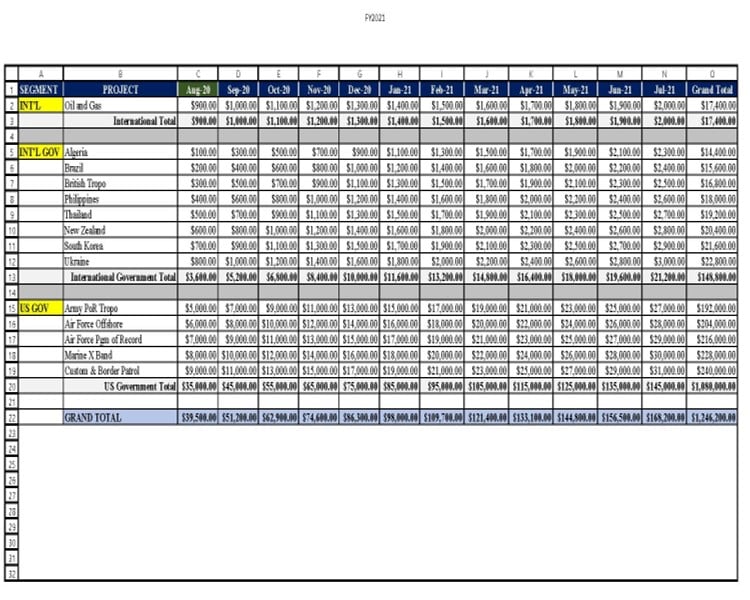
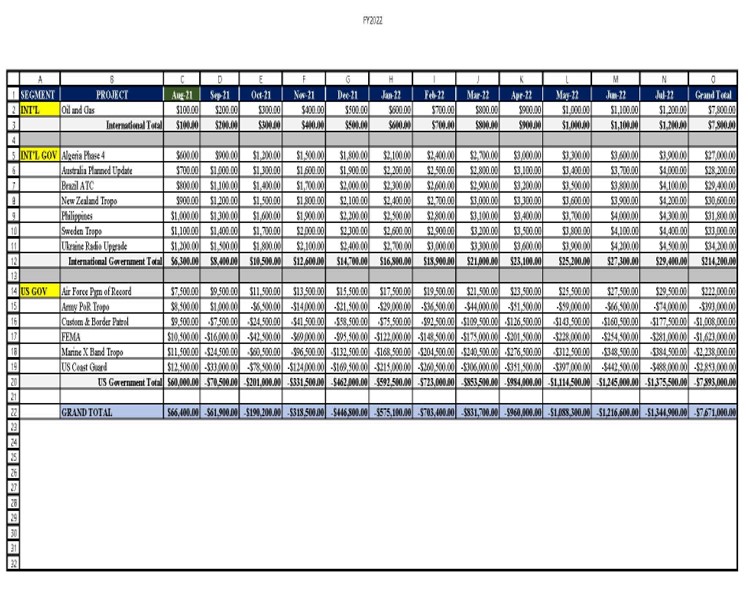
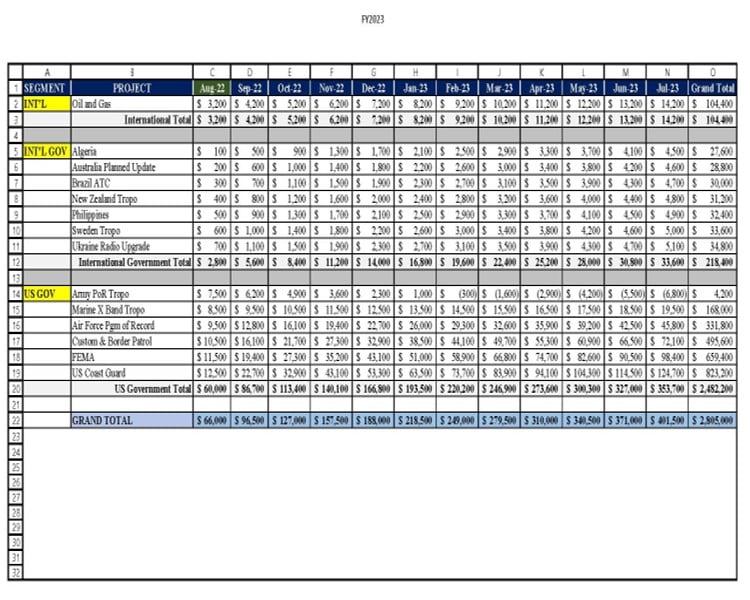
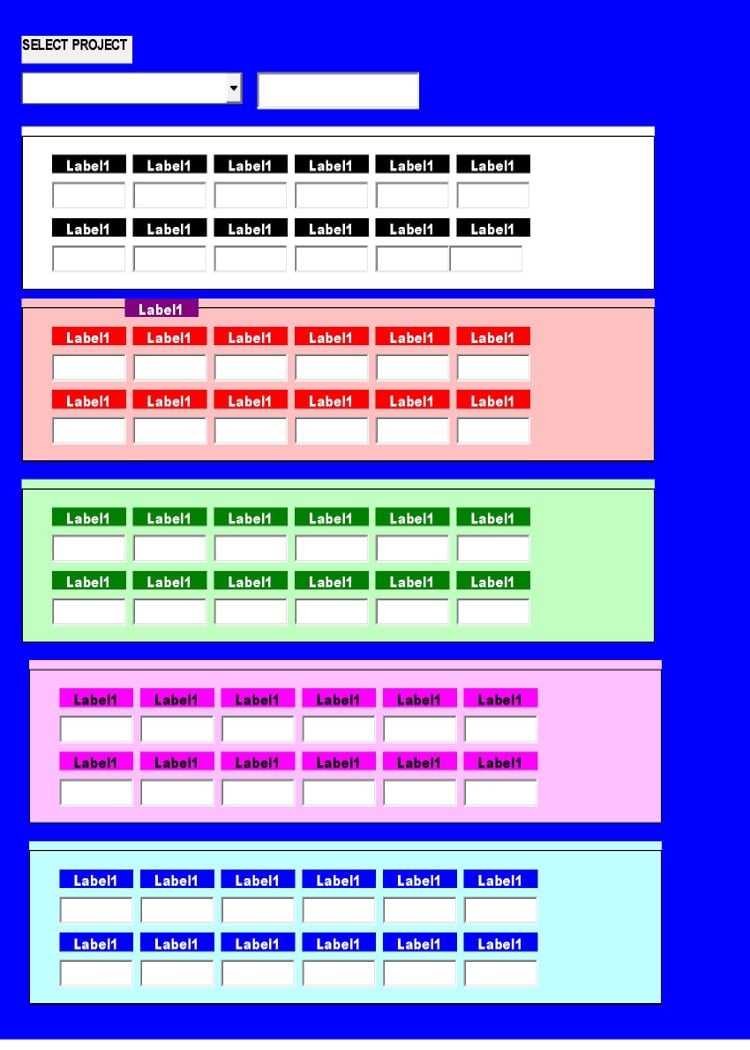
Ok I have a workbook that have 5 worksheets for a 5 year span. On each of the worksheets are there is a list of countries that make up the combobox (which works perfectly). On my userform I have a frame on the userform that represent each worksheet.

My problem is that I can't get the textboxes to populate based on the combobox selection. If that country is on three of the sheets I need for it to populate according to the year.

This code works perfectly with the exception of populating my label boxes with line one starting with column C. It will fill my last 3 userform frames but wrong dates.

Private Sub UserForm_Initialize()

Dim i As Long, j As Long
Dim dic As Object
Dim ctrl As Control, thisFrame As Control
Dim x As Integer, Uniques As Variant, Sorted As Variant

Set dic = CreateObject("Scripting.Dictionary")

'populate combobox

For Each ws In ActiveWorkbook.Worksheets
    Select Case UCase(ws.Name)
    Case "FY2019", "FY2020", "FY2021", "FY2022", "FY2023"
        With ws
            lr = .Cells.Find(What:="*", SearchDirection:=xlPrevious, SearchOrder:=xlByRows).Row
            'for combo drop down
            arr = .Range("B2:B" & lr)
            For i = 1 To UBound(arr, 1)
                If arr(i, 1) <> "" And InStr(arr(i, 1), "Total") = 0 And InStr(arr(i, 1), "TOTAL") = 0 Then
                    dic(arr(i, 1)) = 1
                End If
            Next i
            'for labels
            j = 3
            Set thisFrame = Controls("frame" & ws.Name)
            For Each ctrl In thisFrame.Controls
                If TypeOf ctrl Is MSForms.Label Then
                    ctrl.Caption = Format(.Cells(1, j).Value, "mmm-yy")
                    j = j + 1
                End If
            Next ctrl
        End With
    End Select
Next ws

' Sort The Unique Values
    Uniques = dic.keys
    With CreateObject("System.Collections.ArrayList")
        For x = LBound(Uniques) To UBound(Uniques)
            .Add Uniques(x)
        Next
        .Sort
        Sorted = .ToArray
    End With

  ' Sort combobox
  cboFYList.List = Sorted

End Sub

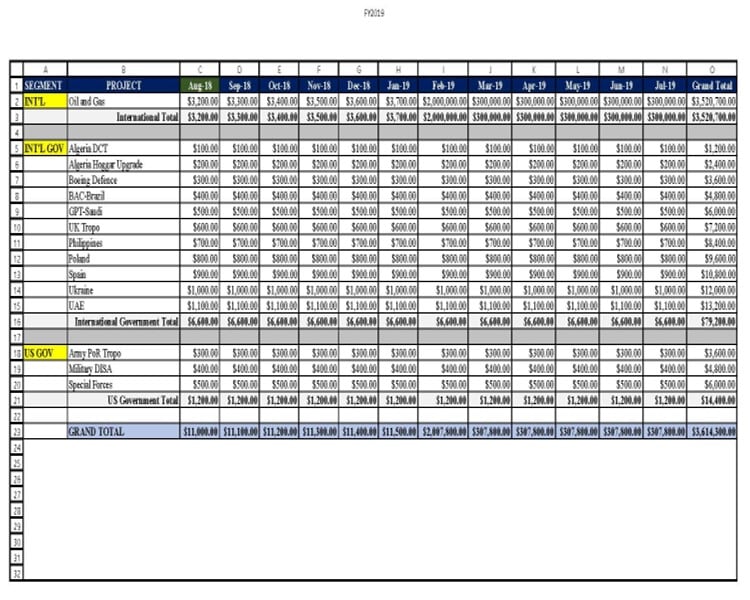
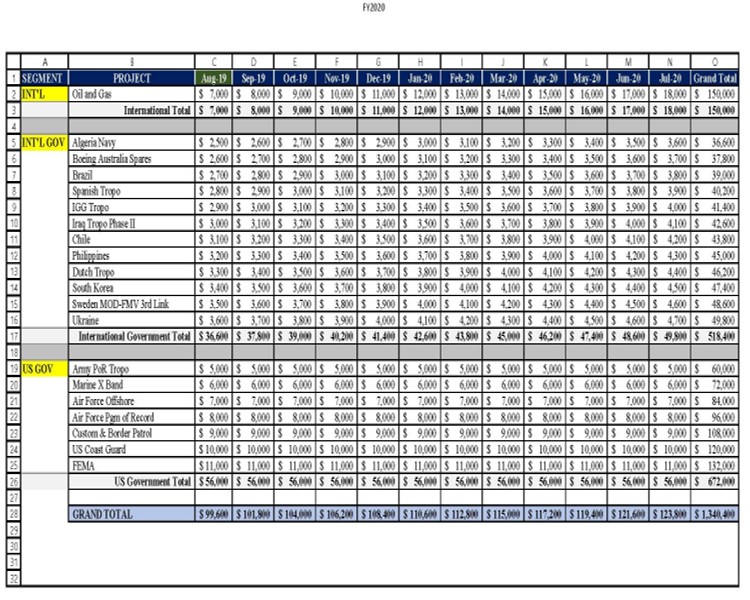
I also need to be able to add info to the corresponding worksheet based on the fiscal year; i.e., If I have to add another country to FY2019, I need to be able to add a new country in the combobox and from the FY2019 frame add new numbers that will go into FY2019 worksheet. The trick to this is that on each worksheet in column A that is "INT'L", "INT'L" AND "US GOV" on each sheet. The newly added info has to be inserted into one of these categories on corresponding pages.

I have attached pictures of the workbook to get a better look at what I'm working with.

ALSO NOTE: Although all the cells are filled in with amounts be advised that there will be blank cells in the mix.

So what I'm looking for is a code to fill my textboxes. I want to learn how so if someone one can get me started then then tell me what to look for I would like to try and figure out as much as possible on my own with just some guidance.
Dani AI

Generated

Short, practical plan that ties the thread together: follow 's advice and split the work into (1) build a clean list of unique country names, (2) make each frame reliably map to its worksheet, (3) populate labels/textboxes from the found row, and (4) implement a save/insert routine that places new countries under the correct category in column A. 's idea to keep year context in the key is useful — use a composite key or keep country lists per-year. A minimal workbook for repro (as suggested) avoids guesswork.

Controls-order is the most common cause of “wrong dates”: the Controls collection order does not guarantee visual order. Make each label/textbox carry the column index in its Tag property at design time, then use that Tag when filling captions/values. Example for label captions (set each label.Tag = 3,4,5... at design time):

Dim lbl As MSForms.Label, f As MSForms.Frame, col As Long
Set f = Me.Controls("frameFY2019")
For Each lbl In f.Controls
  If TypeOf lbl Is MSForms.Label Then
    col = CLng(lbl.Tag)
    lbl.Caption = Format(Sheets("FY2019").Cells(1, col).Value, "mmm-yy")
  End If
Next lbl

Populate textboxes when the combobox value changes by looping FY sheets, finding the country in column B with a case-insensitive Find, and filling textboxes using their Tag for the column. Example:

Private Sub cboCountry_Change()
  Dim country As String, ws As Worksheet, r As Range, ctrl As Control, frm As MSForms.Frame
  country = Trim(cboCountry.Value)
  For Each ws In ThisWorkbook.Worksheets
    If Left(ws.Name,2) = "FY" Then
      Set r = ws.Columns("B").Find(What:=country, LookIn:=xlValues, LookAt:=xlWhole, MatchCase:=False)
      Set frm = Me.Controls("frame" & ws.Name)
      If r Is Nothing Then
        For Each ctrl In frm.Controls: If TypeOf ctrl Is MSForms.TextBox Then ctrl.Value = "" : Next
      Else
        For Each ctrl In frm.Controls: If TypeOf ctrl Is MSForms.TextBox Then ctrl.Value = ws.Cells(r.Row, CLng(ctrl.Tag)).Value : Next
      End If
    End If
  Next ws
End Sub

To insert a new country under the correct category in column A, find the last row of that category and insert below it; a small helper returns that insert row. When saving, convert textbox strings to numeric where appropriate and always work on a copy of the file while testing.

Recommended Answers

All 6 Replies

Ok it's been over a week and no response. If to complicated let me know and we'll take it one step at a time. I need help please if any out there.

Your choice of tags may be a little off. I never saw VB6 used for such. And what code there is may be VBA or VB.NET.

My only advice is to break the problem down to smaller steps. Rather than expect the code to cover all the problems in one go, maybe just find a way to fill in one box. Then code to fill in the next box. Step by step, until it's done.

I also worry at times folk expect others to code it up and supply a finished product. For that you post some for hire type posting.

Another way would be to make the problem smaller so that folk can see the smaller piece and see what can be done.

If you could provide a copy of the workbook it would be much easier to diagnose the issue

Assuming 'lr' is the last populated row it could be lr = .UsedRange.rows.count instead of .cells.find(...
In any case you could change line #21 to:
dic(mid(ws.Name,3) & arr(i,1)) ' prepend the year '
or
dic(arr(i,1) & mid(ws.Name,3)) ' postfix the year '
depending on the sort preference
in this manner you'll have each country once per year.

Of course, I meant the following (equal to 1):

dic(mid(ws.Name,3) & arr(i,1)) = 1 ' prepend the year
or

dic(arr(i,1) & mid(ws.Name,3)) = 1 ' postfix the year

Thank you for the responses but I'm just receiving them been out of touch. I will try your suggestions and get back to you. Again thank you.

Be a part of the DaniWeb community

We're a friendly, industry-focused community of developers, IT pros, digital marketers, and technology enthusiasts meeting, networking, learning, and sharing knowledge.