How to can i do like this:
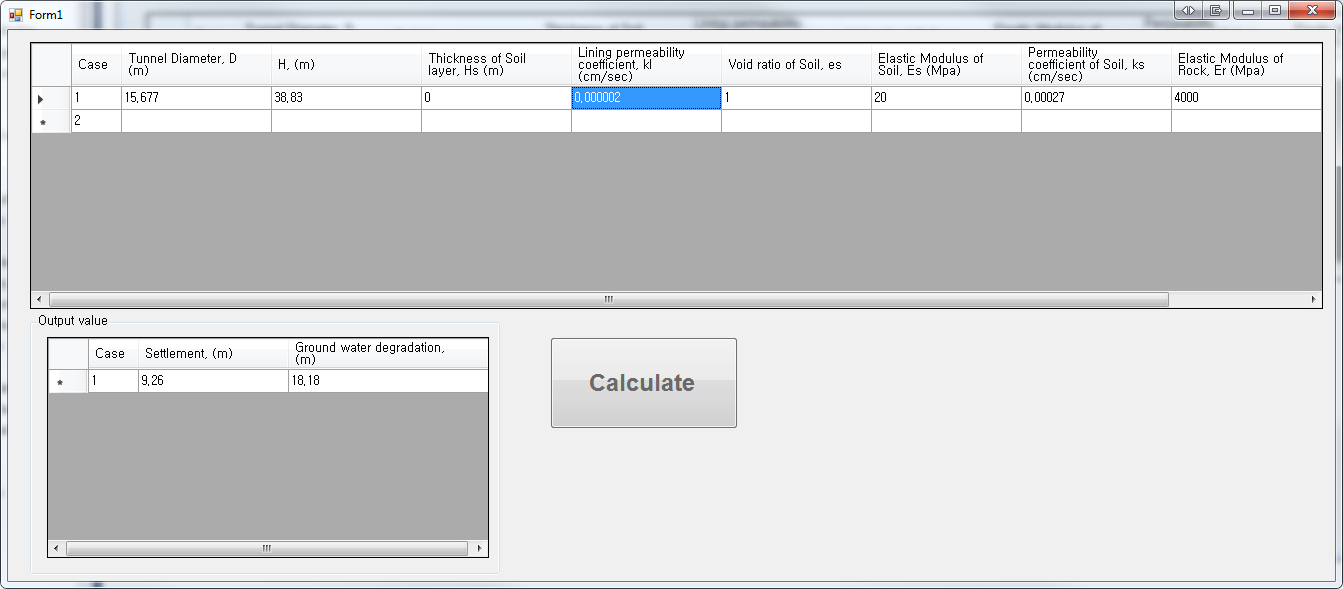
datagridview1.row [i] = input value , and results(calculated) in datagridview2's row[i] = output value. it means input row and output rows are neeb to be same. i need to connect them. please help me.

Dani AI

Generated

Two practical patterns that keep "row i" in sync between grids:

  • Recommended (simpler, less error‑prone): bind both DataGridViews to the same DataTable and use a computed column for the output. That way edits on row i in grid1 immediately show the corresponding result in grid2 and you avoid manual index-mapping. This also avoids many parsing/sync bugs that hinted at.
  • Alternative: if your formula is too complex for a DataColumn expression, compute the output in code when the input cell changes and write the result back into the same underlying row.

Example: DataTable with a computed column and two BindingSources (one shown as inputs, the other as outputs):

Dim dt As New DataTable()
dt.Columns.Add("Input", GetType(Double))
dt.Columns.Add("Output", GetType(Double), "Input * 2") ' example expression

Dim bs1 As New BindingSource() With {.DataSource = dt}
DataGridView1.DataSource = bs1

Dim bs2 As New BindingSource() With {.DataSource = dt}
DataGridView2.DataSource = bs2

DataGridView1.Columns("Output").Visible = False
DataGridView2.Columns("Input").Visible = False

dt.Rows.Add(1.0) ' Output becomes 2.0 automatically

Notes / troubleshooting

  • Ensure edits are committed so expressions recalc immediately (commit at CellEndEdit or call the BindingSource's EndEdit). If you need immediate commits for special cell types, use the appropriate commit call in CurrentCellDirtyStateChanged.
    Private Sub DataGridView1_CellEndEdit(...) Handles DataGridView1.CellEndEdit
      CType(DataGridView1.DataSource, BindingSource).EndEdit()
    End Sub
  • If you must compute in code (custom logic), handle CellValueChanged, convert/validate the input, then set the Output column for that row. Avoid relying on raw row indexes when users can sort/filter — use the same DataSource or a stable key column to find the correct DataRow.

This keeps rows aligned, avoids fragile copy-paste code, and makes the output read-only and reproducible.

Recommended Answers

All 3 Replies

Extract values from DGV1 row. Convert them to doubles. Do calculations. Fill in values in DGV2 row.

what code can i use ?

I guess you do this in the clickhandler of your calculate button.
You could use the Double.Tryparse method. To change the row values of your DGV. Success!

Be a part of the DaniWeb community

We're a friendly, industry-focused community of developers, IT pros, digital marketers, and technology enthusiasts meeting, networking, learning, and sharing knowledge.