Hello There,

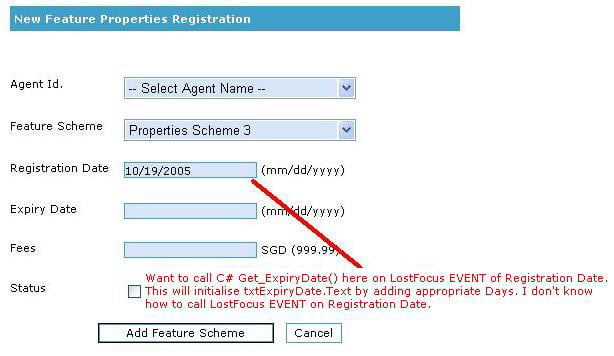
I am working with c# & I have used two textbox server control.
1> Registration Date
2> Expiry Date
First of all, user enters value for the first textbox namely Registration Date and then the expiry date should be auto calculated by adding 30 days into currently entered registration date when he user leaves the first textbox.

That means there are two textboxes - user enters the value for first textbox and the second textbox should be auto calcuated on lost focus event of first textbox.
So pls let me know..... Waiting for your answer....

Thanks,
Paresh
Dani AI

Generated

asked for the expiry to be set to registration + 30 days on lost focus. rightly suggested client- or server-side options, but the sample code has parsing/assignment mistakes and a typo in the C# call. Below are concise, practical alternatives and the pitfalls to avoid.

Client-side (best UX): prefer an HTML5 date input and do the math in the browser so there is no postback. Normalize the input to ISO (YYYY-MM-DD) before parsing because Date.parse is inconsistent across browsers. Use setDate(getDate() + 30) to add days (this correctly rolls months/years). Example (assumes ISO input):

/* reg and exp are the input elements; reg.value is "YYYY-MM-DD" */
reg.addEventListener('blur', function() {
  var p = reg.value.split('-');
  if (p.length !== 3) { exp.value = ''; return; }
  var d = new Date(parseInt(p[0],10), parseInt(p[1],10)-1, parseInt(p[2],10));
  if (isNaN(d)) { exp.value = ''; return; }
  d.setDate(d.getDate() + 30);
  exp.value = d.getFullYear() + '-' + ('0'+(d.getMonth()+1)).slice(-2) + '-' + ('0'+d.getDate()).slice(-2);
});

Server-side (authoritative): always re-check the date on the server. Use DateTime.TryParse and AddDays(30) (not a misspelled method) so malformed input does not throw. If you want to avoid full postbacks use an UpdatePanel or an AJAX/WebMethod so only the expiry value is returned.

Caveats/troubleshooting: decide whether you need exactly 30 days (use AddDays) or “one calendar month” (use AddMonths). Normalize user input (or use a date picker) to avoid culture-format issues. Always validate on the server as the final authority.

Dear friend,

There are two ways of doing it. One on the client side and the other one is server side.

On client side, you javascript's method Onblur event of textBox and call a javascript method that gets value from one TextBox and sets the value in second one. So the code like following:

<input type="text" id="register" OnBlur="SetExpiryDate()" />
<input type="text" id="expired" value="" />

and in head section of page add:
<script language="javascript">
//assuming dates are seperated by '/' and is in MM/DD/YYYY
var Date1Split = document.getElementById('register').value.split('/');
var dte = new Date;
dte.setMonth(dte[0]);
dte.setDate(dte[1]);
dte.setFullYear(dte[2]);
//Calculate the expiry date
var expiryDate ;//add logic to calculate the expiry date..left for u

//set the text of textBox expire
document.getElementById('register').value = expiryDate.getMonth() + '/' + expiryDate.getDate() + '/' + expiryDate.getFullYear();
</script>

on server side you can do it easily by adding an event handler, or by just calling post back to page on OnBlur Event by calling __doPostBack('','');

and on server side do expire.Value = DateTime.Parse(register.Value).AddDaye(30).ToShortString();

Hope this helps

Be a part of the DaniWeb community

We're a friendly, industry-focused community of developers, IT pros, digital marketers, and technology enthusiasts meeting, networking, learning, and sharing knowledge.