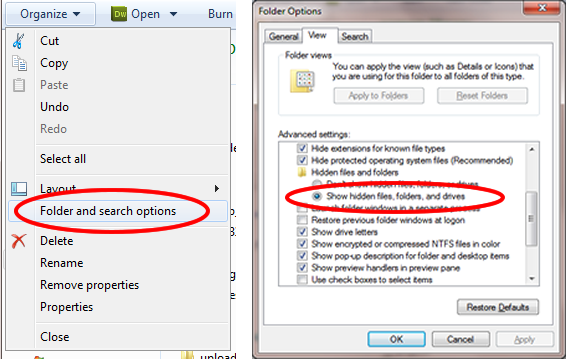
Hello ...I just was trying to output the file names of different folders in my PC using PHP code...But I found that it outputs actually more than visible files in that particular folder..So what did I mean by visible that when I count the number of files in my folder it appears 18 but when i output it appears that the numer is 20. That two files are not visible. One if the is "Folder.jpg" and the second of them is a ".doc" file i opened and think it is inserted by "Administrator".....This is the code

<?php

 function getDirectoryList ($directory)  
  { 

	// create an array to hold directory list 
	$results = array(); 

	// create a handler for the directory 
	$handler = opendir($directory); 

	// open directory and walk through the filenames 
	while ($file = readdir($handler)) { 

	  // if file isn't this directory or its parent, add it to the results 
	  if ($file != "." && $file != "..") { 
		$results[] = $file; 
	  } 

	} 

	// tidy up: close the handler 
	closedir($handler); 

	// done! 
  return $results; 

  } 
  $array_1=getDirectoryList("C:\Documents and Settings\Администратор\Мои документы\Downloads"); 

  
 foreach($array_1 as $value) 
 { 
 echo "<br/>".$value; 
 }
?>

So here is my question ...how can I output only that 18 files and not that invisible files ? Since I want to work only with files that I see.

Please be gentle and help me.

Dani AI

Generated

Short summary and practical fixes

PHP's directory functions will list every filesystem entry; Windows Explorer hides certain system/metadata files (so your count in Explorer can differ from what PHP returns). Common culprits in XP-era Downloads folders are per‑folder thumbnail and configuration files (for example, desktop.ini and Thumbs.db) and files marked with the hidden/system attributes — check the raw folder listing from a command prompt with the DIR /A switches to compare. (learn.microsoft.com)

Two reliable approaches to make PHP match what you "see" in Explorer

  • Read Windows file attributes from PHP (works when PHP runs on Windows and the COM extension is available). The Scripting.FileSystemObject exposes Attributes as bit flags (Hidden=2, System=4), so you can skip entries with those bits set. Use PHP's COM to call into the FileSystemObject and filter those files. This avoids brittle name-based filtering. (php.net)

Example (COM fallback + safe name-filter fallback):

<?php
$path = 'C:\\path\\to\\folder';
$visible = [];

if (class_exists('COM')) {
    $fso = new COM('Scripting.FileSystemObject');
    $it = new DirectoryIterator($path);
    foreach ($it as $fi) {
        if ($fi->isDot()) continue;
        $name = $fi->getFilename();
        $f = $fso->GetFile($path . '\\' . $name);
        $attrs = (int)$f->Attributes;
        // skip hidden (2) and system (4)
        if ($attrs & 2) continue;
        if ($attrs & 4) continue;
        $visible[] = $name;
    }
} else {
    // fallback: ask Windows for all files, then filter common metadata names
    $list = shell_exec('dir /a:-d /b ' . escapeshellarg($path));
    $visible = array_filter(explode("\n", trim($list)));
    $visible = array_filter($visible, fn($v) => !in_array(strtolower($v), ['desktop.ini','thumbs.db','ehthumbs.db']));
}

print_r($visible);
?>

Quick troubleshooting checklist (things that commonly explain the 18 vs 20 mismatch)

  • Turn on "Show hidden files" and "Show protected operating system files" in Explorer and compare counts.
  • From a Windows shell run dir /a /b "C:\path\to\folder" to see everything. (howtogeek.com)
  • Verify which Windows user the PHP/Apache process runs as — the service account can have a different view of per‑user folders.
  • If COM is unavailable, use the DIR-based fallback above, or filter known names (desktop.ini, Thumbs.db) as a pragmatic quick fix. (learn.microsoft.com)

Notes: mention to that and were right to investigate attributes and Explorer settings; the COM method above is a Windows-native, reliable way to detect hidden/system entries (but requires the COM extension and appropriate permissions).

Recommended Answers

All 11 Replies

This code works in windows.
I have used exec function to run attrib command to check type of file.
In linux os attrib won't work.

<?php

 function getDirectoryList ($directory)  
  { 

	// create an array to hold directory list 
	$results = array(); 

	// create a handler for the directory 
	$handler = opendir($directory); 

	// open directory and walk through the filenames 
	while ($file = readdir($handler)) { 

	  // if file isn't this directory or its parent, add it to the results 
	  if ($file != "." && $file != "..") { 
	  	$str = $directory.'\\'.$file;
		$out = trim(exec('attrib '.$str));
		$start = substr($out,0,1);
		if($start != 'H')
		$results[] = $file; 
	  } 

	} 

	// tidy up: close the handler 
	closedir($handler); 

	// done! 
  return $results; 

  } 
  $array_1=getDirectoryList("C:\wamp\www\\test"); 

  
 foreach($array_1 as $value) 
 { 
 echo "<br/>".$value; 
 }
?>

Try this and let me know if it works.

Thx for the help. But the code didnt work..the same result.

But you know i tried my initial code for couple other directories and found that it worked for that cases ...Maybe my download section is kinda speacial thats why i have that 2 more outputs..What do you think?

Ohh..
i have checked only for hidden folder. Below is the complete code for files and folder both.
I have checked in win7 and its working. Try in your PC.

<?php

 function getDirectoryList ($directory)  
  { 

	// create an array to hold directory list 
	$results = array(); 

	// create a handler for the directory 
	$handler = opendir($directory); 

	// open directory and walk through the filenames 
	while ($file = readdir($handler)) { 

	  // if file isn't this directory or its parent, add it to the results 
	  if ($file != "." && $file != "..") { 
	  	$str = $directory.'\\'.$file;
		$out = trim(exec('attrib '.$str));		
		$ar = explode($directory,$out);		
		$temp = explode(' ',trim($ar[0]));		
		if(!in_array('H',$temp))
		$results[] = $file; 
	  } 

	} 

	// tidy up: close the handler 
	closedir($handler); 

	// done! 
  return $results; 

  } 
  $array_1=getDirectoryList("C:\wamp\www\\test"); // add your path here

  
 foreach($array_1 as $value) 
 { 
 echo "<br/>".$value; 
 }
?>

Replace your directory path.

vibhadevit it again outputs the same. When you say it is working on windows 7 you mean that you have invisible files in a directory and the function doesnt output that files , right? My operating system is Windows XP Professional and I have installed XAMPP. Maybe this could help

Member Avatar for Member #120589

when you say files are invisible, what do you mean? not visible from the windows explorer? Have they got certain file properties? Find out.

I mean that when I visit that directory i see that files but when output them using PHP it outputs more than i can see in that folder.

Are you meaning hidden files ?

Member Avatar for Member #120589

Again:

Have they got certain file properties? Find out.

Unless you know what properties those special files have, it's difficult to know what's going on. As Zero states,they're probably hidden files. But we need to be sure.

To show hidden files:


I don't know how php handles 'hidden' files. I was wondering about permissions, but I don't think this will work. I looked at the stat() function and the inode mode, but it doesn't change for hidden or visible files on windows.

Member Avatar for Member #120589

Perhaps using system() and the 'attrib', but I don't know if this will allow a 'get'. Everything I've seen on it is 'set'.

$file = 'filename.php';
system('attrib +H ' . escapeshellarg($file));

That's pretty much the way to make a file hidden OR:

$file = 'filename.php';
system('attrib -H ' . escapeshellarg($file));

TO 'unhide' a file.

Couldn't find anything on returning the attribute as opposed to setting it. Surely it must exist.

@ardav: I have made one file and one directory hidden by right click and changing property to hidden.
And used exec to read file/folder attributes in PHP as shown in above post..
exec('attrib '.$path)

Member Avatar for Member #120589

Ok, I got this to check to see if the file is hidden:

<?php
$file = 'file.php';
$vis = explode(" ",exec('attrib ' . $file));
//print_r($vis);
if($vis[3] == 'H') echo "yep $file is hidden";
?>

I haven't tested whether H crops up at any other position. Anyway play with it.

Be a part of the DaniWeb community

We're a friendly, industry-focused community of developers, IT pros, digital marketers, and technology enthusiasts meeting, networking, learning, and sharing knowledge.