i have a problem in showing two columns which is reff_number and Name in a combobox/select box, and now i can only display one column with it, if i have 9000 customer(in bahasa = pelanggan) , it will take an effort to find for user, and it will be easy if not only name but sho reff_number, please help me, thanks before

select name="cmbclient">
<option value="blank"></option>
<?php
  $datasql="SELECT * FROM pelanggan ORDER BY name;
  $dataQry=mysql_<select name="cmbclient">
  <option value="BLANK"> </option>
    <?php
      $dataSql = "SELECT * FROM pelanggan ORDER BY name";
      $dataQry = mysql_query($dataSql, $koneksidb) or die ("Gagal Query".mysql_error());
      while ($dataRow = mysql_fetch_array($dataQry)) {
        if ($dataRow['reff_number']== $_POST['cmbclient']) {
            $cek = " selected";
        } else { $cek=""; }
        echo "<option value='$dataRow[reff_number]' $cek>$dataRow[name]</option>";
      }
      $sqlData ="";
      ?>
</select>
Dani AI

Generated

Good call from : a <select> can only show one visible text node per option, so the trick is to keep reff_number as the value and render both fields in the option label. Also, because mysql_* was removed in PHP 7, switch to PDO/MySQLi for safety and speed. Here is a compact PDO example that displays both columns and preserves the posted selection safely (HTML-escaped, strict comparison):

<?php
$pdo = new PDO('mysql:host=localhost;dbname=yourdb;charset=utf8mb4','user','pass',[
    PDO::ATTR_ERRMODE => PDO::ERRMODE_EXCEPTION,
]);
$selected = $_POST['cmbclient'] ?? '';

echo '<select name="cmbclient">';
echo '<option value=""></option>';

$stmt = $pdo->query('SELECT reff_number, name FROM pelanggan ORDER BY name');
foreach ($stmt as $row) {
    $val   = (string)$row['reff_number'];
    $label = $row['name'].' ('.$row['reff_number'].')';
    printf(
        '<option value="%s"%s>%s</option>',
        htmlspecialchars($val, ENT_QUOTES, 'UTF-8'),
        $val === $selected ? ' selected' : '',
        htmlspecialchars($label, ENT_QUOTES, 'UTF-8')
    );
}
echo '</select>';

With ~9,000 customers, rendering every option can feel sluggish. @diafol’s suggestion to search-as-you-type is the right direction. If you need to stick with a pure select, at least index your lookup fields and, when you do move to Ajax, return just the top N matches:

CREATE INDEX idx_pelanggan_reff ON pelanggan (reff_number);
CREATE INDEX idx_pelanggan_name ON pelanggan (name);

Small UX polish: for tidy, column-like alignment in the dropdown, apply a monospace font and preserve spacing on the <select>, then pad the label server-side (e.g., str_pad or RPAD in SQL) so names line up while still keeping reff_number as the option value.

Recommended Answers

All 9 Replies

Try:

<select name="cmbclient">
  <option value=""></option>
<?php
      /* select only the fields you need.  Doing SELECT * gets you all the fields on the table, even the one you don't need! */
      $dataSql = 'SELECT reff_number, name FROM pelanggan ORDER BY name';
      $dataQry = mysql_query($dataSql, $koneksidb) or die ("Gagal Query".mysql_error());
      while ($dataRow = mysql_fetch_assoc($dataQry))
      {
        if ($dataRow['reff_number'] !== $_POST['cmbclient'])
        {
            echo '<option value="',htmlentities($dataRow['reff_number'],ENT_QUOTES),'">', htmlentities($dataRow['name'],ENT_QUOTES), '</option>',PHP_EOL;
        }
        else
        { 
            echo '<option value="',htmlentities($dataRow['reff_number'],ENT_QUOTES),'" selected>', htmlentities($dataRow['name'],ENT_QUOTES), '</option>',PHP_EOL;
        }
      }
      mysql_free_result($dataQry);
?>
</select>
Member Avatar for Member #120589

A great little tool I've used many times:

https://twitter.github.io/typeahead.js/examples/

However, never tried it on 9000+ rows though.

If you join your values "id + ' ' + name", then you can search the query on either field.

Also: https://github.com/bassjobsen/Bootstrap-3-Typeahead

BTW - 9000+ rows is a lot to query everytime you change a character. You may consider storing data (if it's not very "volatile") in localStorage (DOM). You should be able to store around 3Mb of data (at least) for each domain on any compatible browser. This will allow you to run blindlingly fast queries vs. round trip ajax affairs.

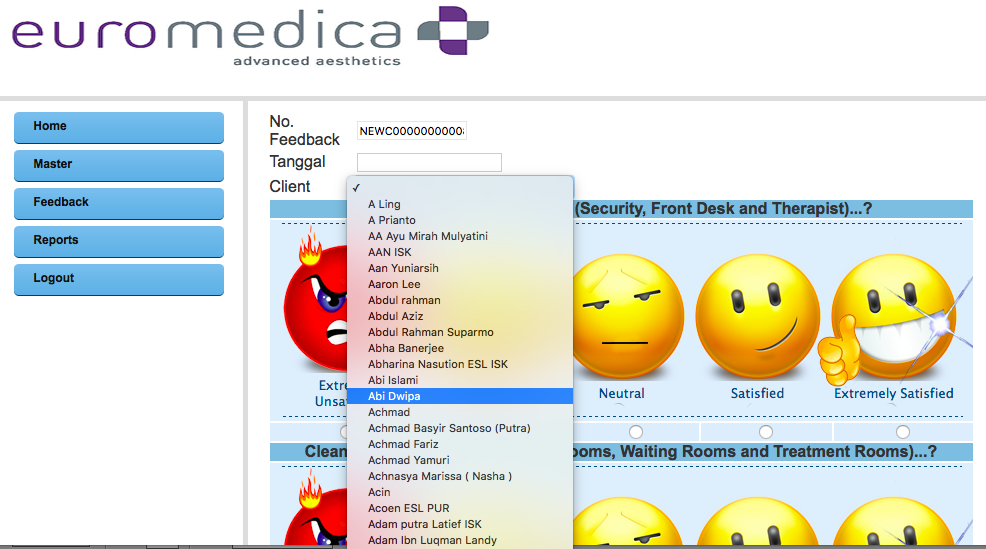
to hielo, thanks for your fast responsed, i have implemented it, but it stil the same , stil display ony the name, not with the reff_number, any advise for me, thx before

here is the pic

here's the pic

Try:

<select name="cmbclient">
  <option value=""></option>
<?php
      /* select only the fields you need.  Doing SELECT * gets you all the fields on the table, even the one you don't need! */
      $dataSql = 'SELECT reff_number, name FROM pelanggan ORDER BY name';
      $dataQry = mysql_query($dataSql, $koneksidb) or die ("Gagal Query".mysql_error());
      while ($dataRow = mysql_fetch_assoc($dataQry))
      {
        if ($dataRow['reff_number'] !== $_POST['cmbclient'])
        {
            echo '<option value="',htmlentities($dataRow['reff_number'],ENT_QUOTES),'">', htmlentities($dataRow['name'] . ' (' . $dataRow['reff_number'] . ')',ENT_QUOTES), '</option>',PHP_EOL;
        }
        else
        { 
            echo '<option value="',htmlentities($dataRow['reff_number'],ENT_QUOTES),'" selected>', htmlentities($dataRow['name'] . ' (' . $dataRow['reff_number'] . ')',ENT_QUOTES), '</option>',PHP_EOL;
        }
      }
      mysql_free_result($dataQry);
?>
</select>
Member Avatar for Member #120589

Here's how I'd do it with Ajax:

//get_users.php
if($searchRef = filter_input(INPUT_GET,"search",FILTER_VALIDATE_INT))
{
  $filter = "WHERE `reff_number` = ?";
}else{
  $searchRef = $_GET['search'];
  $filter = "WHERE `name` = ? ORDER BY `name`";
}

$sql = "SELECT `reff_number`, `name` FROM `pelanggan` " . $filter . " LIMIT 10";
//Using PDO instead of deprecated mysql functions
$db = new PDO("mysql:host=localhost;dbname=mydb","root","");
$stmt = $db->prepare($sql);
$stmt->execute([$searchRef]);
$json = json_encode($stmt->fetchAll(PDO::FETCH_NUM));
echo $json;

Then the page itself...

<!doctype html>
<html lang="en">
<head>
</head>
<body>
<form>
  <input id="searchbox" name="searchbox" />
  <select id=myselect" name="myselect"></select>
</form>
<script src="https://ajax.googleapis.com/ajax/libs/jquery/1.11.2/jquery.min.js"></script>
<script>
  var searchTerm;

  $("#searchbox").change(function() {
    //You can modify this to run on any integer or when text is e.g. more than 3 chars
    searchTerm = $(this).val();
    if(searchTerm.length > 0) runAjax();
  });

  function runAjax(){      {
    $.getJSON(
        "get_users.php", { search: searchTerm }
    ).done(function(json){
      $('#myselect').empty();
      $.each(json, function(i, value) {
        $('#myselect').append($('<option>').text(value[1]).attr('value', value[0]));
      });
    });
  }
</script>
</body>
</html>

Note no PHP within the html page. Helps to keep your parts separated. PHP used simply to retrieve data - it doesn't get involved with spitting out HTML. This is not tested and there are probably bugs - just to give an idea of what you could do. Notice the LIMIT in the SQL too - you'd probably want to stop a full read of all the records (9000?) once you got the first "x" number of results.

To Hielo,Thanks it's work, many thanks

Be a part of the DaniWeb community

We're a friendly, industry-focused community of developers, IT pros, digital marketers, and technology enthusiasts meeting, networking, learning, and sharing knowledge.