Good Day.

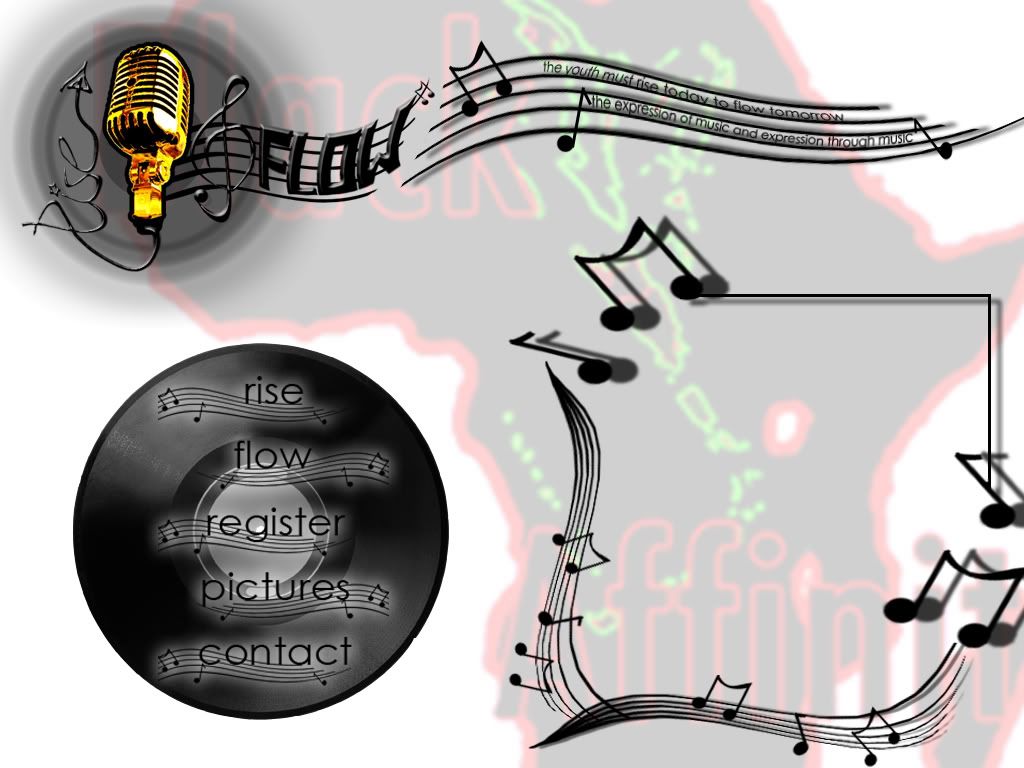
My div will not position properly. Rather, it just sits in the top-left corner. I have tried z-index with no luck. The first Div represents the background for my page, and the div inside of that is supposed to be positioned inside the message box on the background.

Any help is appreciated. Thanks.

<html xmlns="http://www.w3.org/1999/xhtml" xml:lang="en" lang="en">

<head>
  <title>Rise & Flow | Flow & Rise</title>
</head>

<body>
<center>
<div style="background : url(http://i21.photobucket.com/albums/b253/karysmatik/rflowhome.jpg); border:#000000 3px SOLID; color:#ffffff; width:1024px;height:768px; z-index: 2;">

<div style="position:absoute; top:500; left:500; width:100; height:100; border:#000000 3px SOLID; color:#ffffff">DZHZDFHZDHZDGHZDGHZZGNFGNFNCONTENT</div>
  

</div>

</center>


</font>
</div>


</body>

</html>

Dani AI

Generated

A few quick, practical checks and a minimal CSS pattern to make the inner box sit where it belongs inside the background container. Several replies helped (for example caught the typo in position and others suggested using margins or moving styles out of inline attributes), but three issues still commonly cause this exact symptom and are worth verifying.

  • Confirm the containing block: an absolutely positioned element is offset from the nearest ancestor whose position is not static. If the background wrapper is not positioned, the child will be placed relative to the page, not the wrapper.
  • Use valid values: top, left, width, and height require units (for example 500px). Missing units produce invalid declarations that the browser ignores.
  • Keep markup and CSS clean: avoid deprecated tags like <center> and stray closing tags that can break rendering; place layout rules in a stylesheet or a single style block so line breaks and quoting aren’t a problem (as hinted).

Recommended pattern (CSS-only example):

.container { position: relative; width: 1024px; height: 768px; }
.child     { position: absolute; top: 500px; left: 500px; width: 100px; height: 100px; }

Debugging steps: open DevTools (inspect element) and look at the Computed/Styles panel to confirm top/left values are present and not crossed out; check which rule sets the positioning and whether the parent has position set; validate the HTML with the W3C validator to catch stray tags. For authoritative reference on how positioning and offsets work, see the MDN docs on CSS position and the top property.

Relevant docs: MDN: position, MDN: top, W3C Markup Validator.

Recommended Answers

All 5 Replies

give the alignment

Try to remove "position:absolute" and the attributes. Use padding and margin to manage your div position. MMM maybe something like this

<html xmlns="http://www.w3.org/1999/xhtml" xml:lang="en" lang="en">

<head>
  <title>Rise & Flow | Flow & Rise</title>
</head>

<body>
<center>
<div style="background : url(http://i21.photobucket.com/albums/b253/karysmatik/rflowhome.jpg); border:#000000 3px SOLID; color:#ffffff; width:1024px;height:768px; z-index: 2;">

<div style="margin-top:500px; margin-left:500px; width:100px; height:100px; border:#000000 3px SOLID; color:#ffffff">DZHZDFHZ DHZDGHZD GHZZGNF GNFN CONTENT</div>
  

</div>

</center>


</font>
</div>


</body>

</html>

Quoted items don't always work across line breaks in tags. You have styles that take up three lines. Make a stylesheet style for those. You can have line breaks in a stylesheet.

Don't use abslute position. Try to the second div to white clear:both ad left margin:500px. i think it's work, but i dont know what u want to make

Good day, karysma.
Your code had a few errors marked with red.

Good Day.

My div will not position properly. Rather, it just sits in the top-left corner. I have tried z-index with no luck. The first Div represents the background for my page, and the div inside of that is supposed to be positioned inside the message box on the background.

Any help is appreciated. Thanks.

<html xmlns="http://www.w3.org/1999/xhtml" xml:lang="en" lang="en">

<head>
  <title>Rise & Flow | Flow & Rise</title>
</head>

<body>
<center>
<div style="background : url(http://i21.photobucket.com/albums/b253/karysmatik/rflowhome.jpg); border:#000000 3px SOLID; color:#ffffff; width:1024px;height:768px; z-index: 2;">

<div style="position:absoute; top:500; left:500; width:100; height:100; border:#000000 3px SOLID; color:#ffffff">DZHZDFHZDHZDGHZDGHZZGNFGNFNCONTENT</div>

</div>

</center>


</font>
</div>


</body>

</html>

Solution:

<html xmlns="http://www.w3.org/1999/xhtml" xml:lang="en" lang="en">

<head>
  <title>Rise & Flow | Flow & Rise</title>
</head>

<body>
 <center>
   <div style="background : url(http://i21.photobucket.com/albums/b253/karysmatik/rflowhome.jpg); border:#000000 3px SOLID; color:#ffffff; width:1024px;height:768px; ">
     <div style="position: absolute; top:500; left:500; width:100; height:100; border:#000000 3px SOLID; color:#ffffff">DZHZDFHZDHZDGHZDGHZZGNFGNFNCONTENT</div>
   </div>
 </center>

</body>
</html>

Report:
1. There was a typing error in "position" declaration "absoute"
2. z-Index is not needed for absolutely positioned elements to come into view, -they get on top of all nonpositioned elements by default.
3. Few other closures for elements which are not opened: "</font> </div>" removed.

Regards.

Be a part of the DaniWeb community

We're a friendly, industry-focused community of developers, IT pros, digital marketers, and technology enthusiasts meeting, networking, learning, and sharing knowledge.