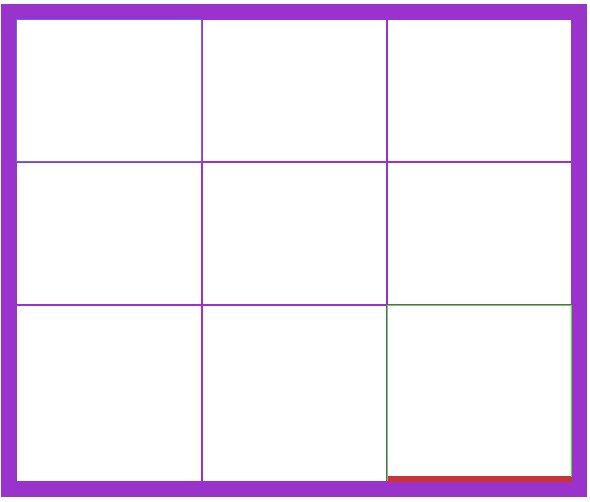
I've been designing a Tic-Tac-Toe game using a 3 x 3 table. Different cells will have different borders: border-right will exist for left two columns cells, border-bottom will exist for top two rows of cells. It's working the way I think it should in Internet Explorer, but not in Firefox. There is a red line in the Internet Explorer table, which is what I want (I made a single red line just to demonstrate here), but not int Firefox. Please see the code and the two photos. The relevant line is line 26. The border-bottom appears to have no effect in Firefox.

<!DOCTYPE html PUBLIC "-//W3C//DTD XHTML 1.0 Transitional//EN" "http://www.w3.org/TR/xhtml1/DTD/xhtml1-transitional.dtd">
<html xmlns="http://www.w3.org/1999/xhtml">
<head>
<meta http-equiv="Content-Type" content="text/html; charset=iso-8859-1" />
<title>Untitled Document</title>
</head>


<body>
<table width="586" height="493" border="15" cellpadding="0" cellspacing="0" bordercolor="#9933CC">
  <tr>
    <td bordercolor="#6666FF">&nbsp;</td>
    <td>&nbsp;</td>
    <td>&nbsp;</td>
  </tr>
  <tr>
    <td>&nbsp;</td>
    <td>&nbsp;</td>
    <td>&nbsp;</td>
  </tr>
  <tr>
    <td>&nbsp;</td>
    <td>&nbsp;</td>
    <td style="border-bottom:thick #CC3333" bordercolor="#33FF00">&nbsp;</td>
  </tr>
</table>
<p>&nbsp;</p>
<p>&nbsp;</p>
<p>&nbsp;</p>
<p>&nbsp;</p>
</body>
</html>

Dani AI

Generated

Quick summary: Firefox was enforcing valid CSS while Internet Explorer was forgiving. The inline declaration used on the cell lacked an explicit border style, so some browsers ignored it. spotted that; 's mention of the table-level rules attribute is a handy quick fix but is old presentational HTML.

Recommended approach (clean, cross-browser, future-friendly)

  • Remove deprecated border / bordercolor attributes and put styling in CSS.
  • Use border-collapse: collapse and zero border-spacing so adjacent cell borders behave predictably.
  • Give each inner cell the side borders you want and always include a border style (for example, solid) together with width and color.
  • Target left two columns and top two rows with simple selectors so only internal grid lines are drawn; this avoids doubled edges.

Example CSS pattern (apply a class to the table)

.table-grid { border-collapse: collapse; border-spacing: 0; }
.table-grid td { width:60px; height:60px; padding:0; box-sizing:border-box; }
.table-grid td:not(:last-child) { border-right:3px solid #666; }
.table-grid tr:not(:last-child) td { border-bottom:3px solid #666; }

Quick debugging checklist

  • Inspect the computed style in Firefox DevTools to confirm border-style/border-width/border-color are present.
  • Ensure the page is rendering in standards mode (valid DOCTYPE).
  • If you need very thick center lines spanning multiple cells, consider an overlay (pseudo-element or absolutely positioned DIV) instead of relying on collapsed-cell borders.

This keeps the markup semantic, avoids browser quirks, and makes the tic-tac-toe grid easy to style and maintain.

Recommended Answers

All 3 Replies

<table rules='all' border='0'>
<tr><td>X<td>&nbsp;<td>&nbsp;
<tr><td>&nbsp;<td>X<td>&nbsp;
<tr><td>O<td>O<td>X
</table>

theres no need for anything fancy, table has a rules property that does what you ask

Just change line 26 to this: (tested in Firefox 3.0.5 under Linux)

<td style="border:thin solid #33ff00; border-bottom:thick solid #CC3333">&nbsp;</td>

This gives a cell with green borders and a thicker red bottom border.

Thanks guys. Those suggestions are both useful. Thanks, colweb. I was banging my head against the wall. Perhaps Internet Explorer let me get away with something it shouldn't have and Firefox was a bit more picky? Anyway, it was driving me crazy. Thanks again.

Be a part of the DaniWeb community

We're a friendly, industry-focused community of developers, IT pros, digital marketers, and technology enthusiasts meeting, networking, learning, and sharing knowledge.