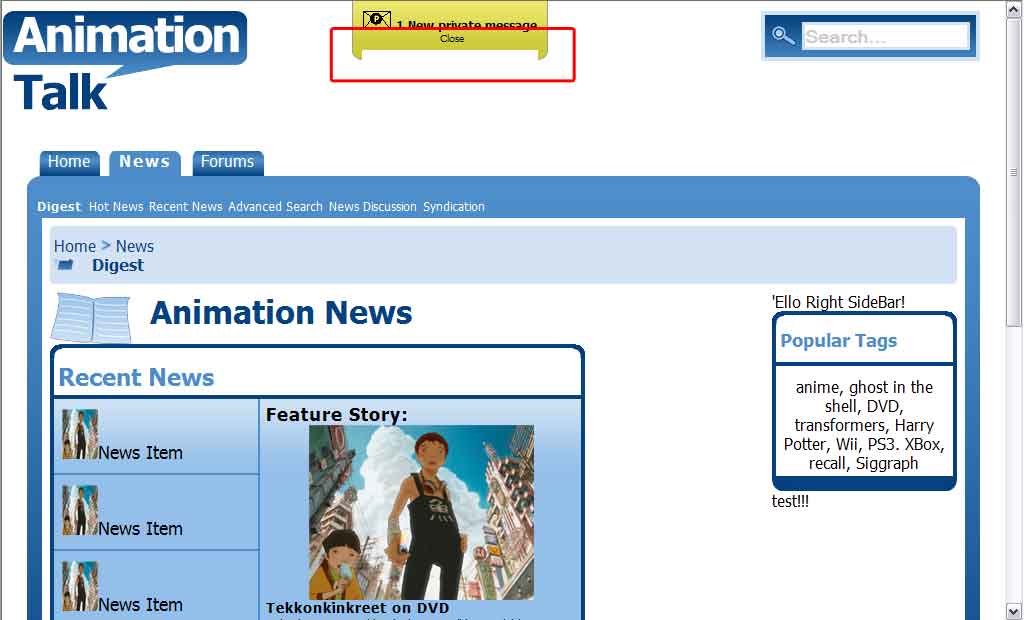
IE7 seems to be incorrectly rendering this filler for rounded corners on this content box in my layout. Safari 3(Windows) and FF 2 render it correctly. I am unsure if it is because I am absolute positioning this content or not. The filler is not expanding to 100% in IE7.

The CSS:

#messagebox {
		background: #cfcb3b url(gradient_msgbox.gif) repeat-x top left;
		font-size: 12px;
		font-weight: bold;
		text-align: center;
		border: 1px solid #999999;
		border-top: 0;
		border-bottom: 0;
		padding: 10px 6px 6px 10px;
	}
	#messagebox_container {
		position: absolute;
		left: 350px;
		top: 0px;
	}
	#messagebox_rdbtm {
		background-image: url(msgbox_lbtm.gif);
		background-position: bottom left;
		background-repeat: no-repeat;
		height:10px;
		width:auto;
		padding-right: 20px;
	}
	#messagebox_rdbtm > img {
		width:10px;
		height:10px;
		position:absolute;
		bottom:0;
		right:0;
	}
	#messagebox_rdborder {
		background: #cfcb3b;
		margin:0px 10px 0px 10px;
		border-bottom:1px solid #999999;
		height: 9px;
		min-height: 9px;
		width:100%;
		display: block;
	}

The XHTML:

<div id="messagebox_container">
		<div id="messagebox">
			<img src="newpmicon.gif" alt="New Private Message" />
			1 New private message.
			<div style="font-size: 10px;font-weight:normal;">Close</div>
		</div>
		<div id="messagebox_rdbtm">
			<div id="messagebox_rdborder"></div>
			<img src="msgbox_rbtm.gif" alt="Rounded Corner" />
		</div>
	</div>

I have also attached a screen shot highlighting the problem.
Dani AI

Generated

Quick expert summary for — the symptom (a filler bar that won’t stretch to 100% in IE7 while FF/Safari are fine) commonly comes from one of two things: the page rendering in quirks mode (missing/old DOCTYPE, which reverts IE to the old box model), or an IE "hasLayout"/sizing quirk that makes width:100% plus borders/margins behave inconsistently. is right to call out box-model differences; add checking DOCTYPE and hasLayout as the next steps.

Practical fixes that avoid fragile width math:

  • Put the bottom wrapper (#messagebox_rdbtm) into a positioned containing block, then position the filler from left to right instead of relying on width:100% with margins. That removes the cross‑browser width calculation.
  • If keeping a flow layout, force hasLayout in IE by adding a safe trigger like zoom:1 or overflow:hidden to the element (note: zoom is proprietary but useful for this specific IE bug).

Example (keeps the same structure but avoids width:100% sizing):

#messagebox_rdbtm { position: relative; height: 10px; padding-right: 20px; }

#messagebox_rdborder {
  position: absolute;
  left: 10px;
  right: 20px;
  bottom: 0;
  height: 9px;
  background-color: #cfcb3b;
  border-bottom: 1px solid #999999;
  zoom: 1;
}

Debug checklist: confirm a standards DOCTYPE is present (so IE uses the standard box model), test the page with IE in standards vs compatibility mode, and inspect computed widths with the IE developer toolbar. If the child selector (>) is being relied on, remember IE7 supports it but IE6/compat modes do not — that can hide absolute-positioned children and affect sizing.

Maybe the difference between Mozilla and IE is messing up your positioning:

- Mozilla browsers (NS and FF) put the margin, border, and padding outside the box-object's defined position and size.

- IE crams them all inside the box-object's defined position and size.

- This includes the body tag.

So you can't do both of these on the same box object if you want all browsers to render your page correctly:

1. Define the size or position of the box object.

2. Put margins, borders, or padding on the box object.

To make this work, you need to nest several box objects. Some of the box objects have defined positions or sizes, while others have margins, borders, and padding.

Also be aware that a browser using a different screen resolution is going to render your page strangely.

Be a part of the DaniWeb community

We're a friendly, industry-focused community of developers, IT pros, digital marketers, and technology enthusiasts meeting, networking, learning, and sharing knowledge.