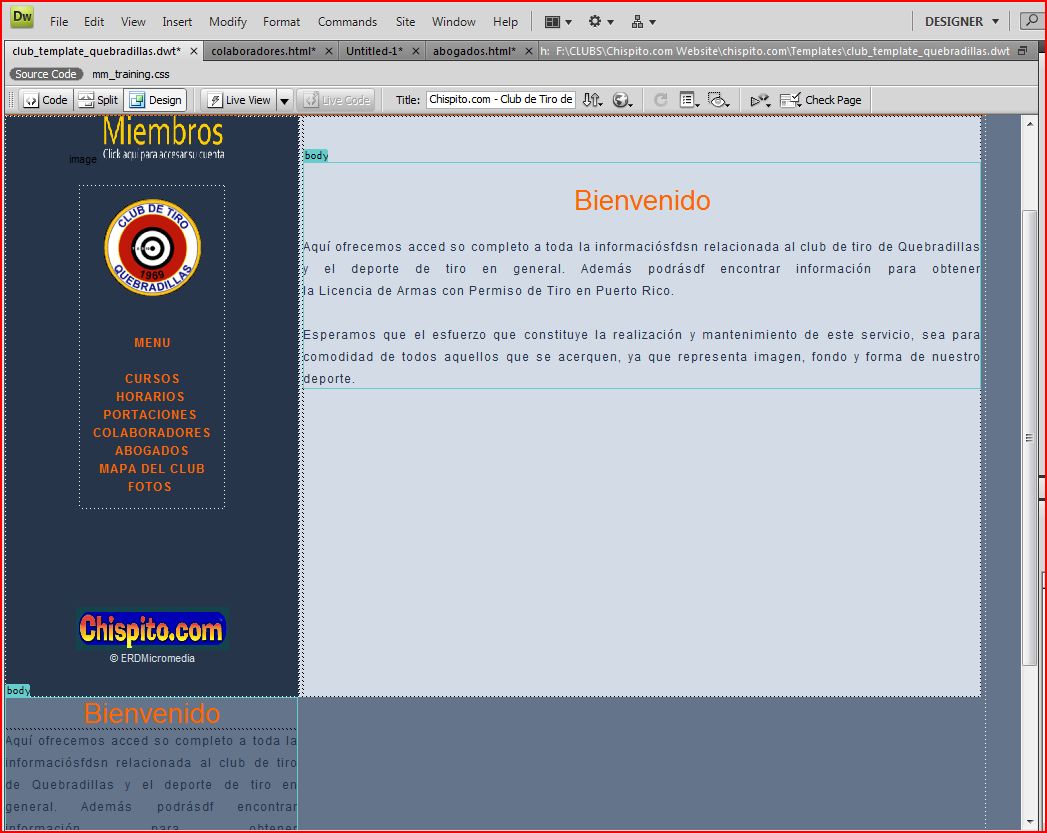
Hi, I am working with a dreameaver template. However, it shown the text of the body in the left side bar.
I had attached a screenshoot.
<!DOCTYPE html PUBLIC "-//W3C//DTD XHTML 1.0 Transitional//EN" "http://www.w3.org/TR/xhtml1/DTD/xhtml1-transitional.dtd">
<html xmlns="http://www.w3.org/1999/xhtml">
<!-- DW6 -->
<head>
<!-- Copyright 2005 Macromedia, Inc. All rights reserved. -->
<!-- TemplateBeginEditable name="doctitle" -->
<title>Chispito.com - Club de Tiro de Quebradillas</title>
<!-- TemplateEndEditable -->
<meta name="keywords" content="Chispito.com : Club de Tiro : Propiedades en Puerto Rico : Propiedades Puerto Rico : Anuncios, club de tiro, armas, licencia, puerto, rico, membresia, pistola, revolver, renovacion, cuota, municiones, arecibo, camuy, hatillo, quebradillas">
<meta name="description" content="club de tiro, armas, licencia, puerto rico, membresia, pistola, revolver, renovacion, cuota">
<meta http-equiv="Content-Type" content="text/html; charset=iso-8859-1" />
<link rel="stylesheet" href="../club/mm_training.css" type="text/css" />
</head>
<body bgcolor="#64748B">
<table width="86%" border="0" cellspacing="0" cellpadding="0">
<tr bgcolor="#26354A">
<td width="149" nowrap="nowrap"><img src="../club/mm_spacer.gif" alt="" width="15" height="1" border="0" /></td>
<td height="70" colspan="3" class="logo" nowrap="nowrap"><img src="../club/images/banner_quebradillas.gif" alt="banner_quebradillas" width="683" height="88" /></td>
<td width="4"> </td>
<td width="1"><del></del></td>
</tr>
<tr bgcolor="#FF6600">
<td colspan="6"><img src="../club/mm_spacer.gif" alt="" width="1" height="4" border="0" /></td>
</tr>
<tr bgcolor="#D3DCE6">
<td colspan="6"><img src="../club/mm_spacer.gif" alt="" width="1" height="1" border="0" /></td>
</tr>
<tr bgcolor="#FFCC00">
<td width="149" nowrap="nowrap"> </td>
<td colspan="3" height="24"><table border="0" cellpadding="0" cellspacing="0" id="navigation">
<tr>
<td class="navText" align="center" nowrap="nowrap"><a href="" target="_self">PAGINA PRINCIPAL </a></td>
<td class="navText" align="center" nowrap="nowrap"><a href="" target="_self">PREGUNTAS</a></td>
<td class="navText" align="center" nowrap="nowrap"><a href="" target="_blank">LEY DE ARMAS </a></td>
<td class="navText" align="center" nowrap="nowrap"><a href="" target="_self">CUOTAS</a></td>
<td class="navText" align="center" nowrap="nowrap"><a href="" target="_self">CONTACTANOS</a></td>
</tr>
</table></td>
<td width="4"> </td>
<td width="1"><del></del></td>
</tr>
<tr bgcolor="#D3DCE6">
<td colspan="6"><img src="../club/mm_spacer.gif" alt="" width="1" height="1" border="0" /></td>
</tr>
<tr bgcolor="#FF6600">
<td colspan="6"><img src="../club/mm_spacer.gif" alt="" width="1" height="4" border="0" /></td>
</tr>
<tr bgcolor="#D3DCE6">
<td height="581" colspan="2" valign="top" bgcolor="#26354A"><p align="center">image<a href="" target="_blank"><img src="../club/images/miembros_click_aqui.gif" alt="miembros_click_aqui" width="138" height="47" border="0" /><br />
</a></p>
<table width="146" border="0" align="center" cellpadding="0" cellspacing="0">
<tr>
<td width="146" class="sidebarText" id="padding"><p align="center"><a href="javascript:;"><img src="../club/images/logo_animado_ctq.gif" alt="logo_animado_ctq" width="97" height="97" border="0" /></a></p>
<p align="center"> <br />
<a href="" target="_self">MENU</a><br />
<br />
<a href="" target="_self">CURSOS</a><br />
<a href="" target="_self">HORARIOS </a><br />
<a href="" target="_self">PORTACIONES</a> <br />
<a href="" target="_self">COLABORADORES</a><br />
<a href="" target="_self">ABOGADOS</a><br />
<a href="" target="_self">MAPA DEL CLUB</a><br />
<a href="" target="_self">FOTOS </a><br />
</p></td>
</tr>
</table>
<br />
<br />
<br />
<br />
<br />
<br />
<br />
<p align="center" ><img src="../club/images/logo_chispito.gif" width="153" height="43" border="0" /><br />
<span class="tagline">© ERDMicromedia</span></p></td>
<td width="4" valign="top"> </td>
<td width="675" valign="top"><br />
<br />
<!-- TemplateBeginEditable name="body" -->
<table width="" height="198" border="0" cellpadding="0" cellspacing="0">
<tr>
<td width="557" class="pageName"><p align="center" class="pageName">Bienvenido</p></td>
</tr>
<tr>
<td class="bodyText"><p align="justify">Aquí ofrecemos acced so completo a toda la informaciósfdsn relacionada al club de tiro de Quebradillas y el deporte de tiro en general. Además podrásdf encontrar información para obtener la Licencia de Armas con Permiso de Tiro en Puerto Rico.<br />
<br />
Esperamos que el esfuerzo que constituye la realización y mantenimiento de este servicio, sea para comodidad de todos aquellos que se acerquen, ya que representa imagen, fondo y forma de nuestro deporte.</p></td>
</tr>
<!-- TemplateEndEditable -->
</table>
<br />
<br /> </td>
<td width="4"> </td>
<td width="1"><del></del></td>
</tr>
<tr bgcolor="#D3DCE6">
<td colspan="6"><img src="../club/mm_spacer.gif" alt="" width="1" height="1" border="0" /></td>
</tr>
<tr>
<td width="149" height="81"> </td>
<td width="4"> </td>
<td width="4"> </td>
<td width="675"> </td>
<td width="4"> </td>
<td width="1"><del></del></td>
</tr>
</body>
</html>