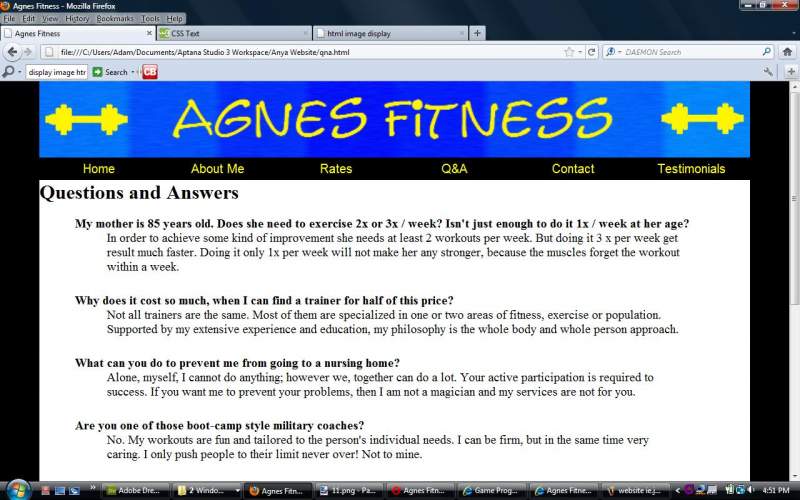
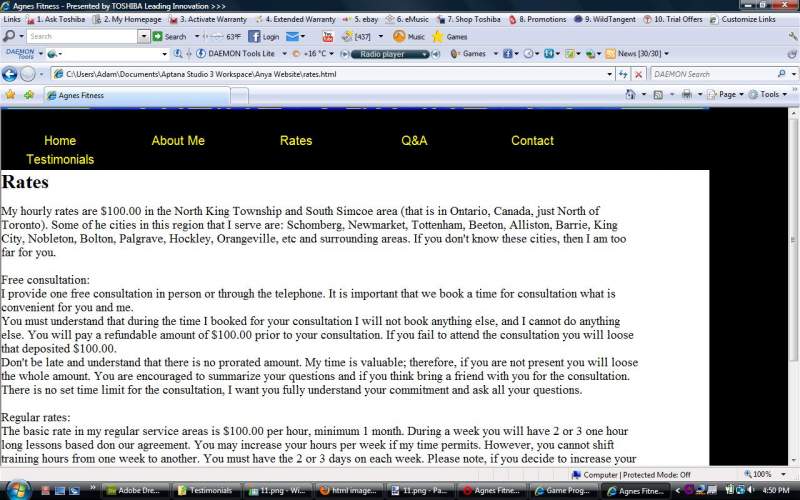
I am making a website and I have a little problem with it on IE and opera, but IE is the bigger issue.
I have 2 images the first one is what it looks like on IE and the second one is what it is supposed to look like.
What is the problem? Here is my css code
style.css:


body {
	background: url('Images/testBackg.jpeg') 50% 50% no-repeat;
}


p {
	font-size: 20px;
}
#images{
	margin-top:10px;
	margin-bottom:10px;
}

#labelId {
	float:left;
}

#inputId {
	float:right;
}

#contactForm {
	max-width:50%;
	min-width:50%;
}

#headerWrap {
	margin-left: auto;
	margin-right: auto;
	margin-bottom: 0;
	width: 90%;
	height: 7%;
	background: url('Images/header.gif') no-repeat;
}
#headerWrap img {
	width: 100%;
	height: 7%;
}

#footer {
	margin-left: auto;
	margin-right: auto;
	height: 12%;
	width: 90%;
	background: black;
	color: gray;
}
#footer p{
	font-size: 8px;
}

#container {
	margin-left: auto;
	margin-right: auto;
	margin-top: 0;
	margin-bottom: 0;
	padding-bottom: 30px;
	color: #000000;
	width: 90%;
	background-color: white;

}

#containerNoCol {
	margin-left: auto;
	margin-right: auto;
	margin-top: 0;
	margin-bottom: 0;
	color: #000000;
	width: 90%;
}


.background {
	background-color: black;
}

#grayCol {
	margin: 0;
	margin-left: auto;
	margin-right: auto;
	background-color: gray;
}

* { margin: 0; padding: 0;}


#navMenu {
	background-color: black;
	width: 100%;
}

#navMenu ul {
	background-color: black;
	list-style-type: none;
}

#navMenu ul li {
	width: 16.66666666666666666666%;
	background-color: black;
	float: left;
}

#navMenu ul ul {
	width: 100%;
	visibility: hidden;
	position: absolute;

}

#navMenu ul li a {
	background-color: black;
	width: 100%;
	height: 30px;
	text-align: center;
    display: block;
  	font-family:"Arial", cursive;
	text-decoration: none;
	font-size: 20px;
	color: yellow;
	border: 1px solid black;

}

#navMenu ul li:hover ul {
	visibility: visible;
}

/*Change color on hover*/
#navMenu a:hover {
	background: blue;
}

#navMenu li:hover {
	color: blue;
	background-color: blue;
}


/* hover for link items */
#navMenu ul li:hover ul li a:hover {
	color: white;
	background-color: red;
}


.clearFloat {
   	clear:both;
}

/* Menu Starting*/
/*
#navMenu {
	margin: 0;
	padding: 0;
	width: 100%;
}

#navMenu ul {
	margin: 0;
	padding: 0;
	height: 30px;
}

#navMenu li {
	float: left;
	position: relative;
	margin: 0;
	padding: 0;
	list-style: none;
	background-color: gray;
}
#navMenu ul li {
	width: 25%;
}

#navMenu ul li a{
	text-align:center;
    height: 30px;
    width: 100%;
    display:block;
    color:#000;
    font-family:"Arial", cursive;
    text-decoration:none;
    color: white;
    border:1px solid black;

}

#navMenu ul ul {
	position: absolute;
	visibility: hidden;

	top: 32px;
}

#navMenu ul li:hover ul {
	visibility: visible;
	width: 400%; /*Makes it so that the item takes up as large of a space as the main products area*/
}
/*Change color on hover*/
/*
#navMenu a:hover {
	background: purple;
}

#navMenu li:hover {
	color: white;
	background-color: blue;
}


/* hover for link items *//*
#navMenu ul li:hover ul li a:hover {
	color: white;
	background-color: red;
}


.clearFloat {
    clear:both;
    margin: 0;
    padding:0;
}

 /*end of menu*/

/*div>div>div { display: inline;}*/
and here is the html for the header and the menu
<div id="headerWrap" align="center"><img src="Images/header.png" class="image"></img></div>

   <div id="containerNoCol" align="center"> <!-- holds menu div>
        <!-- Menu Divider -->
        <div id="navMenu" align="center">
             <ul> <!-- main ul -->
             	<li><a href="index.html">Home</a></li>
             	<li><a href="about_me.html">About Me</a>
       	      	<li><a href="">Rates</a></li> <!-- end of about -->
             	<li><a href="qna.html">Q&A</a></li> <!-- end of contact -->
             	<li><a href="contact.html">Contact</a></li>
              <li> <a href="#">Testimonials</a></li>
             </ul> <!-- end main ul -->

        </div> <!-- end of Menu divider -->
   </div> <!-- end of holds menu div -->
Thanks for any help.
EDIT: I realize that the images are not of the same page, but IE does it for all of the pages