Hello guys, I have a webpage to print that showing some data, I managed to hide all elements that's are not needed in printing, but background color for cells in table not display in printed version, although I've tried to put

<style type="text/css" media="print">
.no-print
{ display: none; }
.bgcol{
background-color: #999;
}
</style>

and tried with css

@media print{
.bgcol{
background-color:#999;
}
}

but still printed without color

4d39ef483389b3011bab1ae498b4e958

it must shows like this

32190ed6567c6d61512dc1a683840352

Dani AI

Generated

If your screen styles work but table cell fills disappear on paper, you are likely hitting two separate constraints: (1) the browser’s default to omit background graphics when printing, and (2) framework print resets. Bootstrap 3’s print stylesheet explicitly strips backgrounds globally and even forces table cell backgrounds to white, both with !important, so your rules may never win unless you out‑specificy or override them. See Bootstrap’s @media print rules here for confirmation. Bootstrap v3 print.less. Also remember users can toggle “Background graphics” in the print dialog; no CSS can override a user’s preference. In Edge, for example, this lives under More settings > Background graphics. Print in Microsoft Edge.

Practical workflow: emulate print CSS in DevTools to see which rule wins, then override Bootstrap with higher specificity and add color‑adjust hints. Chrome DevTools: Emulate CSS media type. The standards property is print-color-adjust, and WebKit browsers also honor -webkit-print-color-adjust; note these are hints and user settings still take precedence. MDN: Using color wisely, CSS Color Adjustment Level 1.

/* Load after bootstrap.css */
@media print {
  html { print-color-adjust: exact; }         /* Standard */
  /* Target the actual cells you want shaded, with higher specificity */
  table.my-report thead th,
  table.my-report tbody td.header {
    background-color: #999 !important;
    -webkit-print-color-adjust: exact;        /* Chrome/Safari */
  }
}

Tips: apply the fill to th/td rather than a nested div when possible, and keep a monochrome fallback (borders or symbols) for users who choose not to print backgrounds.

Recommended Answers

All 5 Replies

I put together an example that you can look at. Seems like the @media print { } is working.

<!DOCTYPE html>
<html>
<head>
<style>
@media print{
  #tbl1 {background-color:#999;
}
</style>

</head>
<body>

<table id="tbl1">
<tr><th>Heading1</th><th>Heading2</th></tr>
<tr><td>Cell1</td><td>Cell2</td></tr>
<tr><td>Cell3</td><td>Cell4</td></tr>
</table>
</body>
</html>

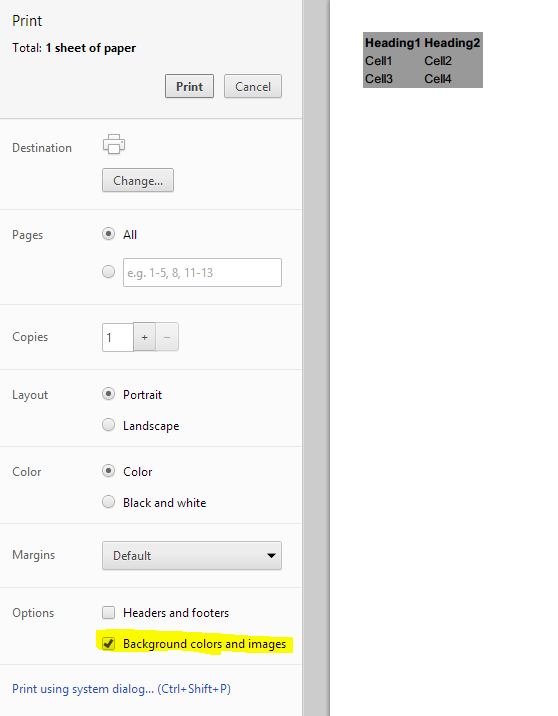
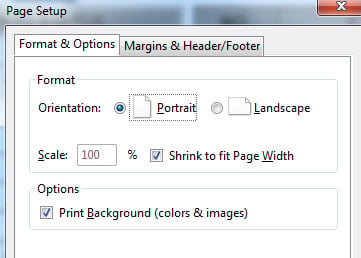
Keep in mind that if the user has to enable "print background colors and images" enabled in their print settings. Your CSS settings will not override that.

4717eff444dad75877972d7f4c3a5ab2

commented: thank you so much !!!!!!!!!!!!!!!!!!!!!!!!!!!!!!!!!!! +0

its not working for me :(
here is the setting in my browser
89a723b9c9befaa077327ed9fa59b4ac

my css for print

    <style type="text/css">
        @media print{
        .no-print{
            display: none;
                }
        .bgcol{
            background-color: #999;
                }
        body{
            padding-top: 1px;
                }
        }
    </style>

my html

<table width="99%" border="1" cellspacing="0" cellpadding="0">
<tr class="brd">
<td><div class="bgcol" align="center"><strong>NO.</strong></div></td>
<td><div class="bgcol" align="center"><strong>RTU NAME </strong></div></td>
<td><div class="bgcol" align="center"><strong>RTU STATUS </strong></div></td>
</tr>
</table>

still no background color,
FYI am using Bootstrap CSS maybe this affect my css ?

I'll check your code soon but did you take my example code and try it on a self standing page (not including boot strap or your code)? Did it work for you?

oooh , sorry I forget to tell you :), your code works perfectly
my code works as well .
so that why I suspect its because of Bootstrap .

Solved my problem
after watching bootstrap.css
I saw @media print
and and added few lines to my print code
so it became like this

<style type="text/css">
@media print{
    .no-print{
        display: none;
    }
    .bgcol{
        background-color: #999;
    }
    body{
        padding-top: 1px;
        background: transparent;
    }
}
</style>

and the result was as I want
03e4604527de201bc9b67b5b75a801f0

this was my nightmare background: transparent;

thanks for helping

Be a part of the DaniWeb community

We're a friendly, industry-focused community of developers, IT pros, digital marketers, and technology enthusiasts meeting, networking, learning, and sharing knowledge.