The documentation (http://www.w3schools.com/tags/att_li_value.asp) says, that a value for a li element must be numeric. Why should it be wrong to use a string instead of a number, if you need the value for saving a f.E. locale like 'US', 'EN' etc. ?

Dani AI

Generated

The value attribute on an li is intended to set an ordinal for ordered lists and is defined as a number by the HTML spec — it is not meant to carry arbitrary strings such as locale codes. That explains the W3Schools wording and is consistent with how browsers and validators treat li[value] (see the HTML spec and MDN for details) (HTML spec: the li element, MDN: li element).

As pointed out, choose the right list type (ol vs ul) for presentation; for storing machine-readable values like "US" or "EN", use a standard mechanism that supports strings. The recommended options are:

  • data attributes on the li (standard, valid HTML, easy to read from JS),
  • actual form controls (option in a select, input/button values, hidden inputs) if the value needs to be submitted,
  • or keep an interactive element (button/link) inside the li rather than relying on the list item itself.

A minimal example using a data attribute and reading it from the DOM:

<ul>
  <li data-locale="US">United States</li>
</ul>

<script>
  var locale = document.querySelector('li').dataset.locale; // "US"
</script>

Using data-* keeps markup valid and predictable. For form submission and accessibility, prefer real form controls or ensure interactive list items are keyboard-focusable and have appropriate roles/labels. See MDN on using data attributes for guidance (MDN: Using data attributes).

Recommended Answers

All 3 Replies

Member Avatar for Member #120589

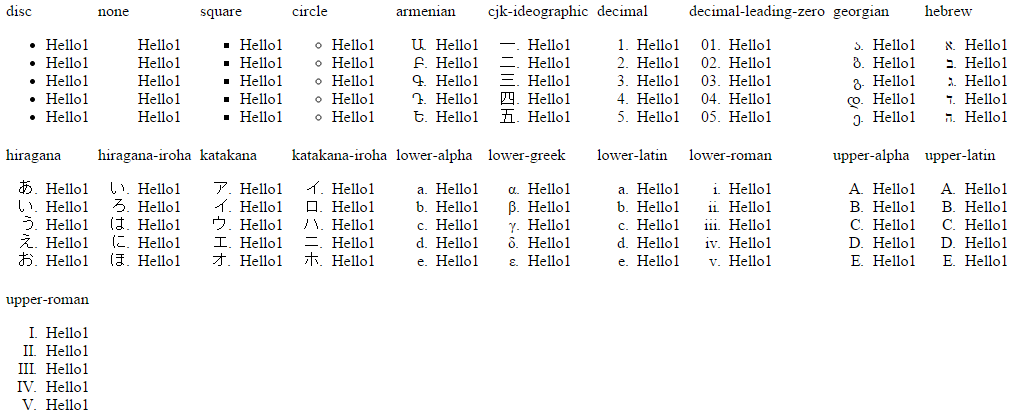
No, <li> is a list item, it can take any manner of numbers, letters or bullets. You are referring to the parent tag, <ol>, which stands for 'ordered list' (numbers by default) as opposed to <ul> which stands for unordered list (bullets usually).

The style of these list items can be set via CSS:

`list-style`, `list-style-type` (or `list-style-image` if you wish to provide your own bullets)    

This can override the specified ol/ul so that ol can be bulleted and ul can be numbered. BUT, semantically choose the right tag for the job.

Member Avatar for Member #120589

Here's a screenshot of the various types:

0cfdc48252541e10ebb251bba4e5fe44

Not sure what you're getting at with this:

If you need the value for saving a f.E. locale like 'US', 'EN' etc. ?

Some solutions here for using characters as bullets (unordered):

http://stackoverflow.com/questions/7698764/custom-bullet-symbol-for-li-elements-in-ul-that-is-a-regular-character-and

Be careful with using non-numerics for ordered lists. For example, what happens to alphabetics (latin/alpha) once you go beyond 26 items?

thanks to you

Be a part of the DaniWeb community

We're a friendly, industry-focused community of developers, IT pros, digital marketers, and technology enthusiasts meeting, networking, learning, and sharing knowledge.