Hi All,

I am a unix script debeloper and I am very new to html coding with basic awarness of syntax. My question is how to add html attributes inside the paragraph which actually contains my XML data?

<LIST>
  <ControlSegment
    TABLENAME="QueueGeneric"
    CLIENT="PST"
    DOCUMENTSTATUS=""
    PARTNERTYPE="TP"
    EDITXM="410"
    EDIVERSION="005010"
    EDIMESSAGETYPE="4100"
    EDIMESSAGECODE=""/>
</LIST>

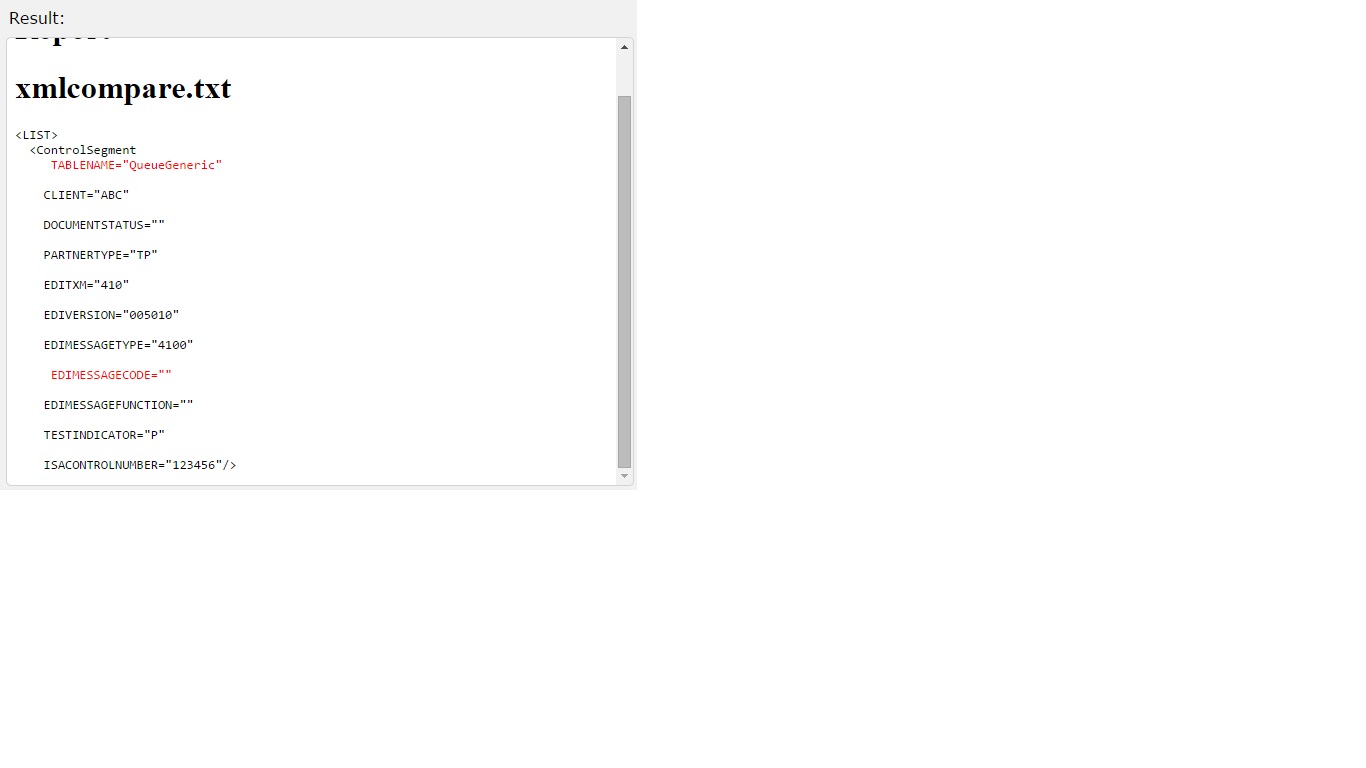
When I add <font color="red"> they are bypassed and the same is displaying in my output also like below.

<LIST>
  <ControlSegment
   <font color="red"> TABLENAME="QueueGeneric"</font>
    CLIENT="PST"
    DOCUMENTSTATUS=""
    PARTNERTYPE="TP"
    EDITXM="410"
    EDIVERSION="005010"
    EDIMESSAGETYPE="4100"
   <font color="red"> EDIMESSAGECODE="" </font> />
</LIST>

I would much appreciate any help to resolve this.

Thanks,
Badhrish

Dani AI

Generated

Brief summary and a practical pattern for future readers: the goal in this thread was to show attribute-level differences inside XML that is being emitted as plain text (a diff). Embedding HTML directly into the XML source makes the XML brittle and requires careful escaping. A more robust and maintainable pattern is to keep the XML data unchanged and render an HTML view that wraps only the changed attribute tokens in styled spans or classes. That keeps the source data pure and gives precise, safe control over presentation.

A compact client-side workflow that avoids mutating the XML itself is: parse the XML string into a DOM, walk element nodes, and build an HTML representation where attribute names and values are inserted with safe text nodes and wrapped in spans with CSS classes for styling. The brief example below shows the key idea (safe insertion via textContent/createTextNode and span wrappers for styling):

const doc = new DOMParser().parseFromString(xmlString, 'application/xml');

function nodeToHtml(n) {
  if (n.nodeType === 1) {
    const container = document.createElement('span');
    container.appendChild(document.createTextNode('<' + n.nodeName));
    for (const a of Array.from(n.attributes)) {
      container.appendChild(document.createTextNode(' '));
      const name = document.createElement('span'); name.className = 'attr-name';
      name.textContent = a.name + '=';
      const val = document.createElement('span'); val.className = 'attr-value';
      val.textContent = '"' + a.value + '"';
      container.appendChild(name); container.appendChild(val);
    }
    if (!n.childNodes.length) container.appendChild(document.createTextNode(' />'));
    else {
      container.appendChild(document.createTextNode('>'));
      for (const c of n.childNodes) container.appendChild(nodeToHtml(c));
      container.appendChild(document.createTextNode('</' + n.nodeName + '>'));
    }
    return container;
  } else if (n.nodeType === 3) return document.createTextNode(n.nodeValue);
  return document.createTextNode('');
}

const pre = document.createElement('pre'); pre.appendChild(nodeToHtml(doc.documentElement));
document.body.appendChild(pre);

Troubleshooting and safety notes: ensure the final page is served as text/html so CSS applies; avoid innerHTML for untrusted attribute values (textContent/createTextNode prevents XSS); prefer CSS classes (.attr-name, .attr-value) over inline styles; for very large diffs consider server-side highlighting or a virtualized renderer to avoid heavy DOM updates.

Context from the thread: ’s encoding approach provides a quick fix for displaying XML as text, and / pointed to stylesheet/XSLT options. The DOM-render approach above gives finer attribute-level control while keeping the original XML intact and safer for automated diff highlighting.

Recommended Answers

All 8 Replies

To add styling to XML tags, you would use an external CSS file which you call at the top of your XML document like so:

<?xml version="1.0" encoding="UTF-8"?>
<?xml-stylesheet type="text/css" href="list.css"?>

But... as far as I know you can't style those attributes seperatly as in your example.

You can style the <list> and <ControlSegment /> as a whole, but if you want to style those attributes seperatly, they have to be in there own XML tags.

Hope this helps a bit!

I personally think that the best way to style your xml file is by using an xslt file.
According to W3Schools: "XSLT (eXtensible Stylesheet Language Transformations) is the recommended style sheet language for XML."
You can start your reading from here: http://www.w3schools.com/xml/xml_xsl.asp
Using this way of styling you have a great deal of versatality and many ways to manipulate your xml file.

Member Avatar for Member #120589

A bit unclear what you're trying to do.
Are you building the XML file from scratch or trying to edit an existing one?
The XMl in your second snippet is obviously wrong as you can't have a tag inside the tag as an attribute.
As mentioned, the attributes will not be coloured individually.
If you don't mind me asking, how are you going to use this XML file and why do you need to colour bits of it?

Hi diafol,
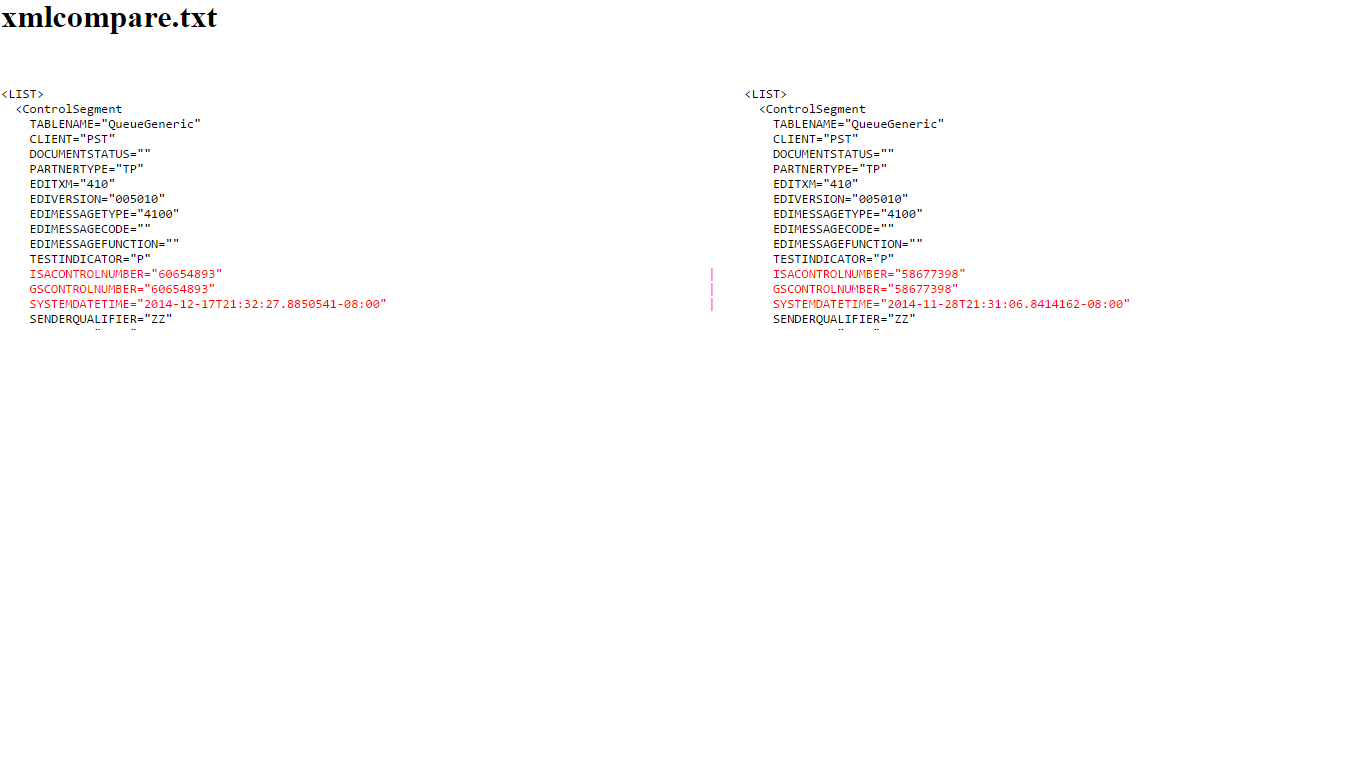
Am trying to edit the exsisting XML file apply the html attributes dynamically. This is required because my script output is nothing but the difference between two files and i am appending the records that has discripancy with Font tags. Unfortunatley font tags are not read as html, but they appear as such in the output.

Hi tdrosiadis,
Thanks for your time. The tricky part is XML should be read as a paragraph, not as XML. For your more understanding the XML file of mine is the difference between two files. I have attached a file how it should look like.

Member Avatar for Member #120589

Ah. OK so you're outputting as raw text. You may need to use html_encode() on the XML before applying the font tags. However, font tags have been deprecated. Use span tags either with a class (linked to CSS rule) or with the inline style attribute.

So you'll probably need an output like this:

&lt;LIST&gt;
  &lt;ControlSegment
   <span style="color:red;">TABLENAME=&quot;QueueGeneric&quot;</span>
    CLIENT=&quot;PST&quot;
    DOCUMENTSTATUS=&quot;&quot;
    PARTNERTYPE=&quot;TP&quot;
    EDITXM=&quot;410&quot;
    EDIVERSION=&quot;005010&quot;
    EDIMESSAGETYPE=&quot;4100&quot;
   <span style="color:red;"> EDIMESSAGECODE=&quot;&quot; </span>
&lt;/LIST&gt;

//EDIT

Sorry, I assumed you were using PHP. However any language should be able to encode the "html/xml". You could even do this in javascript using replacements with or without regex.

Using <pre> tags will ensure that you don't need to place <p> or <br /> tags throughout...

<pre>
&lt;LIST&gt;
  &lt;ControlSegment
   <span style="color:red;">TABLENAME=&quot;QueueGeneric&quot;</span>
    CLIENT=&quot;PST&quot;
    DOCUMENTSTATUS=&quot;&quot;
    PARTNERTYPE=&quot;TP&quot;
    EDITXM=&quot;410&quot;
    EDIVERSION=&quot;005010&quot;
    EDIMESSAGETYPE=&quot;4100&quot;
   <span style="color:red;"> EDIMESSAGECODE=&quot;&quot; </span>
&lt;/LIST&gt;
</pre>

Thanks diafol. I managed to encode my XML whcih converted all symbols < and > into underlying code &lt; &gt; via my unix script before applying html tags. This helped HTML tags to be actually applied this time to the raw data and in broswer I could see my XML as such. The output is just beautiful to watch.

Member Avatar for Member #120589

Awesome! Glad you got it fixed.

Be a part of the DaniWeb community

We're a friendly, industry-focused community of developers, IT pros, digital marketers, and technology enthusiasts meeting, networking, learning, and sharing knowledge.