I needn't even explain it, look it up. You needn't to click anything, just zoom-in 10%, then zoom out as far as you can, and notice how table cell and a div, go full on agression.

View website itself under 5millionpixels-##.comlu.com, (no I'm not a bot, but files are PHP, and you won't probably enjoy watching them). The ## in the link, replace them with two letters in DaniWeb that are closest to being capitalized. Just two letters. If you're willing to help, I've also included entire folder (deleted lots of pictures, uploaded files can be 1MB maximally). The password to the .zip file is the same as the ## cryptic signs, lowercase. Please do not share those.

Can someone tell where I went wrong? If your first assumption is that I used vw instead of em. Well, I used em first, hoped that vw would fix the situation, but it didn't. You might notice lots of errors from hosting company (2 errors), but the same problem was on my own machine. There are also two files missing, ajax.js and handheld.css, they're of no use, because again, they don't affect the problem nor trigger it.

Tested on both Chrome and Opera.

Related to picture below. It should be around 350px by 500px (not sure, since I'm using responsive measurements.
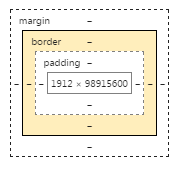
billion.png

Dani AI

Generated

As observed, the visible symptom—an element's height growing each time the page is zoomed/reshown—usually points to either a script repeatedly changing layout values or CSS that depends on a mutable reference (percent/em heights without a fixed container). Browser zoom fires resize-related events and changes computed font sizes, so any code that recalculates and writes style.height on resize/scroll needs to be idempotent and debounced.

Steps that reliably isolate the cause:

  • Disable JavaScript entirely in DevTools. If the problem stops, the culprit is a script (resize/scroll handler or mutation that updates height).
  • Search site scripts (Sources -> Ctrl+Shift+F) for patterns like style.height, .height(, offsetHeight, getComputedStyle, or addEventListener('resize'.
  • Use DevTools breakpoints: set an Element -> Break on -> subtree modifications on the problematic node, and add Event Listener Breakpoints for resize and scroll to catch the moment height changes.
  • Temporarily remove explicit height: rules from the element and parent chain (percent heights need an explicit parent height). If removing them stops the growth, prefer min-height/max-height/height: auto or set the parent's height explicitly.

Small, practical fixes to try:

  • Ensure any JS assigns a numeric height instead of appending to the existing string (avoid el.style.height += '100px').
  • Debounce heavy recalculations so a single zoom/resize triggers one recompute.
  • Prefer CSS solutions (flexbox, grid, max-height) and responsive image rules (max-width:100%; height:auto) to avoid iterative JS layout fixes.

Example debounce + safe assignment pattern:

function debounce(fn, wait) {
  var t;
  return function() {
    var args = arguments, ctx = this;
    clearTimeout(t);
    t = setTimeout(function(){ fn.apply(ctx, args); }, wait);
  };
}

// safe height assignment
var h = parseFloat(getComputedStyle(el).height) || el.offsetHeight;
el.style.height = (h + 100) + 'px';

Common root causes are script callbacks that repeatedly add to the current height, percentage/em heights without fixed parents, or image/table content forcing reflow. Fix handlers to be idempotent and prefer CSS-driven sizing to eliminate the “multiplying” height on zoom.

Apparently it doesn't like when <div> is given height. When I scroll in or out, the height seems to be multiplying.

Be a part of the DaniWeb community

We're a friendly, industry-focused community of developers, IT pros, digital marketers, and technology enthusiasts meeting, networking, learning, and sharing knowledge.