The whole culture of Bring Your Own Device (BYOD) in the workplace has reignited the mobile device security debate. Although there are many ways to protect data, the first line of defence when a mobile device (be it a tablet or smartphone) is lost or stolen is almost always going to be a password of some kind. I'm not going to get into the relative merits of PINs and passwords against more robust methods of data protection, that's for another time, instead let's just focus on the use of passwords. Have you ever wondered how many people are actually using them at all, how many businesses require their BYOD employees to password protect them at the very least?
secures more than a million business devices worldwide, and has tapped into the data it gets from these to examine password usage in the enterprise and provide some answers to those questions. Unfortunately, the answers are not particularly comforting on the whole. The data reveals, for example, that the majority of businesses still only require a weak password and a surprising number require none at all.
OK, so how was the data obtained? Well, the password information was determined by analysing a random sampling of 1,000 of Fiberlink’s 5,000 customers or, put another way, 200,000 or so of the one million smartphones and tablets under Fibrelink management. A simple password was defined as being either a PIN or a string of letters, whereas a complex one contains a combination of alphabets, numbers and special characters.
And what did the data reveal? Well, some 15% of all devices sampled did not require a password at all. Of those where a password was required, the simple PIN is far and away the most popular password type with a staggering 93% using this option. Of these, only 27% have a PIN length greater than 5 characters. It doesn't take a genius to work out that this means only 7% of all the password protected devices in the data sample required either a complex or alphanumeric password string.
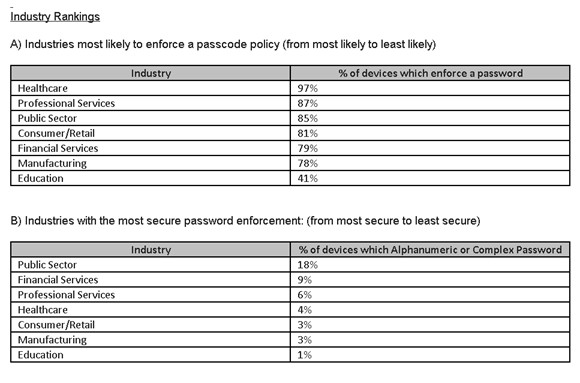
When it comes to industry type, healthcare was out front with password enforcement on 97% of their mobile devices, education trailed in last with just a 41% requirement. The public sector tended to use the most secure mobile device passwords, but don't get too excited as the stats reveal that only 18% of the devices in this sector used complex or alphanumeric passwords. Still, it sure beats the education sector which sits on a figure of just 1%.