Tumblr warns users to change password after security mess

Updated happygeek 0 Tallied Votes 702 Views Share

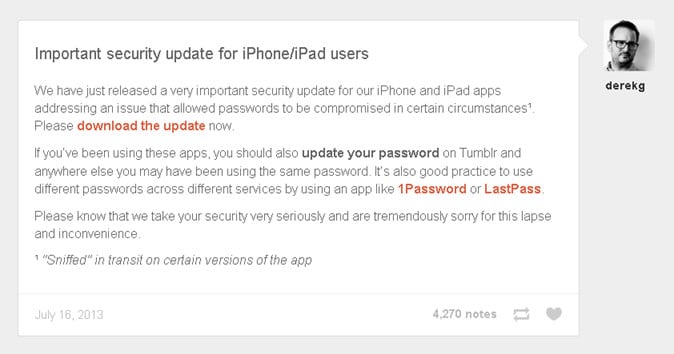
Tumblr, the hugely popular blogging service which was bought by Yahoo! last month, has advised mobile users to change their passwords, and change them immediately. In a posting to the Tumblr staff blog, a spokesperson states "We have just released a very important security update for our iPhone and iPad apps addressing an issue that allowed passwords to be compromised in certain circumstances." The precise details of the vulnerability that enabled this password compromise appear to be rarer than rocking horse crap, however there's a pretty big clue in a footnote to that staff blog post which defines 'certain circumstances' as being "sniffed in transit on certain versions of the app".
55f42dffa90341444fd4cc200571aa01

From which we can fairly confidently extrapolate that the iPhone and iPad Tumblr apps have not been logging users into the platform securely, leaving anyone who has used them from an airport lounge or hotel lobby vulnerable to those who would hack your stuff. The Register broke the story after a security conscious reader carried out an audit on the Tumblr app to see if it was secure enough to use on his corporate devices. "The Tumblr iOS app is sending the password over plain text and not over SSL" the auditor discovered. So the Tumblr app wasn't logging in using an HTTPS connection, and was therefore sending all login data as in-the-clear unencrypted text. Text that is stupidly simple for a drive-by hacker to sniff and grab out of the ether. Or, more accurately, a sit-by hacker as that's what they do in public areas such as those airport lounges and hotel lobbies mentioned earlier. There are dozens of readily available programs that enable such packet sniffing of Wi-Fi network traffic to take place, and which will happily log the data to enable the bad guys to pull logins out of the stream at their leisure.

The fact that Tumblr wasn't using HTTPS might come as a surprise to some, but not those in the security industry such as Graham Cluley who points out that "up until January Yahoo! was one of the few major webmail providers which didn’t provide an option for users to login via HTTPS/SSL". Warning that "last time I looked, Yahoo Mail still wasn’t enabling this option by default" Cluley suggests that perhaps both Tumblr and Yahoo! need a security refresher if they are to properly look after the many millions of users they have.

In addition to downloading the updated apps, Tumblr advises users to "update your password on Tumblr and anywhere else you may have been using the same password" and add that "it’s also good practice to use different passwords across different services by using an app like 1Password or LastPass." Talking of good practice, Tumblr, is surely a candidate for the 'After The Horse Has Bolted' award 2013.

Dani AI

Generated

A short, practical remediation checklist and clarifying notes to complement the posts below (credit to for raising the alert).

  • Change the Tumblr password now (use Settings if already logged in, or the password‑reset flow). If reset emails don’t arrive, follow Tumblr’s account‑recovery guidance. (help.tumblr.com)
  • Enable Two‑Factor Authentication (use an authenticator app) and save the generated backup codes offline. This blocks most account takeovers even if a password is exposed. (help.tumblr.com)
  • If the same password was used elsewhere, change those other accounts too. Prefer long, unique passphrases stored in a reputable password manager rather than reusing or memorizing many short passwords. (pages.nist.gov)
  • Check public breach lists so you know whether the email linked to the account has appeared in past leaks; that helps prioritize what to change first. (ibtimes.co.uk)
  • Assume public Wi‑Fi is risky for logins. When public networks are unavoidable, use a trusted VPN and verify sites use HTTPS; follow travel/public‑Wi‑Fi hygiene guidance. (cisa.gov)
  • After taking the above steps, review recent login activity and connected apps, log out other sessions if possible, and file an account‑recovery/support ticket through Tumblr if there are signs of compromise. (help.tumblr.com)

Context and clarification: several commenters (for example and ) recommend frequent password changes. That instinct is good, but modern guidance (NIST and others) favors strong, unique passphrases plus multi‑factor authentication and breach‑monitoring over arbitrary, calendar‑based rotation—change a password when there’s evidence of compromise. (pages.nist.gov)

Finally, verify any Tumblr support emails come from official domains and use official support channels before following links or sharing account details. (tumblr.com)

Member Avatar for Member #949455
Member #949455

Tumblr, the hugely popular blogging service which was bought by Yahoo! last month, has advised mobile users to change their passwords, and change them immediately.

I did not know Tumblr was brought by Yahoo.

I think for security measure Yahoo did the right thing by sending out emails to warn members to change password.

I mean it's bit a fuss but it's good.

Coloradojaguar 0 Light Poster

Mixing up your passwords for all of your services and systems on a regular basis is a good idea. Too many hacks occur these days and using irregular sequences and changing your passwords may seem like a hassel but in the end the protection it provides can save you a big headache if it is the case that you do get hacked.

Nickray001 0 Newbie Poster

Well it doesn't matters to me who owns the site one thing matter to me is how much efforts i am doing for the site and whats the output of the efforts. Changing pasword on regular interval is a good habit for being escape from hacked. I usually change pwd after a week.

Thanks for sharing a info about tumblr.

Member Avatar for Member #1094041
Member #1094041

Yeah thanx

mildred2013 0 Newbie Poster

its yahoo's fault, how come as soon as they buy it we start having security problems

Be a part of the DaniWeb community

We're a friendly, industry-focused community of developers, IT pros, digital marketers, and technology enthusiasts meeting, networking, learning, and sharing knowledge.