Actually, i protected my files in pendrive using usb security kakasoft but now it hidden in a bad way and i am not able to get them back.I scanned with antivirus makeing sure it is hidden and file is in pendrive.Now how to recover it?You can see scan log screenshot of antivirus at Click Here.Scan log for file is like this:
<Z:_\data0\Thumbs.us\com1.{2227a280-3aea-1069-a2de-08002b30309d}\zᄆ요ᄚ\Dᄆ\Data_work\Md5 Valued> Folder skipped by user while scanning
<Z:_\data0\Thumbs.us\com1.{2227a280-3aea-1069-a2de-08002b30309d}\zᄆ요ᄚ\Dᄆ\Data_work\Final counting>
<Z:_\data0\Thumbs.us\com1.{2227a280-3aea-1069-a2de-08002b30309d}\zᄆ요ᄚ\Dᄆ\Data_work\Ultra final>
Please help, i want my files very importantly.

Dani AI

Generated

Brief summary: already tried the common unhide/attrib approach suggested by and , and later contacted Kakasoft (their decrypter didn’t help after the protector was removed). Those initial steps are fine, but the situation now looks like either (a) an encrypted/containerized store that needs the original protector to mount, (b) a filesystem corruption that hid/replaced entries, or (c) a malware/shortcut symptom. Further work should follow a safe, image-first workflow to avoid making recovery impossible.

Critical immediate steps (do not write any more files to the pendrive and do not format it). Make a raw image of the drive before attempting repair or recovery — a damaged image preserves a recoverable copy. Example (Linux):

dd if=/dev/sdX of=usb_backup.img bs=4M conv=sync,noerror

On Windows, use a GUI image tool such as Win32 Disk Imager or USB Image Tool if unfamiliar with dd.

Inspect the image (or the live drive) to see what is actually present. A quick PowerShell listing will show hidden/system entries:

Get-ChildItem -Path G:\ -Force -Recurse -ErrorAction SilentlyContinue |
  Select-Object FullName, Attributes, Length

If visible entries exist, copy them from the image. If nothing useful appears, try repairing metadata only against the image (only after imaging). Running chkdsk may help with filesystem errors but it changes the drive, so run it only on a copy or after imaging.

If the data was protected by Kakasoft, reinstall the exact Kakasoft product/version and run the vendor decryptor against the original drive or the image (many protectors require their component to mount/decrypt). If that fails, attempt file-carving tools (PhotoRec/TestDisk, Recuva) against the image to recover file contents.

Suggested priority: 1) stop using the drive, 2) create a raw image, 3) run the PowerShell listing on the image and capture the output, 4) try vendor decrypt with the original software, and 5) run recovery tools against the image. If helpful, post the PowerShell listing and the pendrive Properties (used/free space) so responders can give more targeted next steps.

Recommended Answers

All 9 Replies

start cmd
goto removeable drive dir like
cd f:
type
attrib<space> -s -h <filename> then enter
or
** attrib<space> /s<space>/d . ** then enter
or
** attrib -h -r -s /s /d . **

I think it should be work

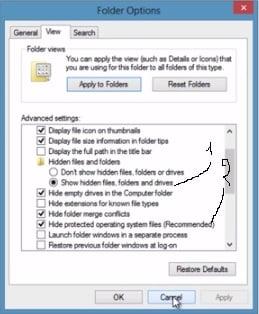
what navjeet123 gives you is the solution , anyway if you want to see the data before running these commands , you can't go to folder options and check show hidden files , and uncheck Hide system files.

Sorry guys for the late reply.I had tried the lastly option of attrib -h -r -s /s /d and it is working correctly not showing any errors but also ot showing files and above two i don't know how to use in filename and in space,even i tried my own but it says incorrect parameters as i used:
attrib -s -h ultra final and attrib /s /d .Please help and suggest am i in wrong track and what should i use if these not work??

something went wrong , ReTry this

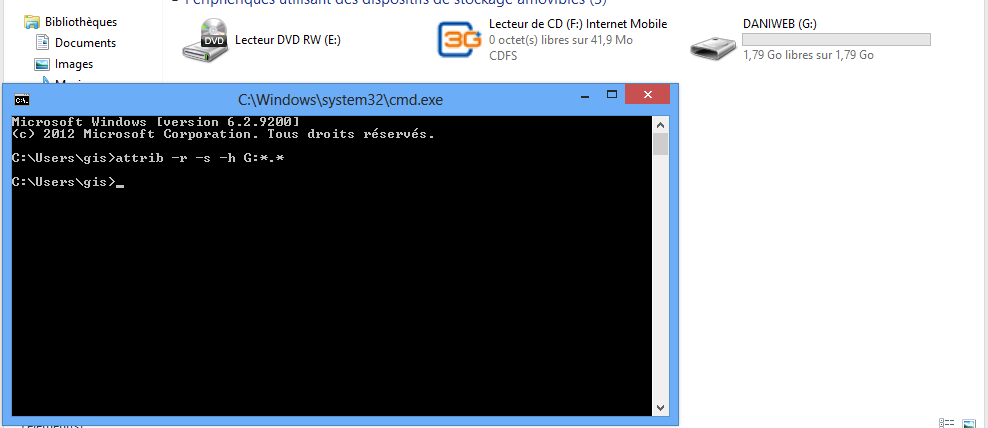
attrib -r -s -h G:*.* 

G is the letter of the Drive

5d46fe12496157552c8a52c67765825e

------

if not then :
try what i told you before : show hidden files manually

you can go to folder options and check show hidden files , and uncheck Hide system files .

dd7db78c65907813497ff5f47cca0845

Oh guys,it doesn't helping.What should i do now??

contact "usb security kakasoft" support .

I had contacted them and they give me decrypter but it doesn't showing files.Finally,after using this i removed kakasoft usb protector,now even i don't know how to get files back.They also not supporting about this.This is what i got solution so far but i don't know how to make batch files using total commander.Check: http://www.wilderssecurity.com/threads/help-cant-open-locked-folder.217984/ Please help guys....

you can retrive data from "cmd". Click (windows+r) then write "cmd", when command window opens write "attrib -r -s -h G:." then click "enter". Replace G with your USB drive's name if necessary

@Narendra you dont need to respond to posts this old.

Be a part of the DaniWeb community

We're a friendly, industry-focused community of developers, IT pros, digital marketers, and technology enthusiasts meeting, networking, learning, and sharing knowledge.